
Cartoon avatars are widely used on social media websites because some people want to hide their real pictures for protecting privacy. How to create avatar from photo? In this post, we provide some of the best editing tools to help people make avatar from photo.
An avatar is a kind of picture that is widely used on social media platforms websites and online role-playing games. It is one of the best ways to express your personality. Meanwhile, it helps other people to identify you.
Have you ever wondered about how to create a cool personal avatar from photo and set it as your social profile? Here is a step-by-step guide on how to create avatar from photo. To make a slideshow from photos, try MiniTool MovieMaker.
How to Create Avatar from Photo on Desktop – BeFunky
BeFunky is an all-in-one online graphics service that has everything you need to easily edit photos, create graphic designs, and make photo collages. Besides, BeFunky comes with a single effect called Cartoonizer, which allows you to create avatar from picture in seconds.
Step 1. Visit BeFunky on your web browser and log in to your account.
Step 2. Select the Create tab and then pick PHOTO EDITOR from the list.
Step 3. After entering the Photo Editor interface, click Open > Computer to upload your photo into the program. Or you can simply drop the image here.
Step 4. Choose the Artsy category from the left panel, and then click the Cartoonizer option.
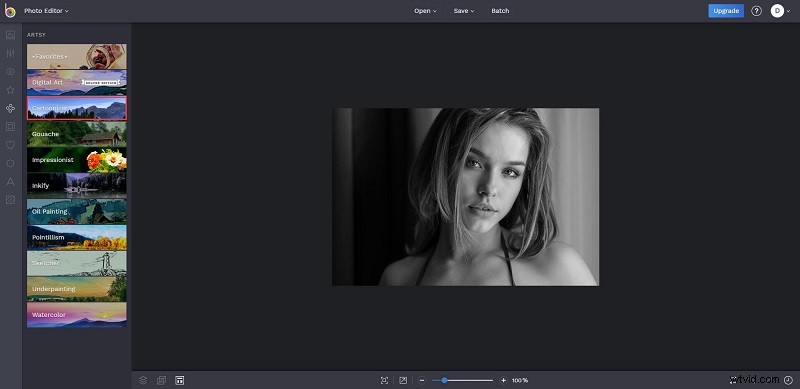
Step 5. Here provides you with 6 Cartoonizer options, each with a slightly different style. Choose any of them and preview your photo.
Step 6. If you’re happy with the result, press the green checkmark to apply the effect to your image.
Step 7. At last, go to Save > Computer, and then rename the avatar, change the format, as well as change the quality before downloading it.
How to Create Avatar from Photo on Phone - Zmoji
Zmoji is one of the best free avatar maker apps, both available on iOS and Android. This app lets you create avatar from photo free and customize it with the numerous Styles and Outfit options. Here’re are the steps on how to create avatar from Photo with Zmoji.
Step 1. Download, install and open Zmoji on your phone.
Step 2. Follow the on-screen instructions to choose a gender, style, and creation method. Here are 2 ways to create an avatar – Facial Recognition and Manual Creation.
- If you choose Facial Recognition, take a selfie of yourself, and then the app will automatically generate your cartoon avatar that looks similar to the selfie photo.
- If you choose Manual Creation, there will be a lot of customization options to help you manually create an avatar.
Step 3. Once you’ve finished, go to Avatar Gallery and click the Share button to save your avatar.
Other Avatar Makers
Apart from the above-mentioned two avatar creators, there are some other excellent tools that you can try. Let’s take a look at them.
Insta Toon
Another amazing avatar maker app is Insta Toon. Using it, you can create cartoon avatar from photo in just a minute. Besides, it consists of many avatar icons and effects for you to choose from.
Cartoonize.net
Cartoonize.net is a free online service that has everything you need to easily edit photos and create beautiful artwork. As an avatar maker, it allows you to use various cartoon filters on your photo.
Recommended post: Lightroom vs Photoshop, Which Is Better?
Bottom Line
It’s time to make a cool avatar for yourself. Have you mastered how to create avatar from photo after reading this post? If you have any questions or suggestions about it, please let us know via admin@wtvid.com or share them in the comments section below.