
FLAC is the best audio format for storing music. When you extract music from CD, you may find music ripped from CD is saved as a single FLAC file with a CUE file. How to split a single FLAC file into multiple tracks? Here are 3 FLAC splitters for you.
You have a single FLAC file containing all the FLAC tracks of an album, and you want to split them into individual tracks. What should you do? In this case, you can use a FLAC CUE splitter to split FLAC into individual tracks. Continue to read this post and learn how to split FLAC file with 3 best free FLAC splitters. (Try MiniTool MovieMaker to split FLAC audio without a CUE file.)
1. Medieval CUE Splitter
Medieval CUE Splitter is a free tool that splits a single audio file into separate tracks using the CUE sheet. You can split files in audio formats like FLAC, WAVE, APE, OGG, WMA, MP3, WV and TTA without losing quality. Besides, it allows you to batch split FLAC CUE files into multiple tracks at once. This FLAC CUE splitter is available for Windows.
Step 1. Download Medieval CUE Splitter from its official site: http://www.medieval.it/cuesplitter-pc/menu-id-71.html and install it on your computer.
Step 2. Open the program and click on File > Open CUE File… to import the FLAC CUE file that you want to split.
Step 3. After adding the FLAC CUE file, click the Split button located in the lower-left corner of the window.
Step 4. Once done, you will get all the FLAC tracks and open them with a FLAC player.
2. CUETools
CUETools is another software you can use to split a FLAC file into individual tracks. It supports FLAC, WAV, ALAC, APE, WavePack and lossyWAV as well as every CUE sheet style.
Step 1. Launch the CUETools software on your computer.
Step 2. Click on Input and import the FLAC CUE file. In the Action section, choose Encode. In the Mode section, choose Tracks. Then select Lossless and FLAC in the Audio Output section.
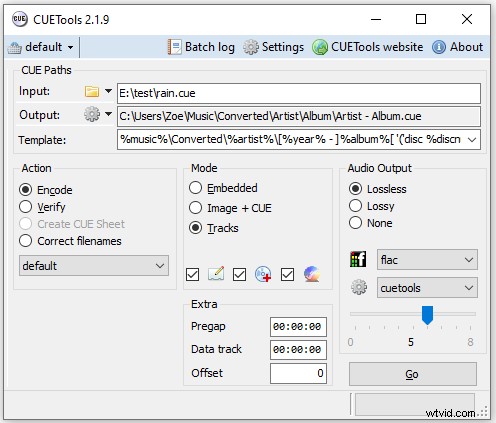
Step 3. Once done, click the Go button to start splitting the FLAC CUE file into separate tracks.
Want to convert FLAC to MP3? See this post: 4 Best Free FLAC Converters to Convert to/from FLAC Files
3. Foobar2000
Foobar2000 is the best free FLAC splitter. It also can be used to play audio files including MP3, AAC, WMA, FLAC, WAV, AIFF and many more. This FLAC CUE splitter works on Windows, macOS, Android and iOS.
Step 1. Visit the official website: https://www.foobar2000.org. Download and install Foobar2000. Then run it.
Step 2. Navigate to File > Open, select the FLAC CUE file and click Open.
Step 3. It will list all the audio tracks. Press “Ctrl + A” to select all files and right-click on them. Then choose Convert > Quick convert.
Step 4. Choose the FLAC option and click Convert.
Step 5. Select a folder to save the converted file and the conversion starts.
Step 6. Once done, you can open the destination folder to check the converted FLAC files.
Conclusion
The above-mentioned FLAC splitters are free to use. With them, you can split a single FLAC file into individual tracks without quality loss!