
Instagram Story is often used by brands to market their business. For those who have 10K followers or verified accounts, they can add links to their Instagram Stories. In this way, they can easily share a YouTube video on Instagram to promote their products. This post will tell you how to do this.
Instagram Story only allows you to upload a video for up to 15 seconds. If you need to post a longer video on Instagram, you can upload the video to YouTube and share it on Instagram Story. How to share a YouTube video on Instagram? Continue to read this post!
To make a cool YouTube video, try MiniTool MovieMaker!
1. Share a YouTube Video on Instagram Story with 10K Followers or Being Verified
To share a YouTube link on Instagram Story, you’ll need at least 10K followers or get verified on Instagram.
Below are the steps to share a YouTube video on Instagram Story.
Step 1. Copy the URL of the YouTube video you would like to share on Instagram Story.
Step 2. Open the Instagram app and click the Your Story icon in the top left corner of the screen.
Step 3. Take a photo or video, or upload a video/photo from your album.
Step 4. At the top of your screen, find and click the chain link icon.
Step 5. Click the + next to Web Link and insert the copied YouTube video link. Tap the checkmark icon to add the link to your Story.
Step 6. Add a call-to-action like “Swipe up for more!” “Swipe up to learn more!” and edit the Story as needed.
Step 7. After that, hit the Send To button and share the Story with your followers.
2. Share a YouTube Video on Instagram Story without 10K Followers or Being Verified
If you don’t have 10K followers or a verified account on Instagram, here are two simple methods of how to add link to Instagram Story without being verified or 10K followers.
Use a poll sticker
You can create a poll and send the YouTube video link to people who want it.
Here’s how:
Step 1. In the Instagram home tab, click the plus icon in the top left corner of your screen.
Step 2. Add the needed photo or video.
Step 3. Tap on the Sticker icon in the top toolbar and select the poll sticker. Create a poll and share it on Instagram Story.
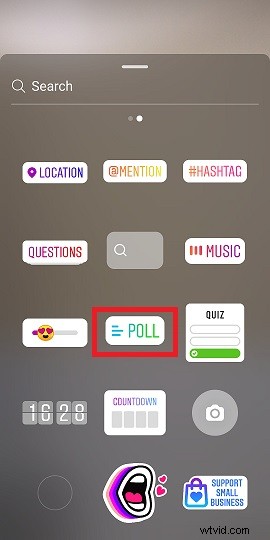
Step 4. Wait for serval hours after posting the Story. Then open your Story and check the poll results.
Step 5. Send the YouTube video link to people who voted “Yes” in the poll.
Use IGTV
Here’s how to add a YouTube video link to Instagram Story by using IGTV.
Step 1. Make an IGTV video and add CTA to the video title.
Step 2. Enter the copied YouTube URL in the description and post it.
Step 3. Open your Instagram Story and tap the link icon.
Step 4. Choose the option +IGTV Video and select the IGTV video that you just published.
Conclusion
Follow these guides and share your YouTube video on Instagram right now!