
Everybody is making videos these days. Good ones, bad ones, funny ones, serious ones. Videos for training. Videos for marketing. Videos for social media. Videos for quick updates. Videos to share ideas.
There are even a ton of videos about making videos.
If you’re making videos, or interested in them, you’ve probably noticed that many of the best ones include a short intro section. It’s an ideal technique for giving videos a professional and polished look.
What makes a good video intro?
A good video intro animation is quick and concise. A short opening to your video lets the audience know what it’s about, who you are, and, if applicable, the brand or organization you represent.
It’s for this reason that video intros are often templatized. One of the most convenient things about a good video intro is they can be reused throughout a video series or in all the videos on a channel.
A bit of catchy music along with a few animations or transitions becomes a visual signature for you or your brand.
Do I need an intro for my videos?
It’s not absolutely necessary to add an intro to every video.
Consider the purpose. If your video is a quick one-off that you’re sending to one or a couple of people, it might not be necessary.
On the other hand, if your video will be hosted and shared publicly or is part of a series, then an intro can be a really nice touch. It’s almost always a good idea to add an intro to YouTube videos.
How long should a video intro be?
YouTube video intros should be quick and snappy. Viewers want information as fast as possible, and your videos should reflect this desire.
The best video intros quickly greet viewers, introduce the presenter, and say what the video is about. This can all be communicated through text displayed in the intro sequence.
The intro is not the place to ask for likes, subscribes, shares, and comments. This adds unnecessary length to the intro and delays viewers getting to the content they want. Save the housekeeping for the end.
As far as raw length, 3-7 seconds is a solid rule of thumb.
How to Make a YouTube Intro (Step-by-step)
Making a video intro is actually a very easy process. All you need is some easy-to-use video editing software and, to make things really easy, a selection of video intro templates.
Camtasia comes with a number of video intros that you can use in any project. And TechSmith Assets for Camtasia has more YouTube video intro templates that you can download straight to Camtasia and then customize.
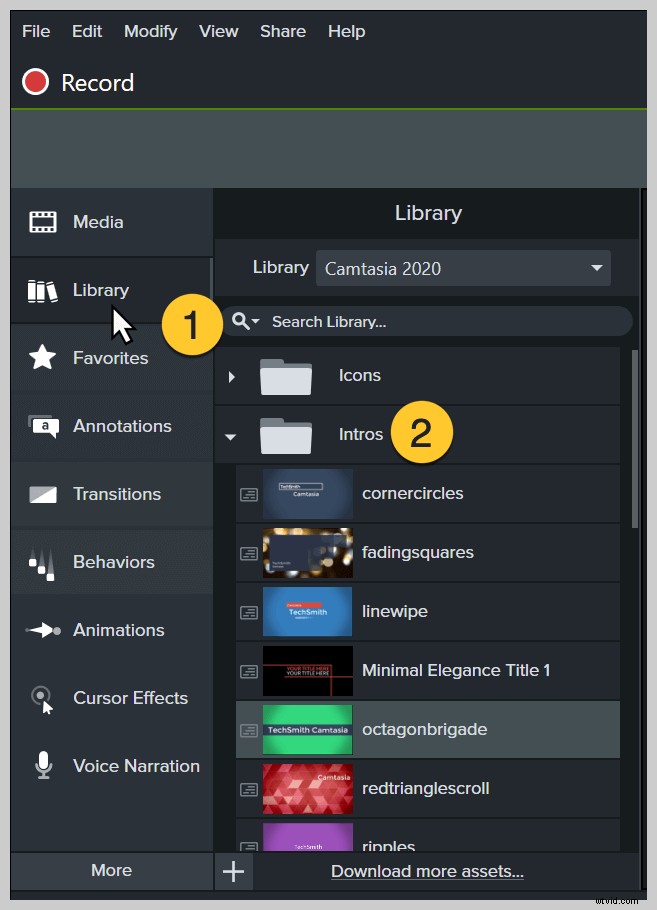
Step 1: Choose a video intro template
This step can be done from within Camtasia by choosing one from the library. Alternatively, you can download one from TechSmith Assets for Camtasia, which has more free video intros plus other resources like video templates, sound effects, music, and more.
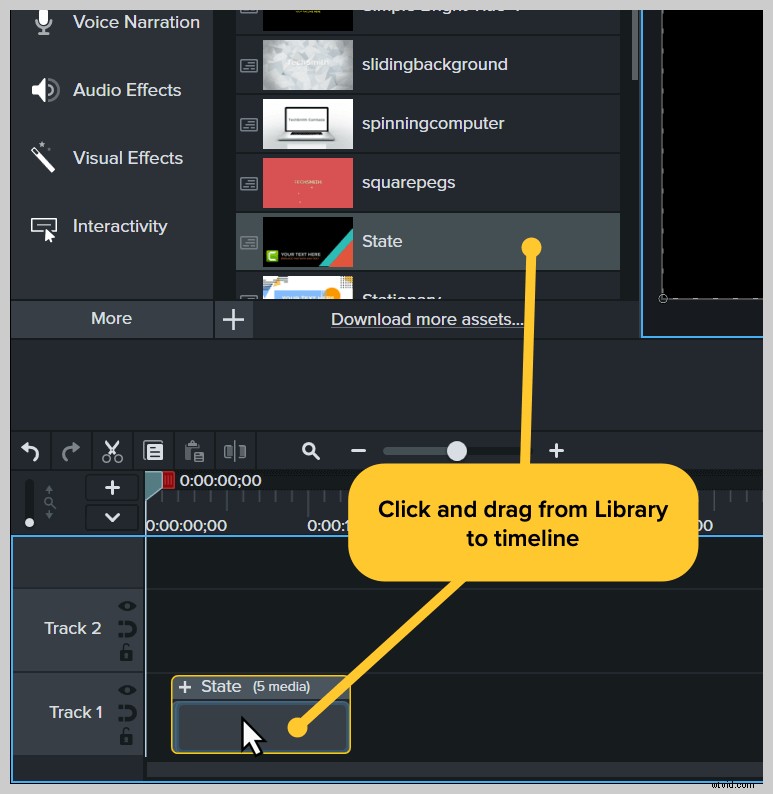
Step 2: Add the intro template to the timeline
Camtasia is a great video intro maker because it makes video editing so easy. Drag your video intro template from the Library to the timeline.
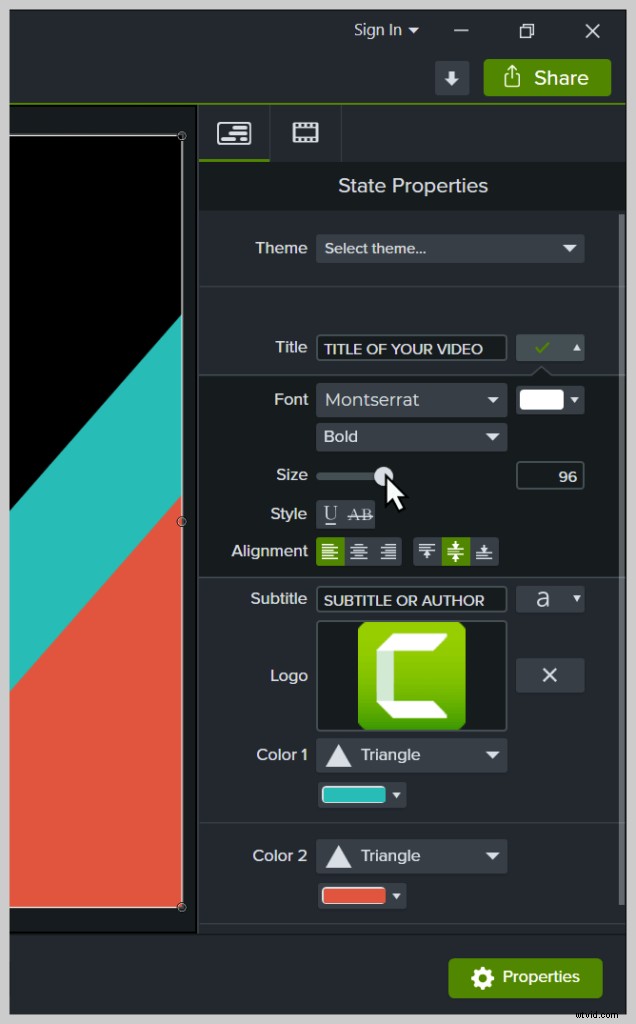
Step 3: Customize the intro with Quick Properties
Camtasia’s Quick Properties gives you customization options that make it easy to change text, colors, and logos in your intro template.
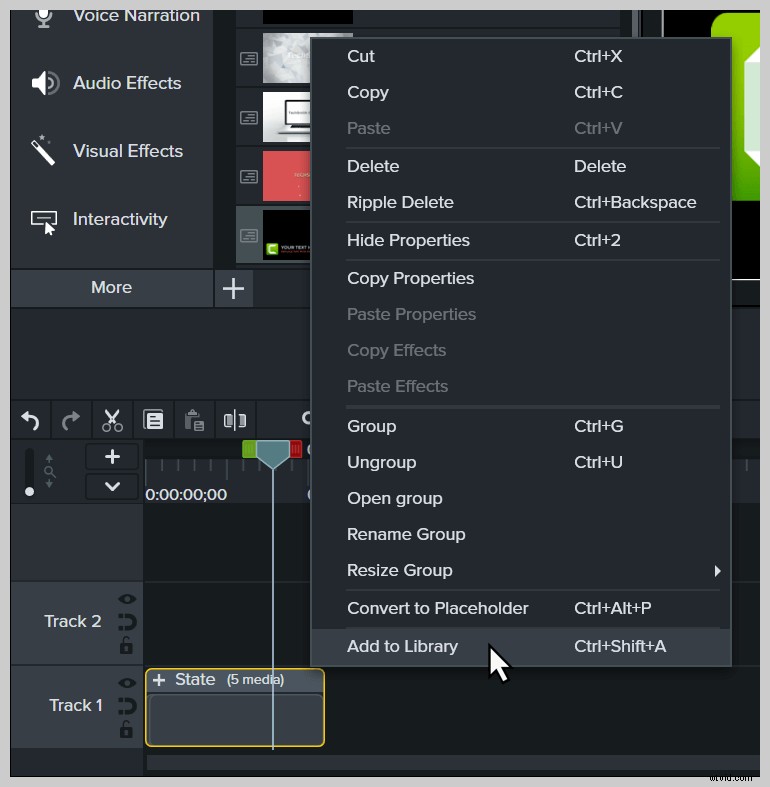
Step 4: Add the customized intro to your Camtasia library
Right click the intro media group on the Camtasia timeline and choose Add to Library.
Name the intro and choose a folder to save it to.
Now, you can use the customized intro as a template in any new video you create!
More reading
Now that you know how to create an intro for your videos, you might want to learn to create an outro. YouTube outros have some special features you can use, so learning the ins and outs can be really helpful.
Check out our post 5 Easy Steps to Make a YouTube Outro for everything you need to know about creating YouTube outros.