
These LUTs were made with care to give your shots the stylized look you’re after. Download them now for FREE.
I’ve been playing around with some color correction tools lately that I’m a big fan of. There’s a new color correction tool called Photon by Color.io that has a whole suite of interesting techniques to create your own custom LUTs. I’ve had quite a bit of fun experimenting with it. It’s a tool that allows you to view and manipulate your colors in a 3D-visualized space, without the need for nodes or excessive masking. It’s a lot of fun. They also have another tool called Match, which is also a phenomenal tool. It allows you to upload your own images and map the colors from it onto a Look Up Table (LUT) that you can use anywhere.
As I’ve been playing around, I created a few looks that are nice for certain occasions, and we thought: Why not give those away for free? So, here we are.
I built these LUTs as I was working on a few different projects, so the colors were developed for specific scenes. They were primarily added onto footage from the Blackmagic Pocket Cinema Camera 6K, so if you’re using Blackmagic color science, the LUTs shouldn’t need much tweaking.
When added onto other Log curves (F-LOG, C-Log, S-Log, etc.), you may find that you’ll need to turn down the intensity of the LUT, or tweak some other settings, to get it sitting just right. Just experiment with them yourself and see what looks you can get.
Click to download these FREE LUTs, as well as a 15% coupon from Shutterstock.
DOWNLOAD THE FREE LUTs HERE
By downloading this FREE LUTs pack, you agree not to resell or redistribute these assets.
How to Use LUTs
In the above video, Robbie Janney gives a walkthrough on how to load up LUTs and give them a try.
The main thing to consider is that these LUTs were designed for Log footage. This means that they work primarily well on shots with a flatter look. So, if you’re shooting on a more standard color curve, these LUTs will potentially look too harsh.
Most editing software has the option to raise or lower the intensity of the LUTs. If this is the case, that’s all you need to do if your footage is in REC709, or something like it.
Varied Looks for Different Types of Scenes
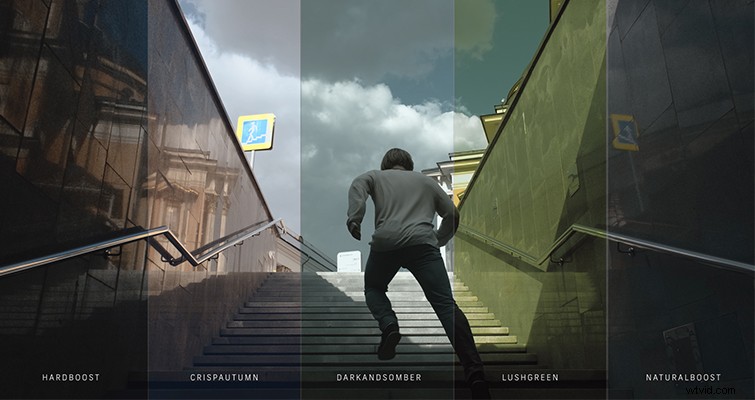
There’s a look for various situations included in this download. From a crisp, blue morning scene to a lush, green forest, there are different looks for most occasions in here. As with most LUTs, a lot of these looks are based off of movie scenes that I like, or film stocks that I always reach for when shooting photography.
For the record, I think my favorite LUT from this pack, and one that I think I’ll find myself using quite often as a base-LUT, is called “NaturalBoost.” In my opinion, it has just enough of that classic teal/blue look with enough of a soft roll-off for other scenarios.
I had a lot of fun making these, and hopefully you’ll get some use out of them.
Download 13 FREE Custom LUTs for Log FootageLiked the footage in the trailer? Here are the clips that were used:
- Bikers Riding On The Mountains
- Abstract Architecture
- Man Running Up Subway Steps
- Blue Building Windows
- Drone Shot Over Waves
- Drone Shot Over Crisp Calm Lake
- Blue Hour Snow Tower
- Rugged Landscape Castle
- Magic Hour Wind Turbines
For more color correction tool tip and advice, check out these articles:
- 5 Essential Tips and Tools for Editing in DaVinci Resolve
- Video Tutorial: Three Tips for Salvaging Overexposed Video
- FREEBIE: Over 80+ FREE Home-Inspired Sound Effects
- Learn What a Circular Polarizer Does with this Quick Tutorial
- Video Tutorial: Learn How to Create Sun Stars with This Quick Tip
Cover image via Creative Travel Projects.