
In this article
-
- Method 1: Download Twitter Video as MP3 File with an Online Converter
- Method 2: Convert Twitter Video to MP3 with a Desktop Video‑Editing Tool
- Method 3: Download Twitter Video to MP3 Using a Browser Extension
- The Benefits of Saving Twitter Video to MP3
Three Trusted Ways to Convert Twitter Video to MP3
Most people prefer audio over video when traveling or when bandwidth is limited. A reliable Twitter video converter lets you extract high‑quality audio from a tweet and play it offline. The good news is that no special technical knowledge is required.
In this guide we’ll walk through three proven methods—online, desktop, and browser‑based—to turn any Twitter video into an MP3 file. We’ll also explain why this conversion is valuable.
Method 1: Download Twitter Video as MP3 with an Online Converter
The most straightforward way is to use Keepvid.to, a free online service that supports over 1,000 sites, including Twitter, TikTok, YouTube, Instagram, and Reddit. It can convert video to MP3, MP4, OPUS, M4A, or 3GP.
Steps:
- Open Keepvid.to’s Twitter downloader and paste the tweet’s URL into the field.
- Click Go to load the video. The analysis usually takes 10–15 seconds for a five‑minute clip.
- Once the page loads, choose Audio only → MP3 (or another format if you prefer). If you need subtitles, you can also download an .srt file.
- Click Download to start the conversion. The built‑in player will play the audio once it’s ready.

Pros: Fast, works on mobile, no installation required.
Cons: Limited to a single MP3 format and offers no advanced editing options.
Method 2: Convert Twitter Video to MP3 with a Desktop Video‑Editing Tool
For those who want to edit the audio—trim silence, add effects, or merge multiple clips—Wondershare Filmora is a powerful, cross‑platform editor.
Steps:
- Create a new project and import the downloaded Twitter video.
- Right‑click the video track and select Detach Audio. Delete the video track if you only need the sound.
- Trim, adjust speed, or add royalty‑free sound effects from the built‑in library. Use the Speech‑to‑Text tool to generate subtitles if desired.
- When satisfied, click Export, choose MP3 as the format, name the file, and pick a destination.
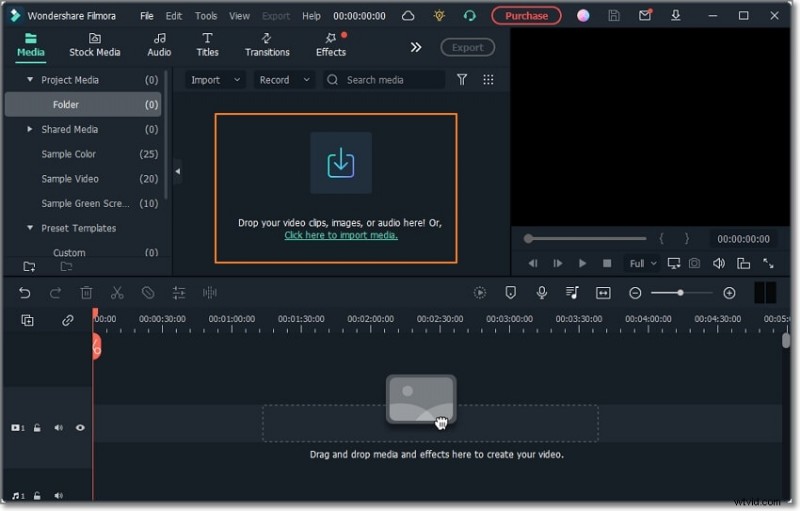
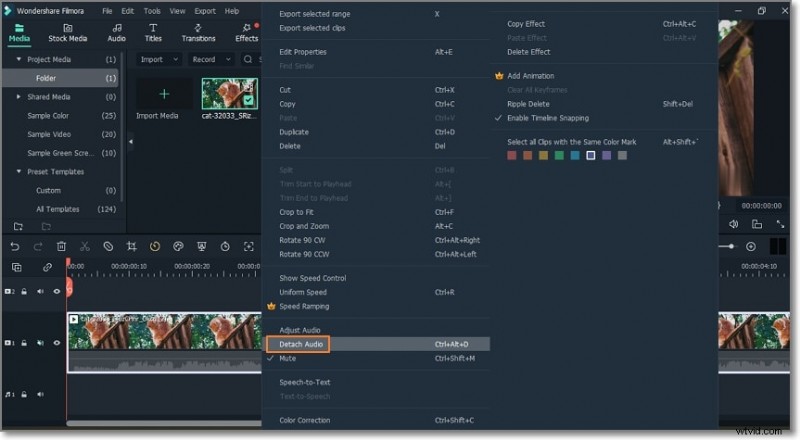
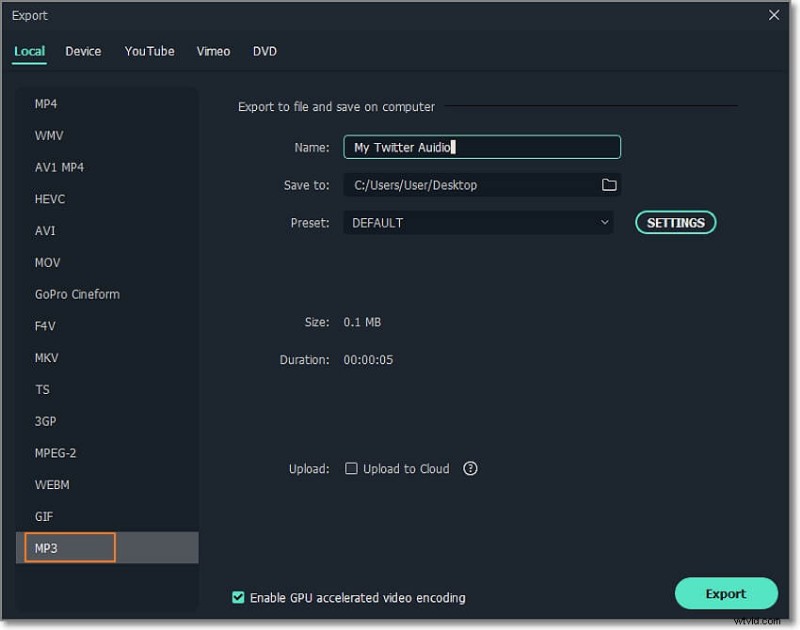
Filmora gives you full control over the audio quality, bitrate, and sample rate.
Method 3: Download Twitter Video to MP3 Using a Browser Extension
The X2Twitter.com Chrome extension is lightweight and works directly within the browser. It lets you save a tweet’s media as MP3, MP4, or GIF without signing in.
Steps:
- Install the X2Twitter.com extension from the Chrome Web Store.
- Open the tweet containing the video and click the blue Download button that appears below the media. The extension will redirect you to its own site.
- Choose Convert to MP3 from the options offered, then click Download to save the audio.

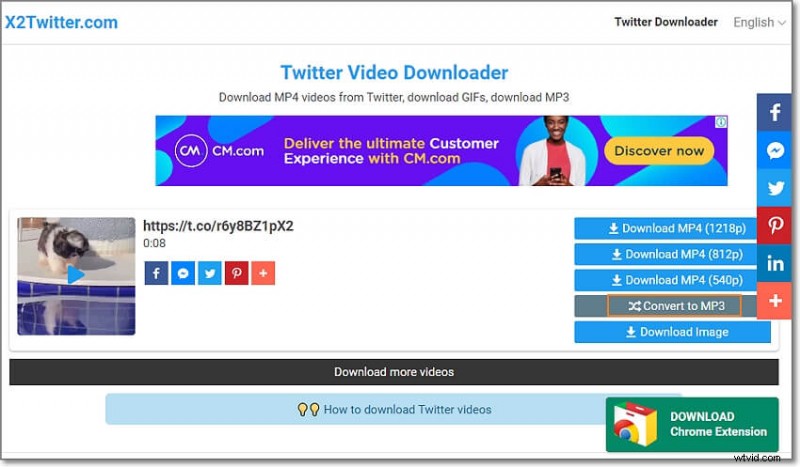
Pros: Works instantly within the browser. Cons: The extension can display ads, and users who prefer no extensions might opt for Keepvid.to.
The Advantages of Saving Twitter Video as MP3
Converting a tweet’s video to MP3 unlocks several benefits:
- Offline Listening – Play the audio anytime without an internet connection.
- Data Savings – Audio files are typically 2–3 times smaller than video.
- Enhanced Editing – Easily trim or add effects with desktop tools.
- Sound‑Effect Extraction – Pull audio snippets for use in your own projects.
- Quote & Dialogue Capture – Convert memorable lines or movie clips into standalone audio.
- Audio‑Only Ringtones – Use the MP3 as a custom ringtone or notification sound.
Final Thoughts
Whether you prefer a quick online converter, a full‑featured editor, or a browser add‑on, there’s a method that fits your workflow. Try Keepvid.to for speed, Filmora for customization, or X2Twitter.com for convenience. Once you’ve extracted the audio, you can enjoy Twitter’s content anywhere, anytime.
Disclaimer: This guide is for educational purposes only. We do not endorse or encourage any illegal activity.