
For every music producer, an EQ is the cornerstone of the mixing process. With a vast array of equalizer plugins available today, you can sculpt tone, eliminate muddiness, and place each element with surgical precision—all from your laptop.
Professional results no longer require a $10,000 hardware rig. Below we’ve evaluated the most effective EQ VSTs—both free and paid—to help you pick the right tool for your workflow.

Our Top 2 EQ VST Picks
TDR Nova – A completely free, dynamic equalizer that blends parametric EQ with multiband compression. Ideal for vocal de‑essing and overall mix cleanup.
FabFilter Pro‑Q 4 – Industry‑standard precision EQ with 24 bands, dynamic processing, and an intuitive UI. The benchmark for surgical tone shaping.
EQ Plugin Comparison Chart
Below is a quick reference for the 10 plugins we cover, showing OS support, format, pricing, and recommended use cases.
| EQ Plugin | OS Compatibility | Format | Price | Best For |
|---|---|---|---|---|
| FabFilter Pro‑Q 4 | Windows, macOS | VST, VST3, AU, AAX, CLAP, AudioSuite | Paid | Precision mixing & mastering |
| TDR Nova | Windows, macOS | VST, VST3, AU, AAX | Free | Vocal control & dynamic EQ tasks |
| MEqualizer | Windows, macOS | VST, VST3, AU, AAX | Free | Beginners & visual mixing |
| ReaEQ (Cockos) | Windows | VST | Free | Low‑CPU edits & quick fixes |
| Marvel GEQ (Voxengo) | Windows, macOS | VST, VST3, AU, AAX | Free | Mastering & clean tone shaping |
| Kirchhoff‑EQ | Windows, macOS | VST, VST3, AU, AAX | Paid | Advanced mastering & tone shaping |
| H‑EQ (Waves) | Windows, macOS | VST, VST3, AU, AAX | Paid | Analog‑style tone & digital precision |
| PTEq‑X (Ignite Amps) | Windows, macOS | VST, VST3, AU | Free | Vintage Pultec‑style warmth |
| Neutron EQ (iZotope) | Windows, macOS | VST3, AU, AAX | Paid | AI‑assisted mixing & dynamic EQ |
| SSL Native X‑EQ 2 | Windows, macOS | VST, VST3, AU, AAX | Paid | Surgical mastering & complex tone shaping |
Top 10 EQ VST Plugins – In‑Depth Review
1. FabFilter Pro‑Q 4
FabFilter Pro‑Q 4 remains the gold standard for EQ. With 24 dynamic bands, multiple phase modes, and real‑time spectrum analysis, it delivers pristine, surgical control.
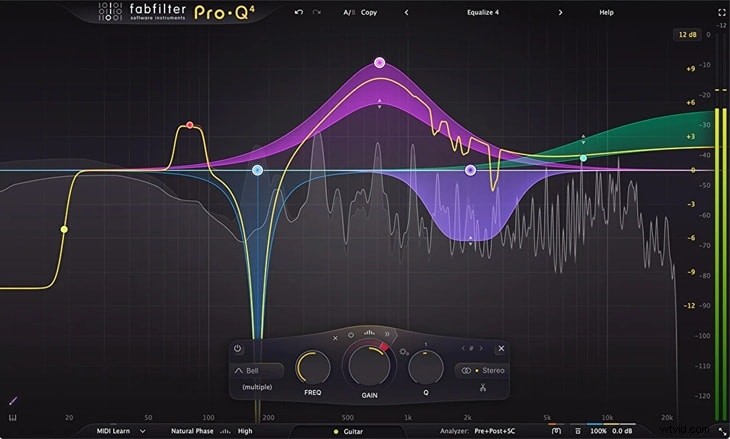
- Drag‑and‑drop band placement for effortless workflow
- Linear‑phase and natural‑phase modes for phase‑accurate processing
- Supports 9.1.6 Dolby Atmos and surround audio
- Intuitive EQ Sketch for quick curve drawing
Cons: Premium price point and advanced features may overwhelm beginners.
Pricing: $179 (full plugin), free trial available.
Who it’s for: Professional engineers needing precise tonal control in mixing and mastering.
2. TDR Nova
TDR Nova offers dynamic EQ and multiband compression in one free package. Its real‑time response makes it perfect for de‑essing vocals or smoothing rough mixes.
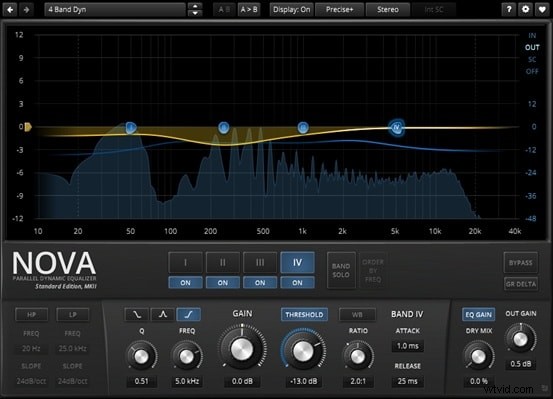
- Four dynamic bands with full Q and gain control
- Built‑in high‑pass & low‑pass filters
- Equal loudness function prevents level distortion
Cons: Steeper learning curve for dynamic EQ; lacks auto‑EQ matching.
Who it’s for: Producers, podcasters, and mastering engineers seeking flexible dynamic EQ.
3. MEqualizer
MEqualizer, part of MeldaProduction’s free bundle, offers six adjustable bands, a spectrum analyzer, and tube saturation—all optimized for modern CPUs.
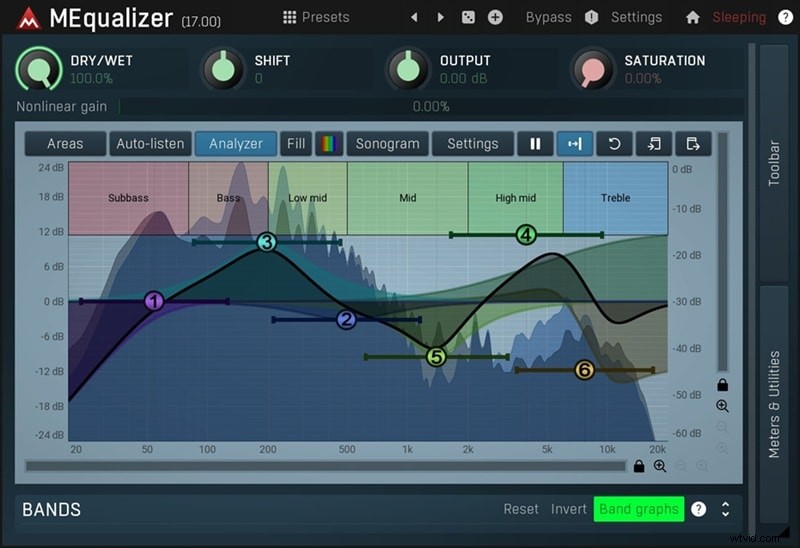
- Highly customizable filter shapes
- Auto‑gain compensation for consistent loudness
- Integrated tube saturation and harmonics control
Cons: Installer includes the full Melda suite; preset navigation can be less intuitive.
Who it’s for: Hobbyists and budget‑conscious producers needing a versatile, free EQ.
4. ReaEQ
ReaEQ, part of Cockos’ ReaPlugs suite, delivers unlimited bands with an extremely low CPU footprint—ideal for quick edits and large sessions.
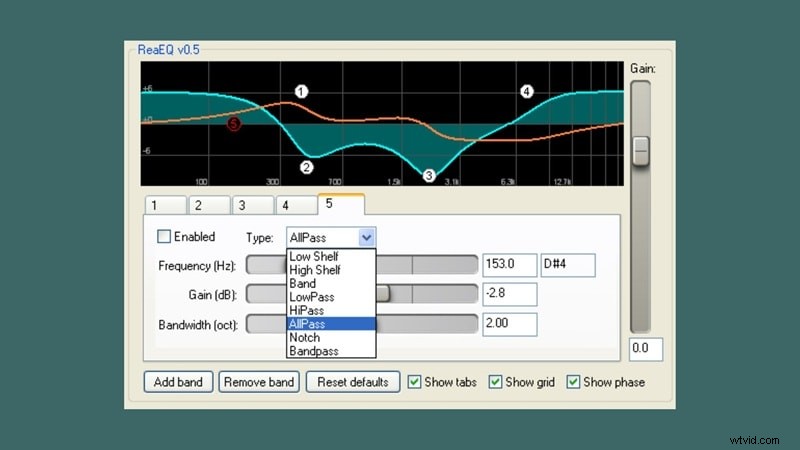
- Supports shelf, band, high/low‑pass, notch, bandpass, and all‑pass filters
- Visual display of frequency and phase response
- Individual bypass control for each band
Cons: No linear‑phase mode, no dynamic EQ, UI feels dated.
Who it’s for: Engineers who need a lightweight, no‑frills EQ for everyday tasks.
5. Marvel GEQ
Marvel GEQ offers 16 fixed‑frequency, linear‑phase graphic bands—clean and phase‑accurate, perfect for mastering and multi‑channel workflows.
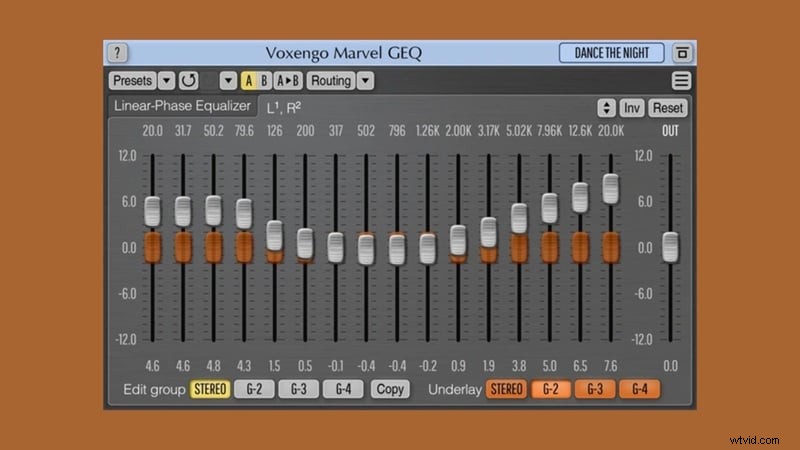
- Handles up to 8 input/output channels, including 5.1/7.1
- Supports stereo, mono, and mid‑side processing
- Zero‑latency performance for real‑time use
Cons: Fixed bands limit surgical flexibility.
Who it’s for: Mastering engineers, live‑sound mixers, and post‑production audio teams.
6. Kirchhoff‑EQ
Kirchhoff‑EQ delivers 32 bands, vintage‑mode modeling, and advanced dynamic EQ features—all wrapped in a transparent, high‑quality sound.
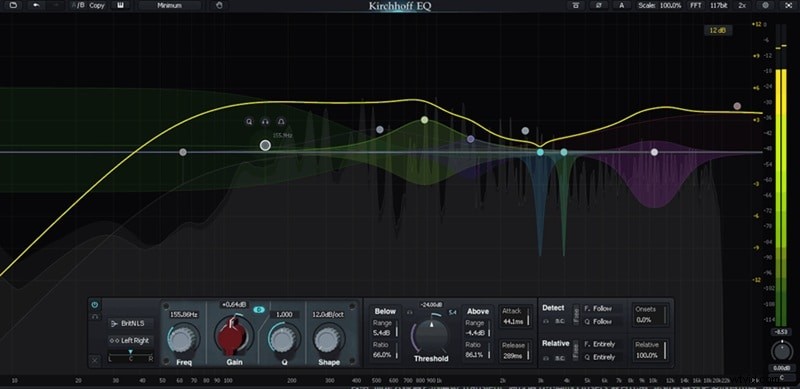
- Multiple phase modes: zero‑latency, analog‑style, linear, hybrid
- Ultra‑high 117‑bit precision processing option
- 15 filter types plus 32 vintage EQ curve emulations
Cons: Premium price and higher CPU usage with advanced settings.
Who it’s for: Pro mix & mastering engineers demanding warmth, transparency, and dynamic control.
7. H‑EQ (Waves)
H‑EQ combines analog‑style saturation with digital precision. It features British and American console emulations, a real‑time spectrum analyzer, and mid/side processing.
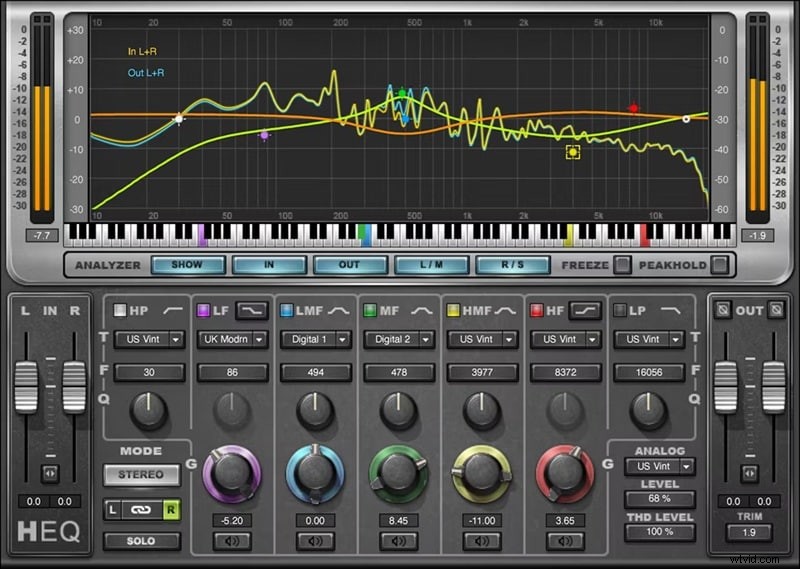
- Asymmetrical bell curves and adjustable harmonic distortion
- Real‑time analyzer with freeze function for precise edits
- Lite mode for reduced CPU usage
Cons: UI feels dated; limited dynamic EQ capabilities.
Who it’s for: Producers seeking analog warmth combined with digital clarity.
8. PTEq‑X
PTEq‑X is a free, high‑quality emulation of the classic Pultec EQ, featuring tube stages and analog‑style curves that add warmth to vocals, guitars, and mastering.
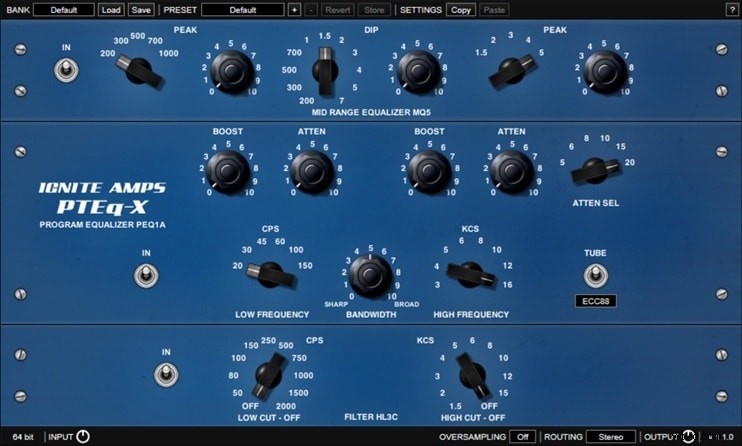
- Three modules: high‑gain low, low‑gain high, and mid‑band
- Four selectable tube types for tone shaping
- Optional linear‑phase oversampling to reduce aliasing
Cons: No built‑in analyzer; interface less suited for surgical work.
Who it’s for: Users who value vintage analog character and depth.
9. Neutron EQ (iZotope)
Neutron EQ, part of iZotope’s intelligent mixing suite, offers up to 12 dynamic or static bands, AI‑assisted learning, and side‑chaining options.
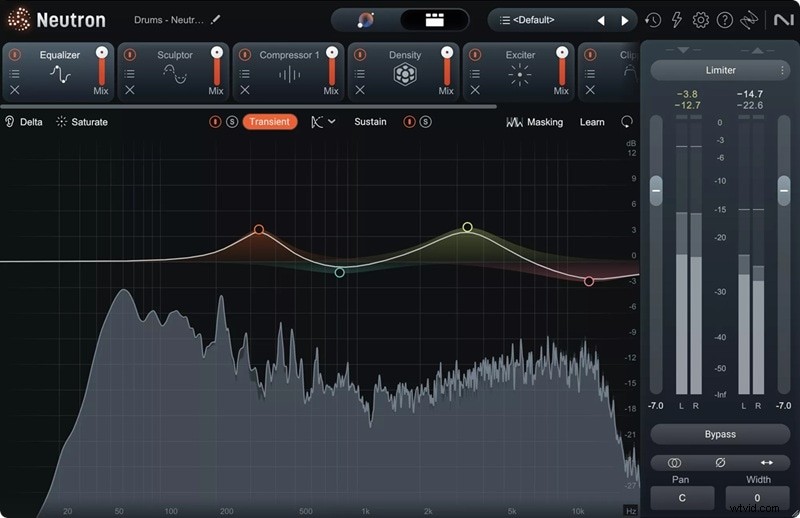
- EQ Learn automatically identifies problematic frequencies
- Delta listening isolates EQ changes for clearer control
- Soft Saturation adds analog warmth
Cons: Requires iZotope ecosystem for full functionality; higher price point.
Who it’s for: Intermediate to pro engineers seeking AI‑powered assistance.
10. SSL Native X‑EQ 2
SSL X‑EQ 2 delivers 24‑band parametric EQ with SSL’s anti‑cramping technology, offering transparency and surgical precision for mastering and complex mixes.
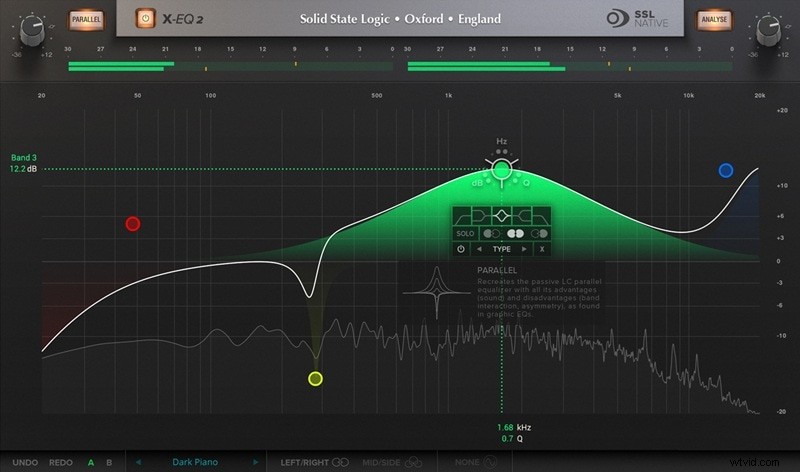
- 17 filter types, including custom shapes and anti‑cramping filters
- CPU‑efficient DSP with optimized 64‑bit processing
- Real‑time spectrum analyzer with phase and step‑response displays
Cons: Limited manual Q control on presets; no built‑in A/B comparison.
Who it’s for: Professionals needing surgical EQ for mastering, mixing, and sound design.
Choosing the Right EQ Plugin
Start by answering these questions:
- What correction do you need? Vocal de‑essing? Instrument tone shaping? Mastering transparency? Pick a plugin that excels in that area.
- What’s your budget? Free plugins (ReaEQ, MEqualizer, PTEq‑X) cover most beginners. Premium options (FabFilter Pro‑Q 4, Kirchhoff‑EQ) provide added polish and workflow efficiency.
- Can your system handle it? Lightweight EQs (ReaEQ, Marvel GEQ) suit low‑spec setups, while CPU‑intensive plugins (H‑EQ, SSL X‑EQ 2) may need more resources.
- Which DAW do you use? Most EQs support VST, AU, and AAX. Verify compatibility on the developer’s website if you’re unsure.
Filmora VST3 Support
Filmora’s VST3 integration lets creators use top EQ plugins—FabFilter Pro‑Q, iZotope Ozone, TDR Kotelnikov—directly within the video editor, enabling professional audio polish without leaving the timeline.
Applying EQ in Filmora
To use an EQ VST in Filmora:
- Download the plugin from the official site.
- Install it in the default VST3 folder:
Windows:C:\Program Files\Common Files\VST3
macOS:/Library/Audio/Plug‑Ins/VST3 - Open Filmora, load the plugin on your track, and adjust the curve.
Follow the step‑by‑step guide in the full article for detailed screenshots.
Conclusion
Finding the right EQ plugin is about aligning your needs, budget, and workflow. With the options above, you can achieve professional results—whether you’re mixing a pop single or mastering a cinematic score.
Ready to dive in? Install a plugin, open your DAW, and start sculpting sound with confidence.