
- Home
- Audio Edit
- Top 6 Free Audio Extraction Tools for PC
Top 6 Free Audio Extraction Tools for PC, Mac, and Linux

By Sumia Rafique – Published Nov 20, 2024; Updated Nov 12, 2025
Separating audio from video files is a common requirement for content creators, musicians, and video editors. Whether you need to isolate a soundtrack for a remix, extract dialogue for subtitles, or simply convert a video clip into an MP3 for a podcast, a reliable audio extractor can make the process quick and hassle‑free.
Below, we present six of the most popular free tools, each chosen for its ease of use, feature set, and cross‑platform support. The list covers everything from basic extraction to advanced editing and AI‑powered enhancements.
How to Pick the Right Free Audio Extractor
- User‑friendly interface: Even beginners can navigate the UI and complete tasks in a few clicks.
- Multiple export formats: Look for support for MP3, WAV, AAC, FLAC, and other widely used codecs.
- Quality control: The ability to adjust bitrate, sample rate, or apply denoising directly improves the final output.
- Batch processing: When working with large libraries, a batch mode saves time and effort.
- Integrated editing features: Some tools include trimming, noise reduction, or voice enhancement, eliminating the need for a separate editor.
- Cross‑platform compatibility: Ensure the software runs on your operating system, whether Windows, macOS, or Linux.
Feature Comparison of the Six Tools
| Software | Compatibility | Best For | Pricing |
|---|---|---|---|
| Wondershare Filmora | Windows, macOS, iOS, Android | High‑quality extraction with AI audio editing | Free version; Paid plans from $49.99/year |
| VLC Media Player | Windows, macOS, Linux, Android, iOS | Basic extraction and playback | Free |
| Wondershare DemoCreator | Windows, macOS | Screen recording with audio capture | Free version; Paid plans $45/year or $75 perpetual |
| Audacity | Windows, macOS, Linux | Advanced audio editing & extraction | Free |
| MiniTool MovieMaker | Windows | Fast extraction from various video formats | Free version; Paid plans $35.99/year or $12.99/month |
| Easy Audio Extractor | Windows | Simple extraction with basic editing | Free; Pro version $29.95 |
1. Wondershare Filmora
Filmora is primarily a video editor, but its “Detach Audio” feature makes it an excellent free extractor. Beyond basic extraction, Filmora offers AI Voice Enhancer, Audio Denoiser, Dereverb, and a Text‑to‑Speech engine, allowing you to polish audio without leaving the app.


How to Use Filmora to Extract Audio
- Download and install Filmora on your PC.
- Import the video file.
- Drag the clip to the timeline, right‑click, and select Detach Audio.
- Delete the video track if it isn’t needed.
- Export the audio as MP3, WAV, or AAC, choosing your desired bitrate.
Pros & Cons
- Pros: Cross‑platform, rich editing tools, supports many formats.
- Cons: Free version adds a watermark to video exports.
2. VLC Media Player
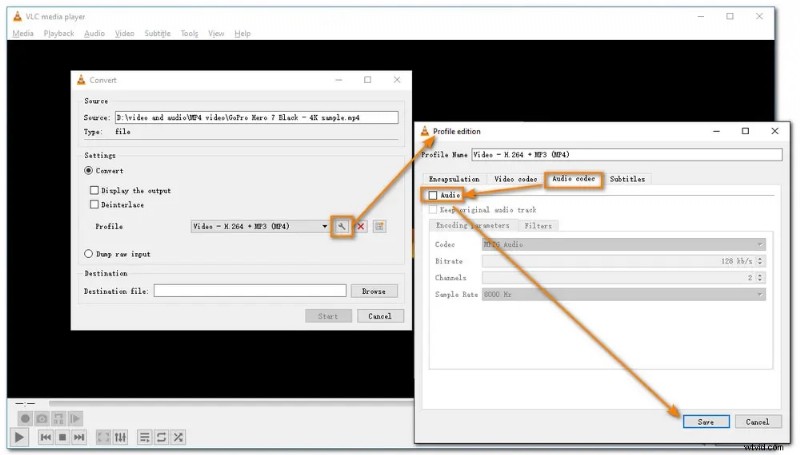
While VLC is best known as a media player, its “Convert/Save” function can strip audio from almost any video format, outputting MP3 or OGG files.
Pros & Cons
- Pros: Completely free, works on all major OSes, supports a vast range of codecs.
- Cons: Lacks built‑in audio editing or noise reduction.
3. Wondershare DemoCreator
Designed for screen capture, DemoCreator also offers audio extraction from video files. Its interface is clean, and it provides basic audio enhancement such as volume control and noise cancellation.
Pros & Cons
- Pros: Simple workflow, AI‑powered denoise, handles large files well.
- Cons: Free version leaves a watermark; full AI features require payment.
4. Audacity
Audacity is a professional‑grade, open‑source editor that can import video files (via FFmpeg) and export the audio track in any format. It supports multi‑track editing, noise reduction, and batch processing.

Pros & Cons
- Pros: Unlimited usage, extensive plugin ecosystem, excellent for detailed editing.
- Cons: Requires FFmpeg for video import; steep learning curve for beginners.
5. MiniTool MovieMaker
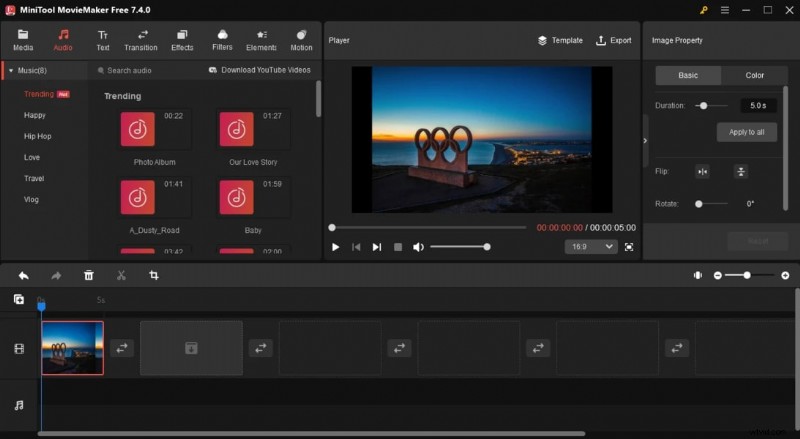
MiniTool MovieMaker focuses on quick conversions. It can extract audio from MP4, MKV, AVI, and other formats, then trim or adjust the sound track before exporting.
Pros & Cons
- Pros: Intuitive, no watermarks in free version, batch processing available.
- Cons: Limited advanced editing, Windows‑only, free tier caps output length.
6. Easy Audio Extractor
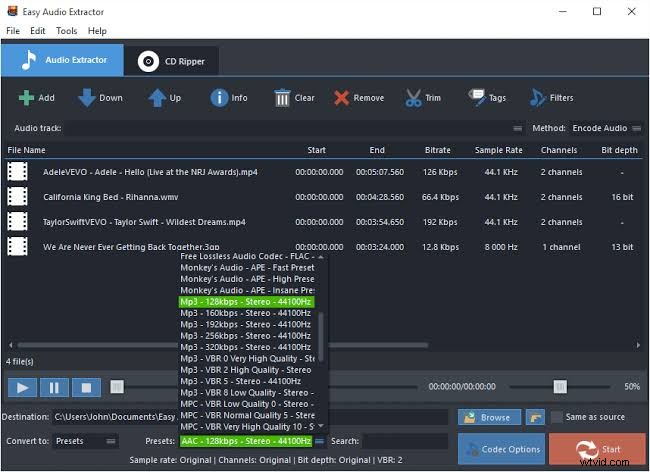
Easy Audio Extractor is lightweight and supports extraction from YouTube, DVDs, and any common video file. It offers basic trimming, normalization, and format conversion to MP3, WAV, or AAC.
Pros & Cons
- Pros: Supports many input and output formats, batch conversion, free for non‑commercial use.
- Cons: Only basic editing, MP3 bitrate capped at 320 kbps.
Conclusion
Choosing the right audio extractor depends on your workflow. If you need advanced AI editing, Filmora is the clear leader. For pure extraction without any frills, VLC or Easy Audio Extractor serve you well. Audacity remains the best choice for professionals who require fine‑tuned edits. All tools are free to start, so you can experiment before committing to a paid plan.
FAQs
-
What is the best app to extract audio from video?
Filmora mobile offers one‑click extraction and robust editing, making it ideal for quick tasks on the go.
-
What's the best way to extract audio from Windows?
Filmora’s three‑step process—install, import, detach—delivers fast results with minimal effort.
-
What is the best software for audio extraction?
Filmora provides the fastest extraction and advanced editing in a single, user‑friendly package.
-
Can a video be translated into audio?
Yes, by extracting the audio track and saving it as MP3 or WAV. Filmora even offers AI translation of speech and subtitles into 23 languages.