
Adobe is really trying to make editing videos on small screens a more enjoyable process. They've looked at ways to give us more screen real estate. They've combined some tabs and made switching between workspaces much easier. It's even possible to do everything you need to in one workspace, and the workspace can be customized and saved as usual.
Updates
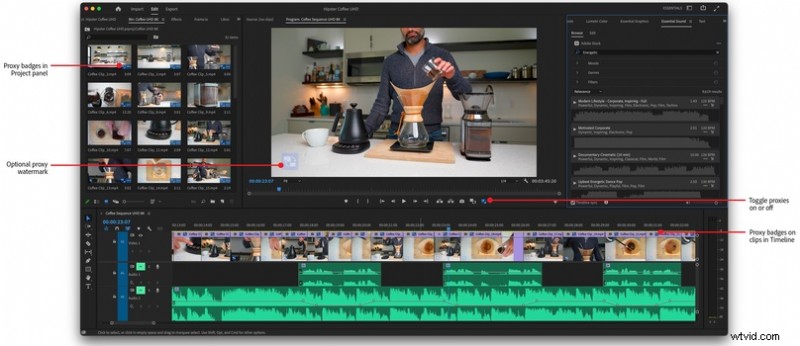
You can now see which clips are being switched out for proxies with badges. You can also have it burnt into the footage, so everyone working on the project knows when they've exported a video with proxies instead of the hi-res source media.
We can now add new gradients, strokes, and shadows to our graphics in the Adobe’s Essential Graphics panel. This is great if you want to add some more value to your videos.
Vertical Video now has a workspace. This optimizes the workspace so you can see the vertical video in the most ideal way.
Additional Updates
- GPU-accelerated effects, including the Magnify, Replicate, Spherize, and Wave effects
- Improved H264/HEVC encoding on Apple M1 systems
- Support for RED V-RAPTOR camera
Overall Improvement
These are minor updates, but they do make working with the software, especially on smaller displays, a better experience. And if there's one thing that's true, it's that if you enjoy doing something, the product will be better executed.
If you'd like to find out more about these updates, you can do so by following this link.