
Texting stories are short videos that show a conversation between two people texting. These stories convey funny, personal, every day conversations that people can relate to. Your classic texting story might be between technologically-challenged mother and her daughter, the group chat gals or a husband and wife domestic conversation. When done well, these videos go viral on social media. So how can you create texting stories for your business’s video marketing strategy?
How to create texting stories for social media
Step 1: Download the app
What many people may not know is that the ‘texting’ is actually done through a third party app, all by one person. We used TextingStory app for iOS devices, and there is also an Android version available.
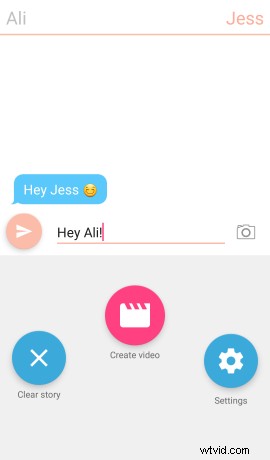
Once you have downloaded the app, you can change the names of the two conversationalists by clicking settings.

Step 2: Have a conversation with yourself
Simply type your message and hit send. Tap on the names at the top to switch between the two people.
You have complete creative freedom here, so remember to be personal and relatable, and type like a person would normally text someone. Try to avoid super formal language and don’t forget to use emojis to help set the tone of your voice.
Step 3: Solve a problem
If you are using TextingStory to promote your business and are struggling to find a conversation topic, try and think of a problem that your business or product solves. For example, in the video above, we created a texting story about how hard it was to easily create marketing videos using professional video editing software. Then we solved the problem at the end of the texting story by linking back to clipchamp.com, telling the viewer that their struggles could be avoided by using Clipchamp Create.
Step 4: Create your video
Click Create video to turn your conversation into a video! If you messed up, just click clear story to start over.
Step 5: Clipchamp it
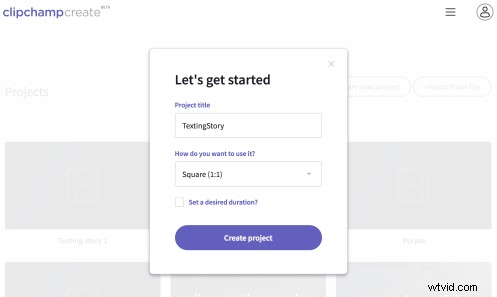
Head over to clipchamp.com to use the free online video editor. Here you can create square videos that are perfect for social media.
Step 6: Add some titles
We added some Quick Peek title slides at the end of our texting story to show the solution to the problem. If you’re stuck, watch this video tutorial on how to add text and titles.

Step 7: Export and Post
Export times may vary depending on your video’s length and your computer’s processing power. However, a short video like this shouldn’t take more than a few minutes! Now post it to your social channels and watch the likes and comments roll in.
…