
Wondering what the lyrics are to a song on Apple Music? Do you want to read through the lyrics while you’re enjoying a song, or maybe you want to confirm what that singer is actually singing? Apple Music makes it easy to view the full song lyrics to any song within the Music app on iPhone and iPad.
This article will show you how to easily check song lyrics through Music app, whether the song is in your local device or on an online playlist the feature works the same.
If you just want to see all lyrics in one place, or you’re not too keen on the bells and whistles that the fancier real-time live lyrics feature has to offer for a karaoke singalong, or your device is running an older version of iOS, you can view full lyrics for supported songs on Apple Music. This works the same on iPhone and iPad with the Music app and Apple Music service, so let’s check out how you can use this cool feature to see the song lyrics for a song of your choosing.
How to View Full Lyrics with Apple Music on iPhone or iPad
Here’s how you can easily see full song lyrics in Apple Music:
- Open Apple Music on iPhone or iPad, and then find or play a song if you have not done so already
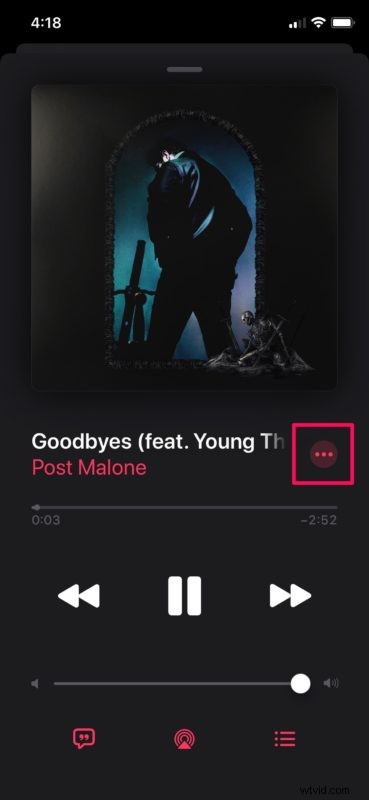
- In the playback menu, tap on the “triple-dot” icon located right next to the title of the song.
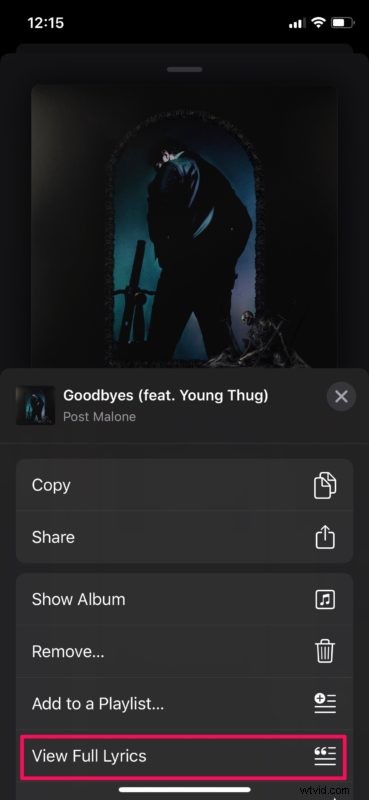
- A menu will pop-up from bottom of your screen. Here, tap on “View Full Lyrics”.
- You should be able to scroll through the entire lyrics here. In order to back out of the lyrics section, just tap on the playback bar at the bottom.
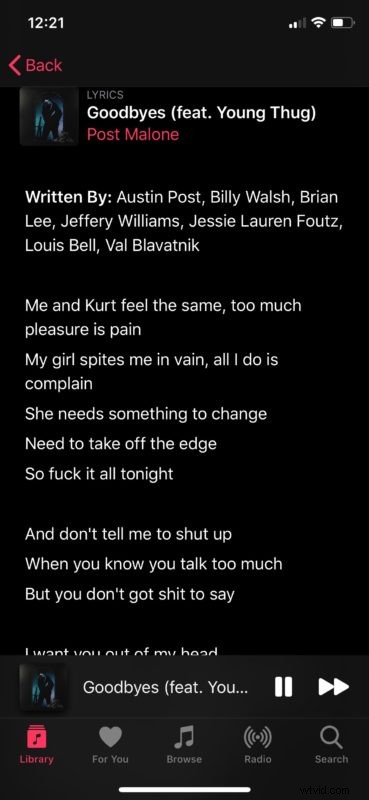

Now you can see the full lyrics of any song in Apple Music.
You can read through them and memorize the song, or confirm what some lyrics were, or just marvel at the prose of a particular artist.
This all assumes that the song you’re looking up supports and includes lyrics anyway, as not all songs do. If the song does not show any lyrics, it may be because it’s from a ripped CD of your own personal library, it’s more a obscure or rare composition or recording, or it just hasn’t had lyrics added to the Apple Music catalog yet. But don’t worry, most popular songs have lyrics included and you’ll be able to enjoy a large catalog this way.
You can view the lyrics of any song in Apple Music that is either streamed live through the service, or stored locally on your iPhone or iPad, as long as the song or music is in the Music app on your iOS or iPadOS device you’ll be able to see the lyrics this way.
As mentioned before, you can also use a separate feature to see live lyrics, scrolling lyrics karaoke style on Apple Music which is great for singing along or just matching words to a part of a song.
Do you use browse through song lyrics in Apple Music? If you hadn’t before, you just might now that you’ve learned how to check lyrical compositions yourself. Enjoy browsing through lyrics with Apple Music, and let us know your thoughts, experiences, and opinions in the comments below.