
Have you ever noticed your podcast is suddenly playing too fast on an iPhone, and everyone sounds like they’re talking super fast after drinking way too much coffee, or the voices pitch higher like chipmunks? No you aren’t going crazy, and you’re almost certainly not alone!
But don’t sweat it, if a podcast is suddenly playing too fast on an iPhone the solution is quite simple. Read on to learn how to get podcast playback speed back to normal again in iOS.
How to Fix Podcasts Playing Too Fast on iPhone
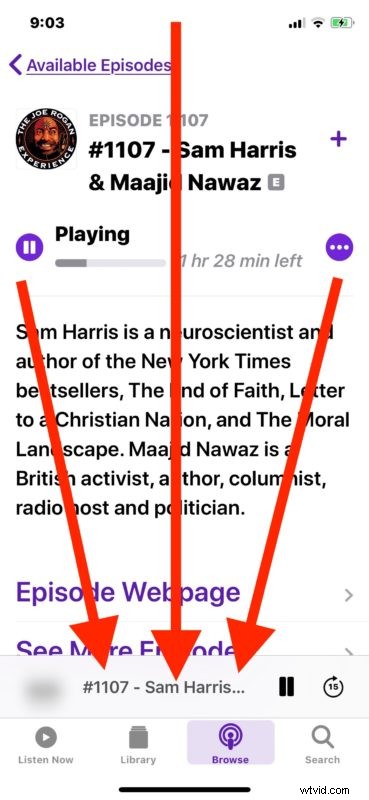
- Open the Podcasts app on the iPhone
- Navigate to the playing podcast by tapping on the little title play bar near the bottom of the Podcast app screen
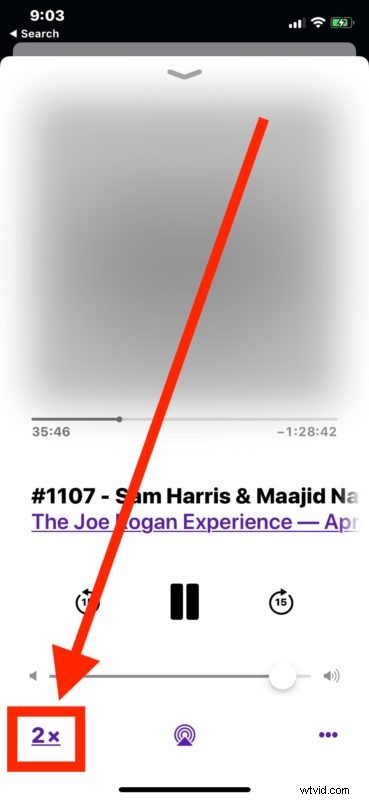
- Look in the bottom left corner for “2x” or “1.5x” and tap on that
- Keep tapping on that text button until it says “1x” indicating normal playback speed
- Enjoy your podcast at a normal playing speed
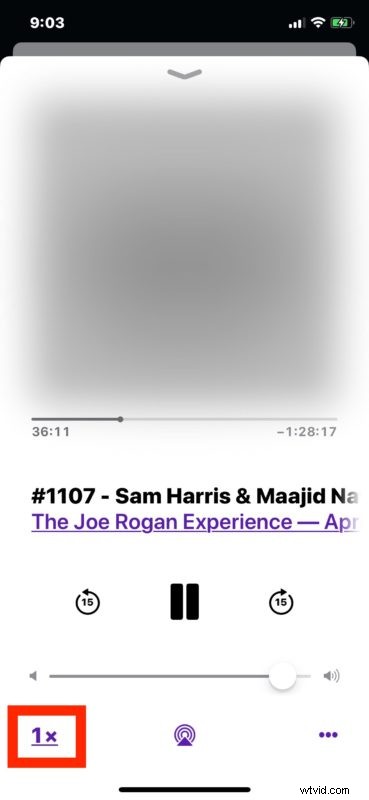
That’s all there is to it, once back at 1x you’ll be listening to the podcast at the normal default speed again, as most podcasts are intended to be heard.
As you may have guessed by now, that little “1x”, “1.5x”, or “2x” button is where the user can manually speed up or slow down Podcast playback on the iPhone, which is a great feature if you want to listen to more of a show a bit quicker, or if you’re trying to speed listen through a particular episode. Many people actually prefer the faster podcast playback speeds since they can hear more in a shorter amount of time, but if you’re listening to a show or speaker where someone already speaks quickly it can really sound crazy to speed it up even faster. Ultimately this is one of those settings that depends on the user and the podcast, so set according to how you like it.
I never changed a setting, so why are my podcasts suddenly playing super fast?
Most likely, you either changed the podcast playback speed and forgot about it, or you inadvertently touched the playback speed button and toggled them to play faster. The latter scenario is quite easy to happen accidentally since it’s just a little text button on the screen.
So if your podcasts are playing too fast and everything sounds sped up, just go back to the Podcasts app and adjust the speed down again to normal.
Oh and if you’re thinking you’ll speed up podcasts to skip through ads or a boring part, then just use the skip feature of Podcasts instead to jump ahead.
Podcasts are an extraordinarily popular medium for listening to various talk shows, so whether you like them sped up, at regular speed, or slowed down, just listen and enjoy!