REC

Recommended: Video Production, Editing & Gear Maintenance Guide

 WTVID >> WTVID >  >> Video Editing >> Adobe Audition

Convert Mono to Stereo (and Vice Versa) in Premiere Pro – Voice‑Over Pro Guide

Convert Mono to Stereo (and Vice Versa) in Premiere Pro

Adobe Premiere Pro is primarily a video editing platform, but it also offers basic audio manipulation tools. One common task is switching a mono audio track to stereo, or collapsing a stereo track into mono, which is essential for consistent voice‑over workflows.

Convert Mono to Stereo (and Vice Versa) in Premiere Pro – Voice‑Over Pro Guide

Step‑by‑Step: Mono → Stereo

  • Import your file by right‑clicking in the Project panel and selecting Import.
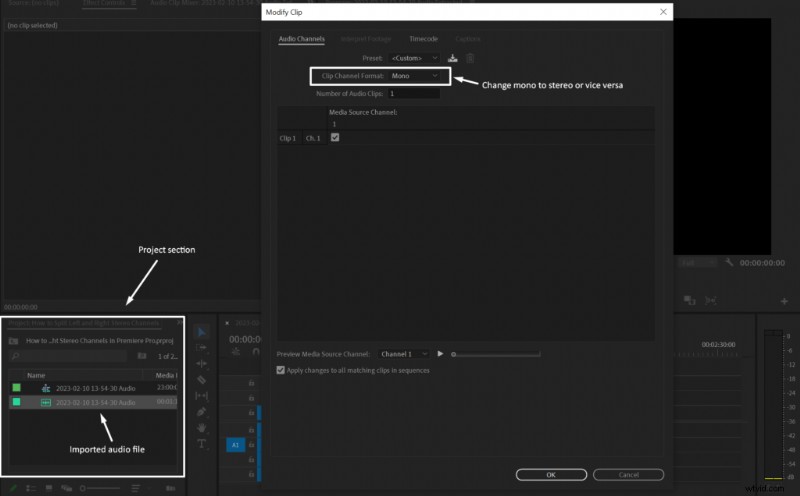
  • Right‑click the clip and choose Modify > Audio Channels.
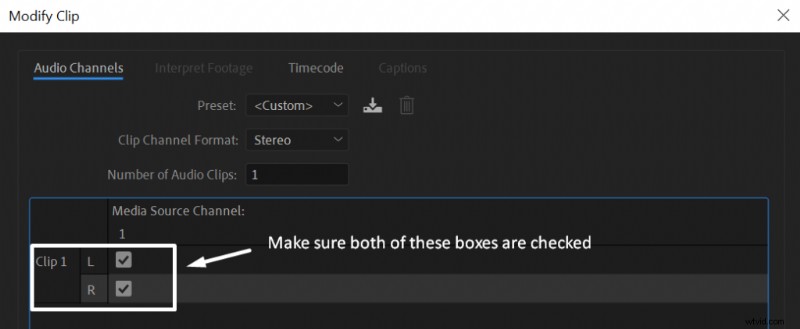
  • In the Clip Channel Format dropdown, select Stereo and ensure both Left (L) and Right (R) boxes are checked.
  • Click OK to apply the change.
Convert Mono to Stereo (and Vice Versa) in Premiere Pro – Voice‑Over Pro Guide

Leaving either the L or R box unchecked will silence that side on a stereo playback device, so always double‑check both.

Step‑by‑Step: Stereo → Mono

  • Right‑click the stereo clip and choose Modify > Audio Channels.
  • Select Mono in the Clip Channel Format menu.
  • Confirm with OK.
Convert Mono to Stereo (and Vice Versa) in Premiere Pro – Voice‑Over Pro Guide

These simple adjustments ensure your voice‑over audio sounds balanced whether played back in stereo or collapsed to mono.

  1. Behind the Scenes: How SNL Editors Delivered an Emmy-Nominated Sketch with 60+ VFX Shots in Just 2 Days

  2. How to Create a Vinyl Record Slowdown Vocal Effect in Adobe Audition

  3. How to Apply Audio Distortion in Adobe Premiere Pro: Step-by-Step Guide

  4. Effortlessly Remove Mouth Clicks in Audacity: Step-by-Step Guide

  5. Premiere Pro Keyboard Shortcuts: Boost Your Editing Workflow

Adobe Audition
  1. Expert Tips for Capturing Stunning HDR Sunsets

  2. Lightroom 4 Virtual Copies Tutorial: Essential Beginner's Guide

  3. Capture One Pro vs. Lightroom Classic: The Ultimate RAW Editing Showdown for Photographers

  4. How to Stream Local Videos to Chromecast from Windows, Mac, Android & iOS

  5. Photoshop vs. Lightroom: Why Lightroom is Best for Beginner Photographers

  6. Top 10 Lightroom Presets for Professional Wedding Photography

  7. Exporting from Premiere Pro to DaVinci Resolve: A Complete Step‑by‑Step Guide

  8. Premiere Pro: Mastering Audio Volume Control for Voiceovers