
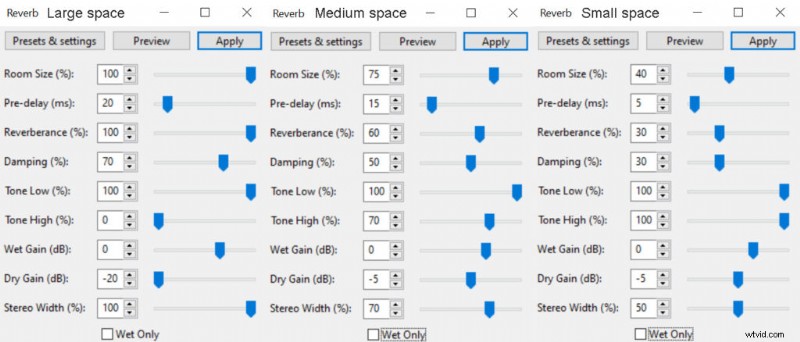
 Reverb settings for large, medium and small cave sizes in Audacity.
Caves have a distinct audio quality to them due to the bare rock walls surrounding you in a cave space. Since there’s nothing to absorb sound waves in a cave, it bounces back and forth within it, creating a reverb effect. Also, the shape of the cave matters as well. A huge hall-like cave space will have different sound compared to a narrow long cave. Audacity has a reverb effect and we’ll take a look at how create a cave sound effect in it.
Here’s a quick step-by-step process in Audacity:
- Generate at least 10s of silence at the end of your track by clicking Generate->Silence
- Click on the line separating two audio clips to merge them
- Select your audio recording and go to Effect->Reverb
- Click Preview and Apply if you like Default settings or copy settings from the above.
Adding the silent part is crucial as it’ll allow adding the tail end generated by the reverb. Otherwise, your audio would truncate where the clip ends. You can later delete uneccesarry surplus of silence if needed.
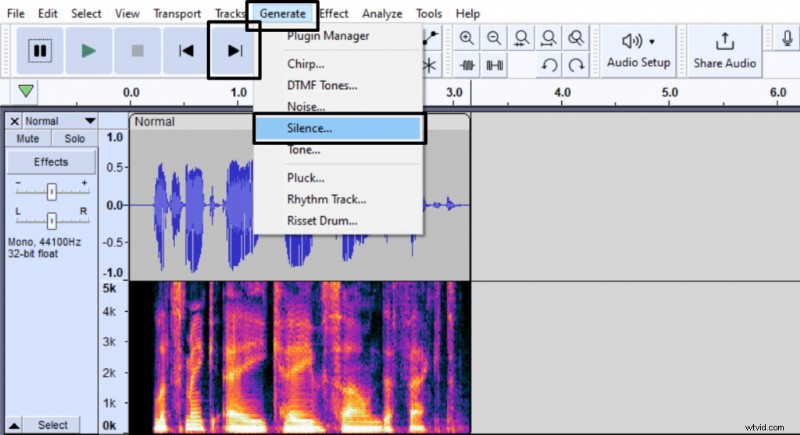 Adding the silent part at the end of the audio track in Audacity.
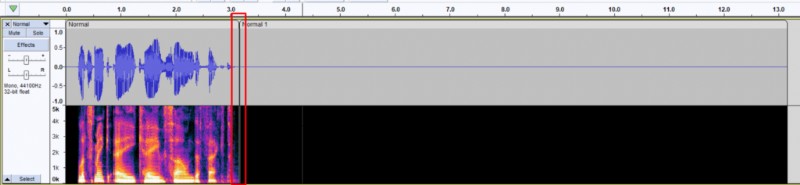 Merging two clicks into one in Audacity.
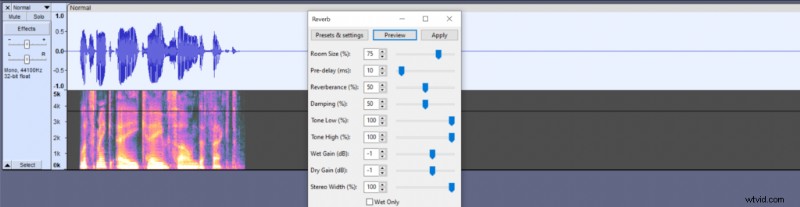 Applying default reverb settings in Audacity.
There’s no one Reverb setting that will fit everyone, so we’ll talk over different parameters in the effect that affect the cave sound.
Room size – Determines how large the space you’re emulating is.
Pre-Delay – Determines how long it takes for the reverb to bounce back. Higher Pre-Delay will make the space sound bigger.
Reverberance – Determines the length of the reverb. Higher Reverberance will make your space sound bigger.
Damping – Determines how quickly reverb fades, especially at the higher-end frequencies. Higher Damping will emulate softer surfaces.
Tone Low – Lower values reduce low-end frequencies from the reverb. Higher values will emulate larger space.
Tone High – Lower values reduce high-end frequencies from the reverb. Higher values will emulate smaller space.
Wet Gain – Determines the volume of reverb audio. This parameter is good for controlling the perceived space between the speaker and the listener. A higher Wet Gain will make the distance seem greater.
Dry Gain – Determines the volume of the original audio. This parameter is good for controlling the perceived space between the speaker and the listener. A higher Dry Gain will make the distance seem smaller.
Stereo Width – Determines the difference between stereo channels, higher value emulates larger space.
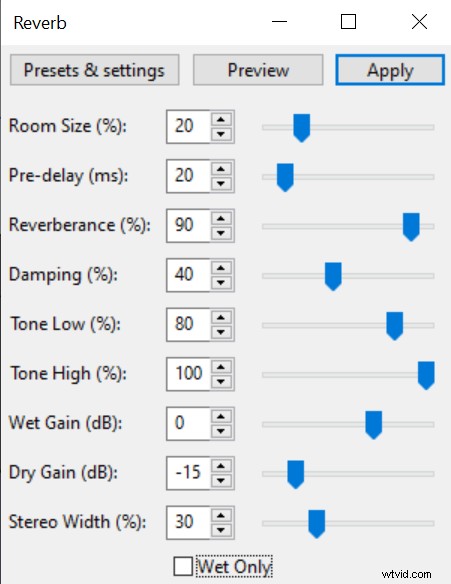 Reverb settings for long and narrow cave sound effect in Audacity.