
In the fast‑evolving world of digital content, the most impactful videos are those that connect instantly with their audience. Content creators are constantly experimenting with new techniques to achieve that seamless engagement, and one of the most effective methods is incorporating subtitles.
However, subtitles in English don’t resonate with every viewer, especially when targeting Korean‑speaking audiences. Korean is spoken by over 80 million people worldwide. Adding Korean subtitles can dramatically boost accessibility and retention for Korean viewers.
In this guide, we’ll explain why translating English subtitles to Korean is essential, how to do it efficiently with SubtitleBee, and why reviewing the translated subtitles is critical.

Why Translate English Subtitles to Korean?
South Korea’s tech‑savvy population consumes online video at an astonishing rate—over 92 % of adults use social media, and YouTube watch time topped the globe in 2024, exceeding 2,600 minutes per month per user (more than 40 hours). Korean audiences also read in abundance; in 2024, roughly 10,262 book titles were translated into Korean. This high content engagement fuels the worldwide popularity of K‑dramas, K‑pop, and the Korean Wave. Delivering Korean subtitles enables creators to reach these audiences directly through social feeds and short‑form platforms.
How to Translate English Subtitles to Korean
SubtitleBee’s AI‑powered translator can convert your English audio into Korean subtitles in minutes, and it lets you review and edit the output with ease. Below is a quick walkthrough.
1. Create an Account
Open SubtitleBee in your browser and sign up with your email. No downloads are required, and a free trial lets you test all core features.
2. Log In and Upload Your Video
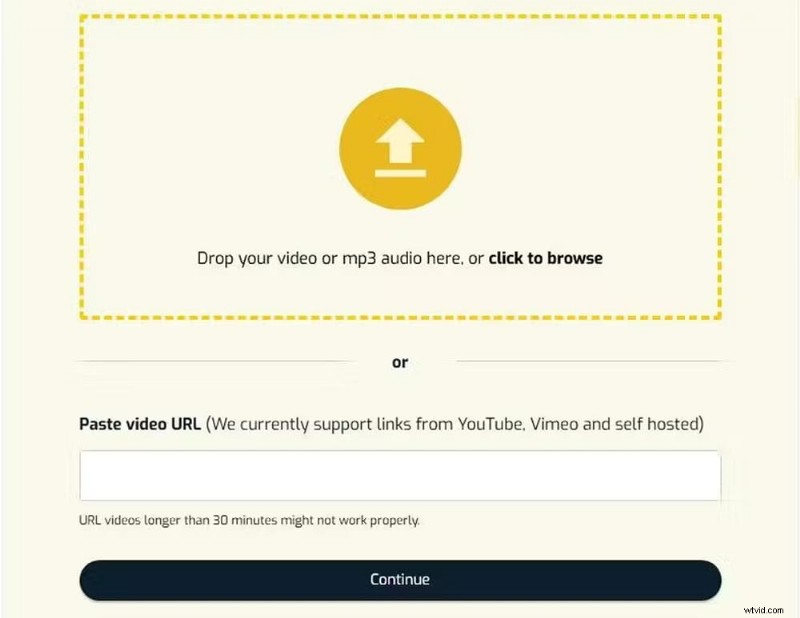
After logging in, click “Upload new file.” Choose English as the source language, then either upload a file from your computer or paste a Vimeo/YouTube URL. SubtitleBee supports MP4, MOV, AVI, MKV, and other common formats.

3. Transcribe the English Audio
SubtitleBee automatically detects the English speech and generates a synced subtitle track. Review the transcription for accuracy before proceeding.
4. Translate to Korean
With the transcription finalized, click “Translate Subtitles” on the right and select “Korean” from the dropdown. Hit “Add Subtitles.”
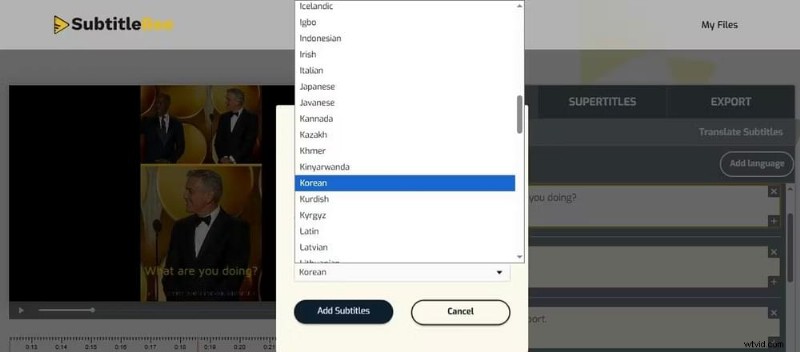
Both English and Korean tracks appear in the dashboard. Verify the Korean subtitles for spelling or grammatical errors, and use “Edit Subtitle Styles” if you wish to adjust font color or size.

5. Export the Video
Choose “Export,” name your file, and select Korean as the subtitle language. You can also download the subtitle file in SRT, VTT, ASS, or TXT formats, or burn the subtitles into the video for universal playback.

Why Reviewing Translated Subtitles Matters
Korean’s syntax differs markedly from English: verbs appear at the end of sentences, and politeness levels affect word choice. For example, the English phrase “I will explain this in the next video” becomes 다음 영상에서 이 내용을 설명할게요, placing the verb at the conclusion. Direct translation often yields awkward phrasing or misaligned timing. Careful review ensures the subtitles read naturally, maintain pacing, and reflect cultural nuance.
Which Content Should Get Korean Subtitles?
Korean viewers consume a wide array of digital content—gaming, fantasy, romance dramas, and more—predominantly on YouTube. In 2024, the average Korean user spent over 2,600 minutes per month watching YouTube. Regardless of your niche, adding Korean subtitles can significantly enhance reach and engagement on this platform.
Conclusion
Translating English videos into Korean subtitles is straightforward with SubtitleBee’s AI. Accurate subtitles expand your audience and improve accessibility, making your content more inclusive and engaging.
FAQs
How do I add English subtitles to Korean drama videos?
To cater to non‑Korean speakers, simply upload the drama to SubtitleBee, review the existing Korean subtitles, translate them into English using the “Translate Subtitles” option, and export the video with burned‑in English subtitles or download the subtitle file.
Which subtitle file format should I export?
The choice depends on your publishing platform. Most sites accept SRT as the standard. VTT works well for web players, while burning subtitles into the video guarantees visibility for all viewers.
Can I add multiple languages in SubtitleBee?
Yes—SubtitleBee supports more than 120 languages. Click “Add Language” and repeat the translation steps for each additional language.
Read more:
How to translate English to Hindi
How to translate video to English subtitles
How to add Arabic subtitles