
You may find lots of funny reverse GIFs on the web and want to create a reverse GIF by yourself. You’ve come to the right place. This post gives your 4 solutions to reverse GIF. Have a try!
Reverse GIF is very popular on social platforms. If you are interested in reverse GIF, you can try the following ways to reverse a GIF. Want to make GIF from video? Try MiniTool software – MiniTool MovieMaker.
For those who want to create reverse video, read this post: 3 Solutions to Reverse Videos.
Solution 1: EZGIF.com
The first GIF reverser tool we recommend is EZGIF.com. It’s the most powerful GIF editor and GIF reverser. In addition to creating reverse GIF, it also allows you to create, resize, crop, reverse, optimize and apply effects to GIFs.
Moreover, it’s capable of adding text to GIF and convert other image formats to GIF such as WebP to GIF and APNG to GIF. The supported images types are GIF, WebP, APNG, MNG and FLIF.
Remember, the GIF you uploaded is limited to 35MB.
Below are the steps on how to reverse GIF with EZGIF.com.
Step 1. Go to EZGIF.com.
Step 2. Hover your mouse on the option Effects and choose Reverse GIF from the drop-down list.
Step 3. Import the GIF from your device or paste the GIF URL in the box.
Step 4. After that, click on Upload! to upload the GIF file.
Step 5. Then scroll down the page, check the reverse option and choose Submit!.
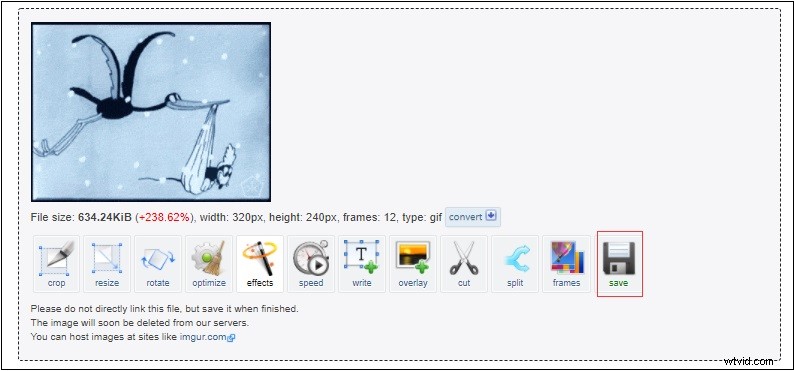
Step 6. Click on Save to download the reverse GIF on your device. Before saving the reverse GIF, you can also edit it like crop, resize, rotate and optimize.
Related article: 4 Best GIF Croppers: How to Crop A GIF.
Solution 2: GIFGIFS.com
GIFGIFS.com is a website that offers tons of free animated GIFs and GIF animations. More than that, this website has a set of GIF editing tools including GIF reverser, GIF crop, Rotate GIF, JPEG optimizer, PNG optimizer and Split GIF.
Related article: Top 4 GIF Splitters to Help You Split a GIF.
Here’s how to reverse a GIF.
Step 1. Head to GIFGIFS.com to get the main interface.
Step 2. Choose the GIF reverser option on your left side.
Step 3. Click on UPLOAD GIF to add the target GIF. Or click PASTE IMAGE URL to enter the GIF link.
Step 4. Tap on REVERSE and click Download the result, then it will automatically download the reverse GIF you just created.
Solution 3: FreeGifMaker.me
FreeGifMaker.me is not only a GIF maker, but also a YouTube to GIF converter. Apart from that, it allows you to reverse GIF and apply GIF effects.
You can reverse a GIF by select the local file from your device or pasting the GIF URL. After that, you can share the link of the reverse GIF with your friends or download it on your device. Or directly post the reverse GIF on Facebook, Twitter and Pinterest.
Related article: How to Post a GIF on Facebook – 4 Ways.
Solution 4: GIF Reverse
GIF Reverse is an online GIF reverser. It’s very easy to use. With it, you can reverse a GIF quickly.
You need to click on Select image and upload the target GIF. Then press the Reverse it! Button. Finally, save the reverse GIF on your device.
Conclusion
After reading this post, you must know how to reverse GIF in four ways. If you like this post, don’t forget to share it with your friends!
If you have any questions about reverse GIF, please post your comments in the comment area!