
There are lots of methods to remove watermarks from images, documents, videos, etc. But if you are looking for an easier way to get rid of watermarks, an online watermark remover is the best option. Here’re the top 5 online watermark removers, try them now!
It’s illegal to remove watermarks from other people’s works, but it’s totally legal to remove watermarks from your works, such as images, PDFs, videos, etc. The most common tools to get rid of watermarks are: clone stamp, spot heal, and eraser. There are also other ways to do it like crop, blur and change the background.
If you’re a video creator, a watermark-free video editor is also important for you. Here recommend MiniTool software - MiniTool MovieMaker. It’s free, no watermarks, no ads, and no bundles.
#1. Pixlr
Pixlr is a free online watermark remover as well as a photo editing tool. It comes with a set of advanced photo editing tool such as spot heal, drawing, clone stamp, blur, sharpen, cutout. Therefore, you can easily remove watermarks from your photo and make a graphic design like a pro.
It supports almost all image formats including PSD, PXD, Jpeg, PNG, SVG, WebP, etc. It requires no design experience and no registration.

To remove image watermarks, just open the watermarked image and use the spot heal tool or clone stamp tool to clean up your image.
To learn more, you may need this post: How to Remove Watermark from Video and Photo Efficiently.
#2. Inpaint
Inpaint is an image watermark remover that helps you remove unwanted projects, remove image watermark, erase data stamps, repair old photos, and so on. More importantly, it can batch remove photo watermark at once.
It’s compatible with Windows, Mac, and iOS. Also, it offers an online tool. Although this Inpaint online watermark remover is limited, it’s still a good option for removing unwanted objects from images.
#3. Apowersoft Watermark Remover
This online watermark remover is very easy to use. It can batch remove multiple watermarks at a time. It supports various image formats like JPG, JPEG, BMP, PNG, TIF, TIFF, etc.
Apowersoft watermark remover not only can get rid of image watermarks but also can remove video watermarks supporting MP4, MKV, WMV, WebM, AVI, etc.
#4. Watermark Remover
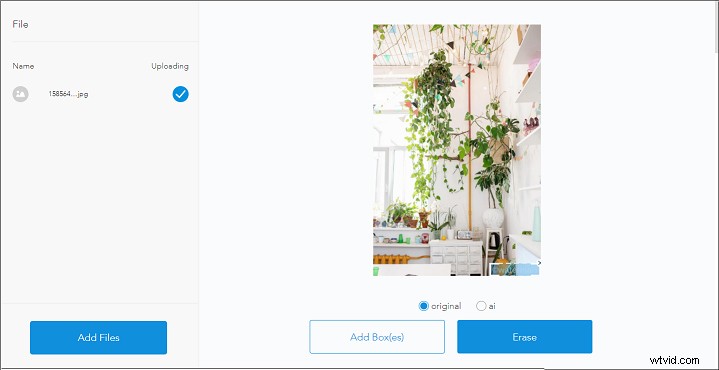
It’s the simplest image watermark remover that allows you to erase image watermarks by just one click. It supports JPG, JPEG, PDF, ICO, and GIF. No installation, no registration requirements. Just import the watermarked image and delete the watermark from the image.
However, Watermark Remover is not stable. Sometimes, it fails to process your image.
#5. PDFfiller
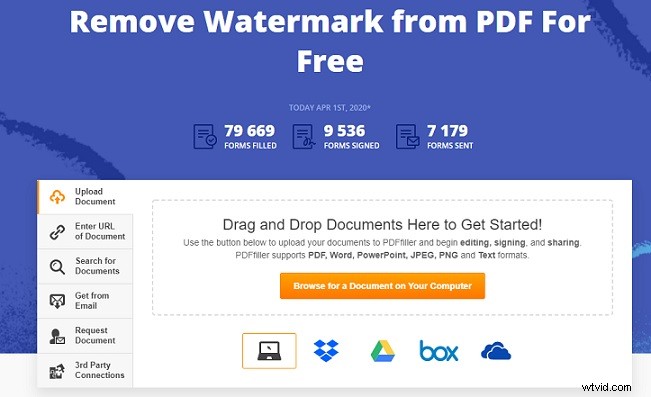
PDFfiller is a free PDF watermark remover. It supports deleting watermarks from PDF, image, and text. Also, it allows you to upload the watermarked PDF from the computer, Dropbox, Google Drive, OneDrive or simply enter the URL of the target PDF.
Aside from this, PDFfiller holds 10 million documents where you can search for the needed documents.
Conclusion
With these online watermark removers, it’s so easy to remove watermarks from your files. All of them are free to use, choose the one you like to get rid of annoying watermarks!
Online Watermark Remover FAQ
What are the best online watermark remover?- Pixlr
- Inpaint
- Apowersoft Watermark Remover
- Watermark Remover
- PDFfiller
- Use the Spot Heal tool.
- Use the Clone Stamp tool.
- Crop the Watermark.
- Blur the Watermark.
- Background Eraser
- iWatermark
- Photo Retouch
- Watermark Remover
- AirBrush
- ToolWiz Photos
- Fotogenic
- PicLab
- Open the Apowersoft Video Watermark Remover.
- Import your watermarked video.
- Select the watermark you want to remove.
- Click on Erase button to delete watermark.
- Download the watermark-free video.