
Can’t open AI image files on your computer? To solve this, the best solution is to convert AI to PNG. This post will illustrate how to convert AI to PNG with 3 online free converters in detail.
What is an AI file? AI is an image format for Adobe Illustrator. Different from other image formats, AI files can be resized with zero quality loss. Fail to open AI files? Here are some image viewers you can try: Photoshop, Acrobat, InDesign, and PaintShop.
If you want to view AI files without installing any third-party software, you can try AI to PNG converters to convert AI to PNG (To make a video or GIF from PNG files, try MiniTool MovieMaker).
#1. Convert AI to PNG with Zamzar
Zamzar is a powerful online file converter. It can convert different types of files such as video, audio, image, eBook, and Document. It supports 1200+ formats including AI, PNG, XPS, PDF, MP4, MP3, and more. Plus, you can upload the media file from your computer or URL.
Take the following steps to learn how to convert AI to PNG online free.
Step 1. Visit the Zamzar website.
Step 2. Click on Add Files to open the File Explorer window. Find the AI file you want to convert and upload it to Zamzar.
Note: The maximum upload file size is 50 MB.
Step 3. Next, click the down arrow icon to expand the output format list. From the drop-down list, choose the PNG option as the output format.
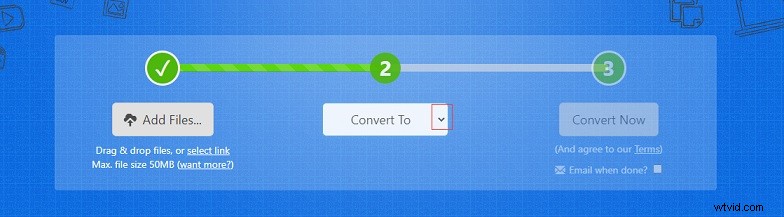
Step 4. Then tap on Convert Now to convert AI to PNG. After the converting process is finished, you can download the converted file from the website.
Related article: 4 Best Free Ways to Convert AI to SVG [2020 Guide]
#2. Convert AI to PNG with Online-Convert
Another way to convert AI to PNG is by using Online-Convert. This file converter can handle any conversion such as AI to PNG, PNG to AI, and TIFF to JPG.
Here’s how to use Online-Convert to convert AI to PNG.
Step 1. Open the Online-Convert website in your web browser.
Step 2. Go to the Image converter tab and click on Select target format to choose Convert to PNG.
Step 3. Tap on Choose Files to upload the AI file from your computer. Or upload the file from URL, Dropbox, or Google Drive.
Step 4. Click the Start conversion button to process the AI file.
Step 5. When the AI to PNG conversion is done, the converted image file will be downloaded to your device automatically.
#4. Convert AI to PNG with Onlineconvertfree
As its name suggests, Onlineconvertfree is a free online file converter that lets you convert files fast and easily. Like Zamzar and Online-Convert, this tool also supports converting videos, audio files, documents, and images. With it, converting AI to PNG is so easy.
Here’s a quick guide on how to convert AI to PNG.
Step 1. Go to Onlineconvertfree and choose PNG converter.
Step 2. Choose the AI file and upload it to this tool.
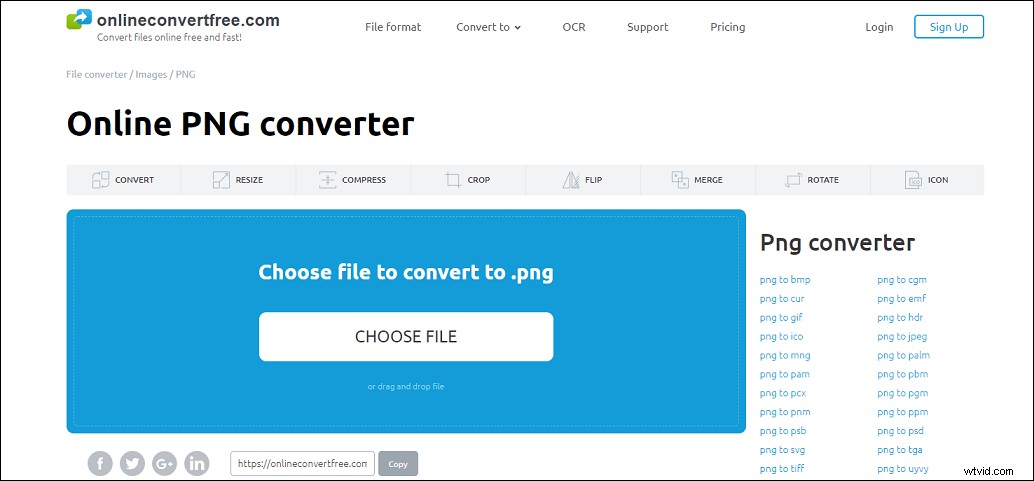
Step 3. Tap on CONVERT to convert AI to PNG online.
Step 4. It will take a few minutes to complete the conversion. Once done, just click Download to save the converted file.
Conclusion
If you have some AI files to convert, don’t forget to try the top 3 online file converters. It can easily convert AI to PNG and vice versa.