
Many people know that PDFs can be easily converted into images. How to convert PDF to GIF? This post introduces some online converters that help you handle PDF to GIF and GIF to PDF conversions. (If you want to make a GIF from images or video, try MiniTool MovieMaker.)
How to Convert PDF to GIF
PDF is the best file format used to display documents containing images and text. But PDFs cannot be shared on social networks like Twitter. To publish a PDF file on Twitter, you need to convert PDF to images or convert PDF to link. If a PDF file has over 10 pages, it’s a good idea to convert PDF to GIF.
Ezgif
Ezgif is a free online GIF maker and GIF editor. It can make GIFs and edit GIFs by resizing, splitting, cropping, etc. It also can be regarded as a GIF converter to convert video to GIF, PDF to GIF, GIF to PDF, GIF to APNG, WebP to GIF, and more.
How to convert PDF to GIF online for free using Ezgif.
Step 1. Go to the website: https://ezgif.com/pdf-to-gif.
Step 2. Upload the PDF you want to convert.
Step 3. All the frames of the PDF file appear. Check the Create animated GIF option and enter a value in the Delay time and Loop count boxes. Click on Convert to GIF.
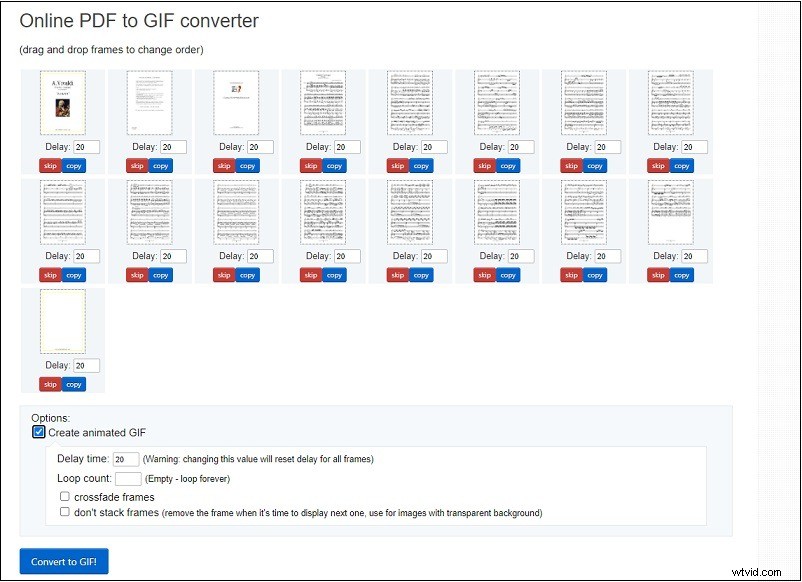
Step 4. Tap on save to download the output GIF.
EasyPDF
This is a PDF to GIF converter that converts a PDF file to GIF without limits. It works in web browsers and allows you to upload PDFs from your computer, Google Drive, or Dropbox.
How to convert PDF to GIF using EasyPDF.
- Go to the website: https://easypdf.com/.
- Tap on PDF to GIF.
- Import the PDF file and it will start the conversion automatically.
- When the converting process is finished, save the GIF.
Zamzar
Zamzar supports over 1,100 formats which can easily convert PDF to GIF or other formats. It’s free and fast. The maximum file upload size limit is 50 MB.
How to convert PDF to GIF using Zamzar.
- Visit the website: https://www.zamzar.com/.
- Click Choose Files to add the PDF.
- Select GIF from the Convert To list and click Convert Now.
How to Convert GIF to PDF
If you want to convert GIF to PDF, you can try the following file converters.
- Online2PDF
- SodaPDF
- CloudConvert
- SmallPDF
- Convertio
- EasePDF
Tip: How to Make a GIF from a Video or Pictures
MiniTool MovieMaker is a GIF maker that can create GIFs from videos and photos. It lets you split, trim, reverse, speed up, slow down GIFs, add text to GIFs, etc.
Follow these steps to make a GIF from your video or pictures.
Step 1. Download and install MiniTool MovieMaker. Open it.
Step 2. Click Import Media Files to load the video and click the + to add it to the timeline.
Step 3. Trim or split the video to remove the unwanted parts and make other edits to the video.
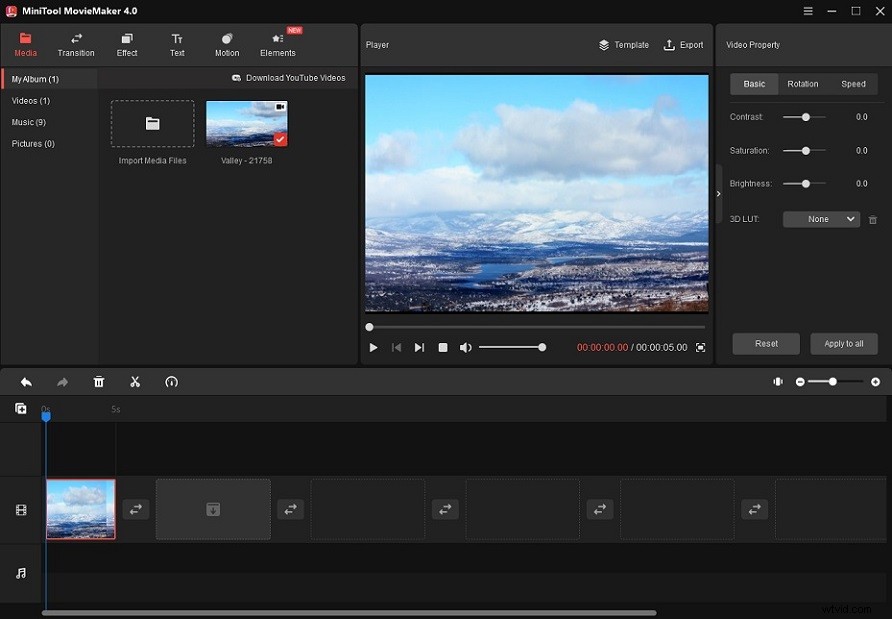
Step 4. When you are done, click Export.
Step 5. Choose GIF as the output format and export the GIF.
Conclusion
Now, you can try these PDF to GIF converters and share GIFs with your friends!