
There are countless audio editors on the Internet, but only a few of them have the capability to change audio speed. Therefore, this post compiles a list of the audio speed changers for you to choose from. If you want to reverse video, MiniTool MovieMaker is your best choice.
Here is a list of the best audio speed changer software. Any of these audio speed changers can let you change the tempo of audio files. More importantly, some of the listed software provides lots of handy audio-editing tools, like Mix and Render, Effects, Fade in/Fade out, etc.
1. Audacity
Price: Free
Compatibility: Windows, macOS, Linux
Audacity is a free audio speed changer. It is a very popular audio editor, as it provides all the essential audio editing tools. This audio speed changer supports lots of audio formats, namely, MP3, WAV, AIFF, OGG, etc. Once you are done with changing the speed of audio, you can save the modified audio file.
Related article: How to Split Audio in Audacity - Solved
2. AudioDope
Price: Free
Compatibility: Windows
AudioDope is a free audio editor for Windows. This software can also be used as a free audio speed changer. You can import various audio formats, namely, WAV, MP3, OGG, FLAC, AVI, AC3, etc. The key point is that you can choose to change the speed of a part of the audio file or the entire audio file.
3. QuickTime Player
Price: Free
Compatibility: macOS, iOS
QuickTime is an extensible multimedia framework, capable of handling various formats of digital video, picture, sound, etc. It comes pre-installed in macOS and enables you to change the speed of audio very quickly. It supports the conversion of audio files and enables you to trim audio to remove unnecessary parts.
4. iMovie
Price: Free
Compatibility: macOS, iOS
iMovie is a video editing software application developed by Apple Inc., which can be used to edit both audio and video files. With it, you can change audio speed, reverse audio. However, you can only export the audio file in M4A format.
5. WavePad Sound Editor
Price: Free & Paid
Compatibility: Windows, macOS
WavePad Sound Editor is a full-featured professional audio and music editor for Windows and Mac. It supports many audio file formats including WAV, MP3, VOX, GSM, WMA, AU, AIF, FLAC, OGG, and more. If you want to edit audio, merge audio files, or change audio speed, this one is for you.
6. Audio Speed Changer
Price: Free
Compatibility: Web-based
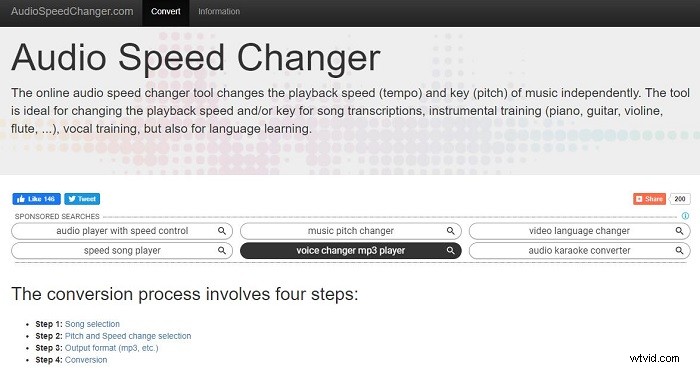
If you only want to change the speed of the audio file, then it is best to choose an online tool. Audio Speed Changer is an ideal option. It can independently change the playback speed (tempo) and keys (pitch) of music and export the audio file in MP3 or M4A format.
7. Audio Trimmer Tempo Changer
Price: Free
Compatibility: Web-based
The last best audio speed changer on the list is Audio Trimmer Tempo Changer. It provides a both desktop and mobile-friendly user interface. With this free online audio speed changer, you can change the speed of audio files without changing the pitch.
Bottom Line
Now that you have seen some best online audio speed changers for different devices, which one do you prefer? If you have any questions or suggestions about it, please let us know via admin@wtvid.com or share them in the comments section below.