
Hulu is one of the most popular video streaming services, offering a powerful library for shows and movies, as well as a robust live TV option. Streaming videos or shows on Hulu is the top choice of many users, but can you download shows on Hulu to watch offline? Luckily, you will find an answer in this post.
Downloading shows or videos is a great method to let you enjoy your favorite shows or videos without an internet connection. Hulu, the first option among video streaming services, provides many available videos to download. Can you download Hulu shows for offline watching? This post will show how to download content from Hulu as well as some preparatory work.
And if you want to make your downloaded videos more amazing, you can add captions, music, or transition effects with MiniTool MovieMaker.
Preparatory Work to Download Hulu Content
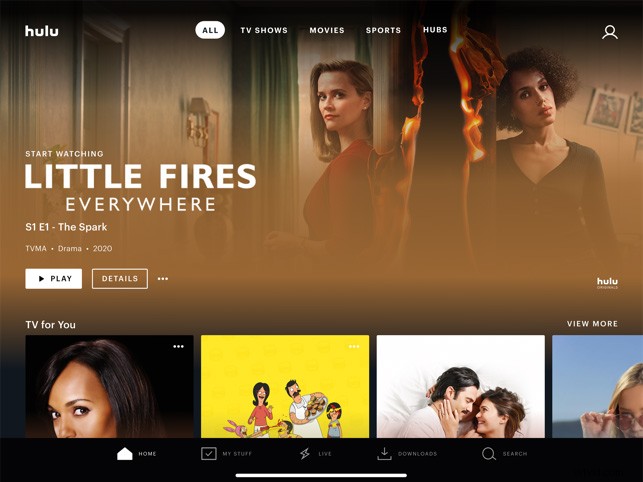
Before you get started, you must know what can you download and what do you need? If you desire to download content on Hulu, firstly, you have to download and install Hulu on a supported mobile device. The following will show you the details.
Supported Android mobile devices: Android 5.0 and up, the screen size of at least 800 x 480 pixels.
Supported iPhones and iPads: iPhone 5S and above, iPad 5th generation or later, iPod Touch 6th generation.
Supported Amazon Fire Tablets: Fire OS 5 and higher.
Secondly, you’re required to be a Hulu subscriber to download your favorite shows and some funny videos. Hulu (No Ads) plan or Hulu (No Ads) + Live TV plan are both available to download content from Hulu. Following is the price of the 2 plans.
Hulu (No Ads): $11.99/month.
Hulu (No Ads) + Live TV: $60.99/month.
How to Download Shows on Hulu With WiFi Connection
How to download Hulu videos for offline viewing. Here are the clear steps you can refer to.
Step 1. Download and install Hulu on a supported mobile device.
Step 2. Open it and Go to the Search section.
Step 3. Click the Download button browse shows or videos allowed to download.
Step 4. To download TV shows, Choose the Episodes tab to find downloadable episodes, and then tap on the Download.
Step 5. To download movies, find the downloadable movie and click Download on the detail page.
How to Download Shows on Hulu Using Cellular Data
If your WiFi is not available when you download streaming videos, you will be notified and asked if you’d like to use cellular data to continue downloading. If yes, you can do with the following steps.
For iOS users:
Step 1. Go to Downloads bar, click Settings on the top of the screen.
Step 2. Set Cellular Downloading to On or Off.
For Android users:
Step 1. Go to Account selection, and tap on the Settings > Downloads.
Step 2. Set Cellular Downloading to On or Off.
And then, go back to the homepage, and continue to download movies or shows as tips mentioned in the previous part.
Bonus Tip – How to Delete the Downloaded Videos
When the storage space is insufficient, you need to delete some downloaded videos or shows to download others. Here’s the guidance to delete the downloaded content.
Step 1. Go to Downloads and then choose Edit.
Step 2. Choose the content you want to delete.
Step 3. Tap on the Trash button.
Step 4. Click Delete to delete the unwanted content.
Bottom Line
Now, what’s your answer when you’re asked again can you download shows on Hulu or can you download Hulu shows? Undoubtedly, it is yes. And if you like this post, share it with your friends.