
HDR software can be a great asset for most landscape photographers. In addition to good lighting and exposure, great HDR software is essential for perfecting your photos. What is the best HDR software on the market? This post offers the top 5 HDR software for you.
HDR stands for High Dynamic Range and is a popular technique to expand the range of highlights and shadows in a photo by combining multiple exposures. That way, you can get a balanced exposure in high-contrast scenes.
If you’re not sure where to start, here I will share the 5 best HDR software with you. Having the right software will help you a lot to get beautiful HDR photographs.
If you want to create videos from your amazing photography works, you may need a handy video editor. Here MiniTool MovieMaker is the top recommendation.
Aurora HDR
Aurora HDR is one of the best HDR software for Mac and Windows users. It offers a user-friendly interface and provides superb image quality with a Quantum HDR Engine. The Quantum HDR Engine is powered by AI and delivers unparalleled results, which produces the highest quality bracket merging and outstanding color enhancements.
It not only allows you to work on shadows and highlights but also with color toning, polarizing filter, details enhancer, LUT mapping, and so much more. For advanced and professional photographers, it offers presets, RAW support, batch processing, and many advanced features powered by artificial intelligence.
Photomatix Pro
Photomatix Pro is also a popular and long-standing HDR software for Mac and Windows. It allows you to merge three or more bracketed photos to create a high dynamic range photo without sacrificing the details in the highlights and shadows.
Besides, it offers a ghost removal tool that lets you remove unwanted artifacts and a brush tool to make further adjustments. It also comes with 40 built-in presets, which you can use as a reference when editing photos.
Luminance HDR
Luminance HDR is an open-source and free HDR software for Mac, Windows, and Linux. While it offers a wide range of functionalities you can use when working with high dynamic range photos. Eight tone-mapping operators are offered to ensure better results.
This free HDR software also offers ghost removal, basic image transformations, noise reduction, and more. It can export your work to other photo editor like GIMP and Adobe Photoshop. The supported image formats include JPEG and RAW. The output can come in different formats such as JPEG and TIFF.
So, if you are on a budget and want a quick and easy-to-use tool, Luminance HDR is optional for you.
EasyHDR
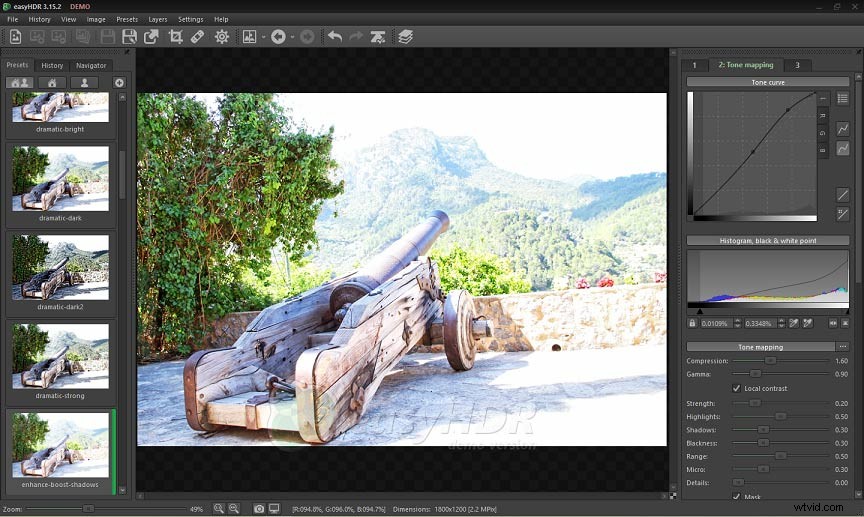
EasyHDR is also an awesome HDR software for Mac and Windows. It is a solid choice for beginners with a straightforward interface. It has everything you need to achieve professional-looking HDR photos. This software gives you features like ghost removal, panoramic mapping, chromatic aberration correction, and more.
It also offers a live preview of your work while maximizing the image’s full resolution. It also allows you to rotate the image and correct the perspective.
It is capable of handling most of the popular image formats such as PNG, JPEG, TIFF, and RAW.
HDR Projects Pro
HDR Projects is also one of the best HDR software which is suitable for both amateur and experts in HDR photography. It offers the highlight of HDR photography - Ultra HDR, with brilliant colors and detail of your photos.
As soon as you upload the original image, it presents you with many suggested versions to give you inspiration and new ideas. Every image uploaded to the program will be analyzed individually with a wide range of possible effects. It is convenient for you to pick the perfect shot.
Conclusion
In a nutshell, we’ve learned the 5 best HDR software in this post. I hope this list helps you make a better decision of which application to choose.