
Ted Lasso has taken the world by storm thanks to its positivity and a stellar cast. It has achieved a record-breaking 20 Primetime Emmy Award nominations, breaking the all-time record for a comedy in its first season. If you don’t know how to watch the show, here’s everything you need to know about how to watch Ted Lasso.
Try the amazing video editor to make interesting videos by yourself- MiniTool MovieMaker.
What Is Ted Lasso About?
To make things clear at the very beginning, what is Ted Lasso talking about? Why this Emmy-winning comedy has become a major success? As one of the few silver linings of 2020, Ted Lasso is a hilarious comedy starring Jason Sudeikis as the title character.
Jason Sudeikis is an American football coach who’s hired to coach a professional soccer team across the pond even though he is a layman and has no experience at all with soccer. Heartwarming stories happen between him and his team, where they all learn from each other. Ted Lasso cast includes Juno Temple, Hannah Waddingham, Anthony Stewart Head, Phil Dunster, and Brett Goldstein.
You may also like Where to Watch Euphoria Teen Drama Series.
How to Watch Ted Lasso without Apple TV?
If you still haven’t watched and are hoping to get caught up, here’s how (there are two seasons to watch now!). Since the show is an Apple TV+ original series, the answer is pretty easy. The show airs exclusively on the streaming service, which fans can access through the Apple TV.
How to watch Ted Lasso without Apple TV since you do not have the Apple TV box device? Not to worry, there are solutions. You can visit the official website or install the Apple TV+ app to watch the show depending on your device and preference.
Solution 1. Using the Apple TV+ App
Compatible devices: iPhone, iPad, Mac, Smart TV, Xbox, PlayStation, Roku, FireTV, and Google TV
1. Download and install the Apple TV+ application on your device.
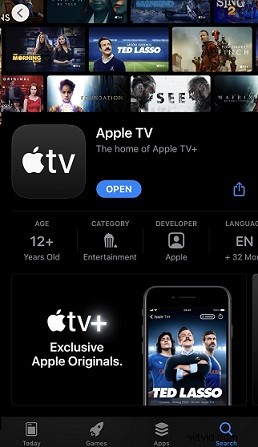
2. Login or sign up with your Apple ID and passport for its 7-day free trial or buy its subscription for $4.99/month.
3. Search for Ted Lasso and enjoy the show.
You can tap on Start Free Trial. Apple TV + lets you choose between watching the first episode of Ted Lasso for free or starting a seven-day free trial.
Solution 2. Using the Apple TV Website
Compatible devices: Android, Windows, smart TVs, and any other gadget that can access the browser.
1. Go to Apple TV’s website (https://tv.apple.com/).
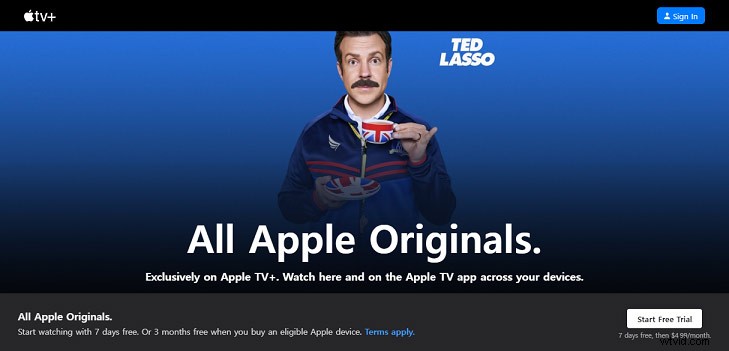
2. Sign in or start your free trial using your Apple ID. If you sign in for the first time, you will have to set up two-factor authentication.
3. Scroll down and search for Ted Lasso. Now, you can enjoy the show.
Can You Watch Ted Lasso for Free?
This Apple TV+ exclusive show is free to watch? The short answer is no. Apple TV+ requires a membership fee which $4.99/month. However, if you wish to watch Ted Lasso for free, you have the below two options:
- Take the 7-day free trial: Every new user can sign up for a free seven-day trial of Apple TV+, which is plenty of time to binge the whole first season. Note that remember to cancel the subscription before the expiry of the free trial subscription, otherwise, you’ll be charged $4.99.
- Get a new Apple device: Apple offers a free 3-month Apple TV+ subscription if you purchase any new Apple devices. But it seems not reasonable to buy an Apple device for a free subscription.
Conclusion
That is all about how to watch Ted Lasso. I do hope this post is helpful to you. This show has 2 seasons available to stream at the moment, Season 3 began filming in London on March 6. Happy binging!