
Background music that doesn’t sync with a trivia video’s rhythm can cause viewers to scroll before the answer lands. The problem isn’t volume or quality – it’s emotional timing. In a trivia format, music must pace the question, build tension during the countdown, and release that tension when the answer is revealed.
Below is a step‑by‑step guide to choosing the right genres, BPM ranges, and how to match music to each moment, no matter the platform.
At a Glance
- Why Background Music Matters in Trivia Videos
- The Background Music Format: What to Play When
- Which Music Style Fits Your Trivia Format
- Best Background Music Types for Trivia Videos
- Should You Use Music in Trivia Videos or Not?
- Common Background Music Mistakes in Trivia Videos
- Best Trivia Video Music for TikTok, Reels, and YouTube
- How to Add Background Music to Trivia Video
Why Background Music Matters in Trivia Videos
Choosing a track, lowering it, and calling it a day is the biggest mistake creators make. Music has a distinct purpose at each stage of a trivia video:
- Sets the emotional tone before the question even appears.
- Fills the thinking window without breaking the silence that feels empty.
- Signals transitions—from question to countdown to reveal—without hard cuts.
The Background Music Format: What to Play When
Most creators default to a single track for the entire video, but each moment deserves a different musical cue. The ideal approach is to find a track that starts understated, rises during the countdown, and peaks at the reveal.

Music for the Question Phase
A soft, non‑melodic loop keeps viewers focused on the text. Think of the subtle Jeopardy intro—present but invisible.
Recommended: Ambient, non‑melodic loops under 70 BPM.
Music for the Countdown
This is where tension is built. A ticking pulse that gradually climbs—like the “Who Wants to Be a Millionaire” theme—signals that time is running out without dictating an emotion. The rise itself creates urgency.
Recommended: Rhythmic pulse tracks, 80–110 BPM.
Music for the Reveal
The reveal needs a release. A short stab, sting, or drop punctuates the moment and gives viewers a payoff. Without it, the answer feels flat.
Recommended: 3‑second stabs or drops; major key for correct answers, minor or dissonant for wrong ones.
Key insight: The music shouldn’t be the same across all three moments. Most short‑form trivia videos only use one track, so the trick is to select a piece that naturally builds, starts understated, rises through the countdown, and peaks at zero.
Which Music Style Fits Your Trivia Format
Popular quiz‑show styles fall into four distinct emotional categories. Pick the one that matches your format and audience.
| Style | Sound | Best for | Example |
|---|---|---|---|
| Light & Playful | Vibraphone, acoustic bass, soft jazz | Pop culture, general knowledge, fun social content | The Jeopardy theme – everyone knows it works |
| Thumping Tension | Heavy bassline, sparse percussion | High‑stakes reveals, hard questions, finals rounds | Who Wants to Be a Millionaire at the million‑dollar question |
| Atmospheric Pad | Synth drone, slow‑moving soundscape | Countdown windows, thinking time, mute‑first feeds | Ambient pressure without the distraction |
| Upbeat & Punchy | Bright synth, fast tempo | Rapid‑fire formats, sports trivia, team games | Quick‑fire rounds that need energy, not tension |
Common pitfall: Mismatching music to question difficulty breaks immersion. Use tension synth when the countdown is core; use upbeat when the focus is entertainment.
Best Background Music Types for Trivia Videos
1. Tension Synth: 110–130 BPM
Minimal melody, rising pads, pulsing synth bass. It’s the DNA of Jeopardy, engineered to create urgency without demanding attention.
Best for: Social trivia where the countdown is the centerpiece (TikTok, Reels, YouTube Shorts).
Why it works: The rising pad structure does the emotional heavy lifting automatically.
Avoid when: The round is light or fun; tension synth over easy pop‑culture questions creates a tonal mismatch.
2. Upbeat Pop Instrumental: 120–140 BPM
Bright, bouncy, feel‑good. Works when the vibe is casual and the questions are easy.
Best for: Nostalgia trivia, pop culture rounds, team icebreakers.
Why it works: High energy without stakes keeps the mood light and the viewer smiling.
Avoid when: The countdown is the main event; this genre doesn’t build tension.
3. LoFi / Jazz: 60–90 BPM
Chill, slow, contemplative. Gives the audience room to think.
Best for: Classroom rounds, newsletter trivia, longer‑format YouTube content.
Why it works: The slower pace signals a thinking moment, not a race.
Avoid when: Publishing to social—tempo kills urgency and causes viewers to scroll before the reveal.
4. Orchestral Sting: Variable
Short dramatic bursts, strings, brass hits, cinematic swells. Built for one moment, not the whole video.
Best for: The reveal only; especially effective with “Wait, really?” closers.
Why it works: The contrast between countdown music and a cinematic sting makes the answer feel like an event.
Avoid when: Used throughout; running stings for the full video feels like a movie trailer, not a quiz.
5. Trending Audio: Variable
Platform‑native sounds that the algorithm already favours. On TikTok, this beats everything else for reach.
Best for: TikTok discovery plays, Reels, algorithm‑first publishing.
Why it works: The platform boosts content using popular audio. Reach comes before mood here.
Avoid when: Tension is the goal; trending audio rarely builds suspense. Layer trivia text over it instead of relying on it for atmosphere.
6. Silence: No BPM
Deliberate absence of sound.
Best for: LinkedIn posts, mute‑first environments, captions‑only formats.
Why it works: In scroll environments where 80%+ watch on mute, the wrong music is worse than none. Strong on‑screen text, bold captions, and a visible countdown timer carry more weight than a track nobody hears.
Avoid when: The platform has a sound‑on culture; on TikTok or YouTube, silence reads as unfinished.
Should You Use Music in Trivia Videos or Not?
Rule of thumb: Use music for tension; use silence for emphasis.
Research shows that the presence of music matters more than specific tempo. Silence is also a valid choice and often the right one.
- When silence works better:
- Before the reveal—adds a dramatic pause that feels like a punchline.
- Very short clips (under 8 seconds)—music has no time to establish itself.
- Mute‑first feeds like LinkedIn—most viewers won’t hear it anyway.
- When music is essential:
- Any countdown window—silence feels awkward, like something is missing.
- Long‑form and live events—without a backdrop, a host voice sounds like a phone call.
- Looping short‑form feeds—music helps the video feel complete when it repeats.
⚡️ A simple rule of thumb: vocals should be at least 20 dB higher than background audio. That makes speech four times louder than the music.
Common Background Music Mistakes in Trivia Videos
Most trivia videos fail because the music fights the format.
| What Goes Wrong | The Fix |
|---|---|
| Music too loud | Keep it 20 dB below voice; use auto‑ducking. |
| Same track, every moment | Choose a track that builds naturally or cut at the reveal beat. |
| Lyrics in the background | Use instrumentals only to avoid competing word streams. |
| Wrong genre for the topic | Match vibe to category (playful for pop culture, serious for history). |
| Copyrighted tracks | Use royalty‑free libraries or platform‑native audio. |
Best Trivia Video Music for TikTok, Reels, and YouTube
Each platform has different audio defaults, algorithm preferences, and audience expectations. What works on Reels can hurt reach on TikTok.
| Format | Music Styles | Key Rules | Why It Works |
|---|---|---|---|
| Short‑form Reels / TikTok | Punchy, trending‑adjacent | Track that builds to the reveal—hook the viewer at the payoff. | TikTok’s algorithm values watch‑through rate; a build that pays off at the reveal keeps viewers past the halfway mark, triggering distribution. |
| YouTube Shorts | Optional, or skip entirely | Visuals and captions carry the format. | Shorts rank on swipe‑away rate, not audio; clean text and a sharp reveal keep retention higher than a track that takes time to establish. |
| Live events / long‑form YouTube, classroom, teams | Full underscore, hosted feel | Silence feels wrong; music sets the room. | Long‑form watch time drops sharply in the first 30 seconds; continuous underscore signals production quality and keeps early viewers from bouncing before the first question lands. |
How to Add Background Music to Trivia Videos (Fastest Way)
Manually sourcing, cutting, ducking, and syncing music is time‑consuming. Tools like Trivia by Typito AI automate the process.
1. Enter Your Topic and Select the Generated Prompt
Navigate to Trivia by Typito AI, type your topic, pick the generated prompt, adjust difficulty and question count, then hit Generate. The video comes out with background music already synced to the countdown and reveal.
What gets included automatically: background music matched to quiz tempo, countdown timer per question, voiceover on the reveal, question and answer text, and animated transitions—all synced, no manual audio editing.
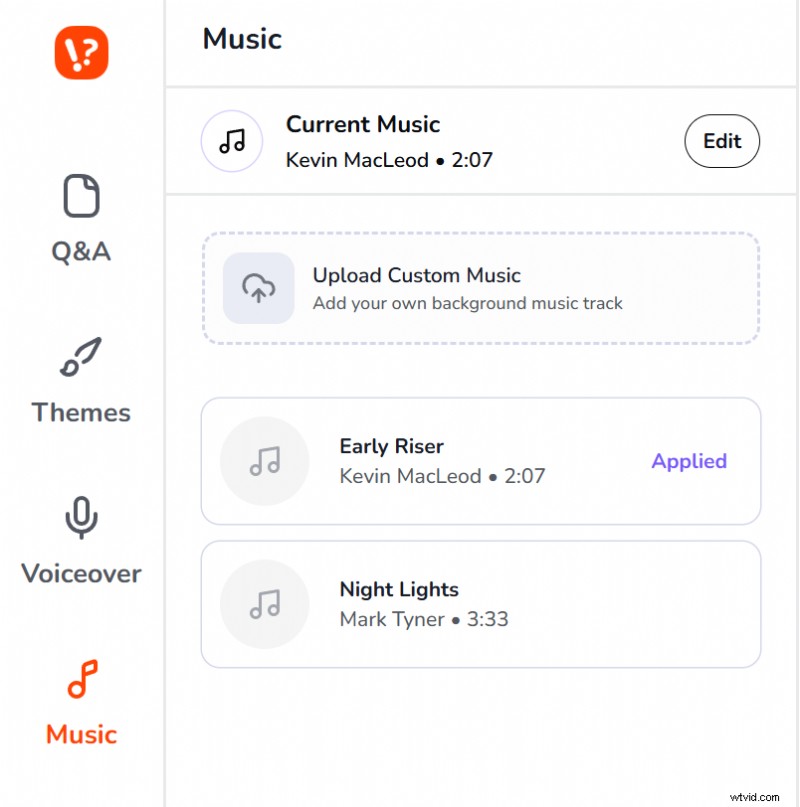
2. Go to the Music Section in the Left Panel
Open the left panel and find the Music section. Preview and swap between tension synth, upbeat, cinematic, lo‑fi, and more.
Tension synth is the default for most social trivia. Upbeat works for nostalgia or fun‑facts rounds. Cinematic fits “Wait, really?” closers and dramatic reveals.
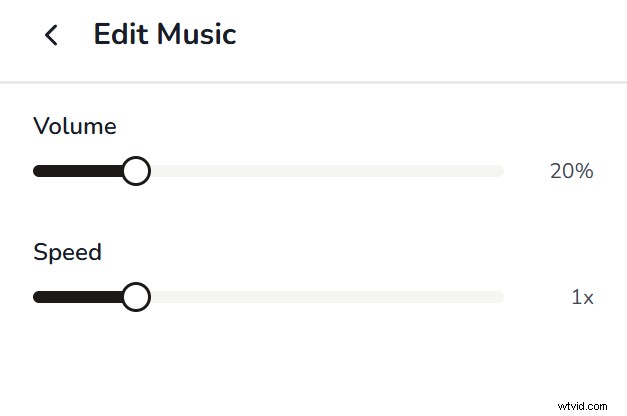
3. Hit Edit: Set Volume and Speed
Volume: keep the music clearly below the voiceover. If you can’t separate the voice from the track, the music is too loud.
Speed: slow it down for a deliberate reveal; speed it up for fast‑paced social formats.
4. Do the Headphones‑Off Test Before Downloading
Play the video through your phone speaker pointed away from you. Does the reveal still feel like a moment? Does the music build tension without grabbing attention? If both answers are yes, download and post.
FAQs
Q1. What if I want no music at all?
A: It can work—but only if your visual design is strong enough to carry the tension. A clear question, visible timer, and punchy reveal with a sound effect can replace a music track entirely.
Q2. What is the best background music for trivia videos?
A: Tension synth at 110–130 BPM is the most reliable choice for social trivia. It creates urgency during the countdown without demanding attention, letting viewers focus on the question while the music builds pressure. For the reveal, a short drop or orchestral sting adds the emotional shift that makes the answer feel like a payoff.
Q3. What BPM works best for trivia countdown music?
A: 110–130 BPM is the sweet spot for social trivia formats. It’s fast enough to create urgency without feeling frantic, and it matches the natural pace of a 7–10 second countdown. For easier or lighter‑hearted rounds, 90–110 BPM works well. Anything below 80 BPM removes urgency; anything above 140 BPM can feel overwhelming.
Stop guessing what music works. Generate trivia videos with synced countdown music in seconds.
Try Trivia by Typito for free.