
Versatile Video Editor - Wondershare Filmora
Filmora offers an intuitive yet powerful editing platform that combines advanced features with a user‑friendly interface.
It includes a wide selection of high‑quality effects to enhance your creative vision.
Step‑by‑step tutorials are available on the official channel, ensuring you master every tool.
In this article
Want to vanish into the cosmos without a trace? The key is to start with a high‑impact galaxy effect and pair it with Filmora X’s robust editing capabilities. Cosmic effects mimic real space phenomena—colorful galaxies, bright stars, nebula clouds, and swirling light streaks—giving your videos a vivid, other‑worldly flair. In this guide, we’ll walk you through ten standout galaxy effects that will transform your footage.
Part 1: Top 10 Cosmic & Galaxy Effects to Make a Milky Way!
1. Galaxy Pack
The name speaks for itself. This free bundle from Filmstock contains 19 dynamic titles and 10 customizable elements, all featuring bright stars and swirling galaxies. It’s a versatile foundation for any alien‑invasion or sci‑fi project.
2. Cosmic Pack
Another comprehensive Filmstock collection, the Cosmic Pack showcases galaxies, star fields, and even wormhole visuals. It comes with titles, transitions, and overlays that help your videos cut through the clutter on platforms like YouTube.
3. Planets Pack
Ready to guide viewers through an interplanetary journey? The Planets Pack offers smooth transitions and immersive overlays that make it feel like you’re standing on a distant world. It’s especially effective in 360‑degree video formats.
4. Rotating Spiral Galaxy Background
Vloggers and YouTubers can add dynamic depth to their footage with this free rotating galaxy background from Videezy. No sign‑up or payment is required—just download and layer into your timeline.
5. Milky Way in Space
Overlay a luminous Milky Way across night‑sky footage using this Videezy effect. Its vibrant star field and sweeping galaxy backdrop are perfect for sci‑fi, animation, and space‑themed projects.
6. Wormhole Space Tunnel
Experience the thrill of traveling through a wormhole with this 1080p video from Pixabay. It’s an ideal addition for time‑travel narratives or dramatic vanish scenes.
7. Dizzying Spiral Light Tunnel Loop
If wormholes feel too intense, try this endless, spiraling light tunnel. The motion graphic offers a hypnotic, colorful journey that can be looped for extended visual impact.
8. Blue Nebula Clouds
Inspired by NASA’s discoveries? This motion effect takes you into distant nebula clouds, complete with floating star particles. It’s a stellar choice for exploratory space footage.
9. Earth Planet Sunrise
This stock motion clip provides a close‑up view of Earth during sunrise, gradually zooming out as the sun rises. Use it for logo reveals, presentations, or cinematic transitions.
10. Colorful and Dynamic Nebula
Finish your toolkit with this 3D nebula animation. The swirling clouds and vibrant hues are perfect for documentaries, YouTube videos, and sci‑fi storytelling.
Part 2: How to Edit Your Own Galaxy Effect with Filmora?
Now that you know where to source galaxy effects, let’s dive into creating a disappearing space effect in Filmora X. Follow these steps to seamlessly merge your foreground with a cosmic backdrop.
Step 1. Upload your footage to Filmora.
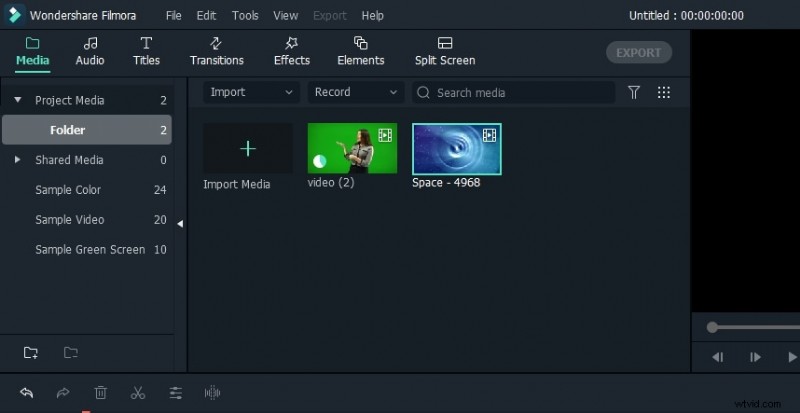
Begin by filming yourself against a green screen—any smartphone or camcorder will do. Upload both the green‑screen clip and the galaxy effect to Filmora X, then drag them onto the timeline. Place the green‑screen footage above the galaxy layer.
Step 2. Trim and adjust the clips (optional).
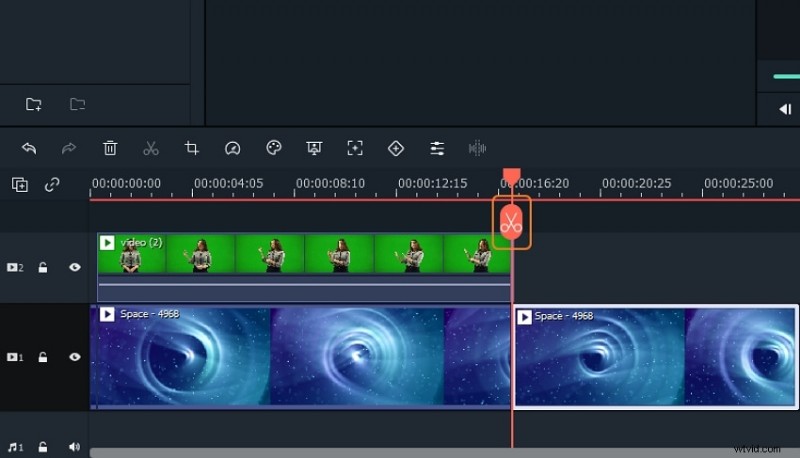
If the green‑screen clip is longer than the background, trim it by selecting the clip, positioning the playhead, and clicking Trim. You can also adjust playback speed via Speed and Duration in the right‑click menu.
Step 3. Remove the green background.
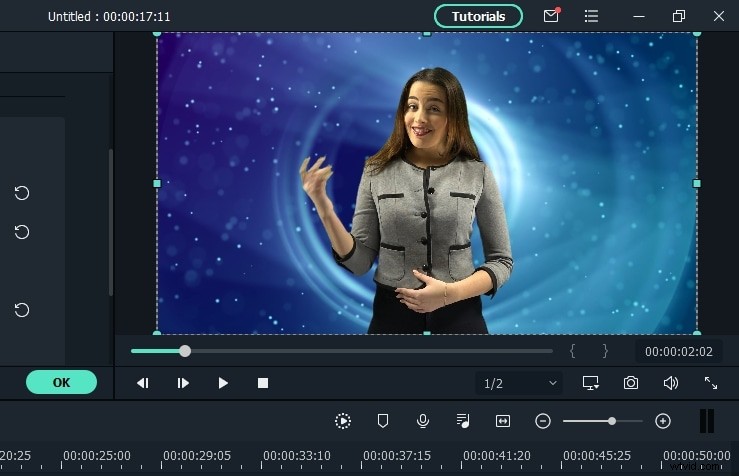
Right‑click the green‑screen clip, choose Green Screen, and preview the result. Then, open the Chroma Key settings under the Video section. Fine‑tune tolerance, edge thickness, offset, and feathering until the background is cleanly removed.
Enhance the scene with suitable background audio—upload a sound effect or select one from Filmstock and place it on a separate track.
Step 4. Add a zoom‑in effect.
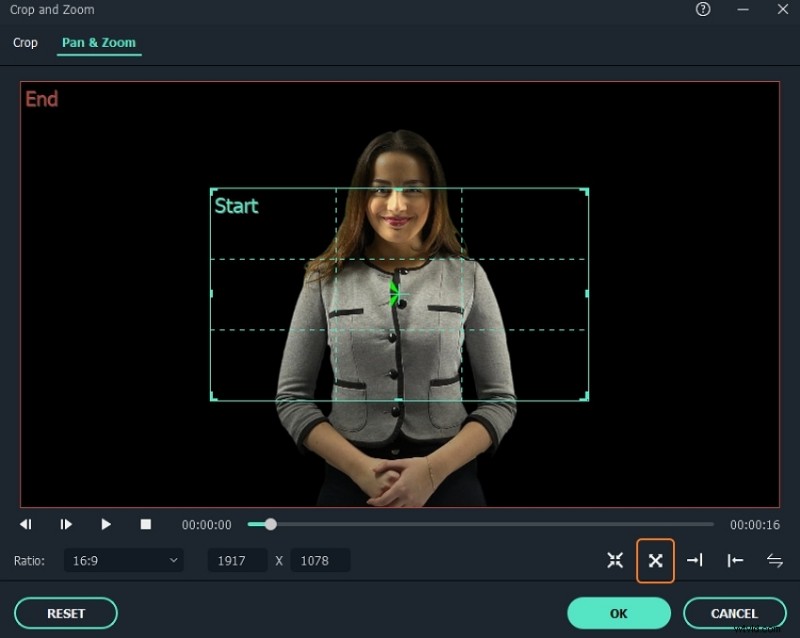
To create a dramatic disappearing motion, select the green‑screen clip and click Crop. In the Crop & Zoom window, switch to the Pan & Zoom tab and activate From near to far. Adjust the inner rectangle to set the focal point of your zoom. Once satisfied, apply the effect and preview the final look.
Conclusion
With the right assets and Filmora X’s intuitive tools, crafting a captivating galaxy effect is straightforward. Filmora’s integration with Filmstock grants you access to hundreds of high‑quality effects, ensuring your videos stand out in 2026 and beyond. Start experimenting today and bring your cosmic visions to life!