
More training teams are testing AI voices and avatars to speed up video production and reduce costs, but there’s still hesitation. Will learners take these formats seriously? Could they come across as cheap or distracting? And what if people tune out?
To move beyond opinion, the Camtasia team ran two global viewer studies focused on instructional video.
Participants watched short training clips that were identical except for the narration voice or presenter format. They then rated professionalism, confidence, and engagement and completed a brief quiz to measure retention.
The goal was to understand how real learners respond to AI voices and AI avatars in a controlled setting. Here’s what we found out about where each format helps, where it falls short, and how it actually influences learning outcomes.
Key takeaways
- High-quality voices, whether AI or human, consistently increased perceived professionalism and improved retention. Low-quality, robotic audio was the real problem.
- Learners often couldn’t tell whether a high-quality AI voice was AI or human, especially when the audio sounded natural and polished.
- Across all formats, AI avatar videos were rated professional and rewatchable, but avatar picture-in-picture produced the strongest learning retention for screen-based instruction.
- Fullscreen avatars made it easier for viewers to notice robotic traits, which lowered quality ratings and shifted attention away from the task.
- The picture-in-picture avatar format showed meaningfully higher comprehension, suggesting that presenter size and placement influence learning.
Take this study with you.
Download the AI study as a PDF to read offline and plan your AI video strategy without the tabs.
By submitting your email address, you agree to receive email from TechSmith. You can unsubscribe at any time.
What our AI Voices study tells us about voice in training videos
Can learners actually tell the difference between a human and an AI voice? In our AI Voices study, viewers watched the same short instructional video on Google Advanced Search — only the voice changed.
There were four versions: a high-quality human voice, a low-quality human voice, a high-quality AI voice, and a low-quality AI voice. Everything else stayed the same, so the narration alone could be evaluated.
The audience included 768 full-time workers ages 18–64 who had watched at least one instructional video in the last 30 days. Participants came from the U.S., U.K., Canada, and Australia.
Why voice quality matters more than AI vs. human
What really makes learners pay attention? A voice that sounds clear, warm, and polished — not whether it’s human or AI. As voice quality improved in the study, so did professionalism ratings. In fact, 92% of viewers said the high-quality AI voice made the video feel professionally produced.
For learning and development (L&D) and training leaders, the real risk isn’t AI itself. Its poor audio quality, which can make content harder to follow (and learn from) and more distracting.
This is where tools like Camtasia help creators hit the mark. You can capture and edit clean audio, reduce background noise, or use AI-powered text-to-speech options that sound natural and professional, all without a studio setup.
Do AI voices help or hurt learning retention?
Results from the “pop quiz” portion of our study make the pattern clear: correct answers increased as voice quality improved. In fact, the high-quality AI voice produced the strongest retention numbers, aside from one low-quality human outlier.
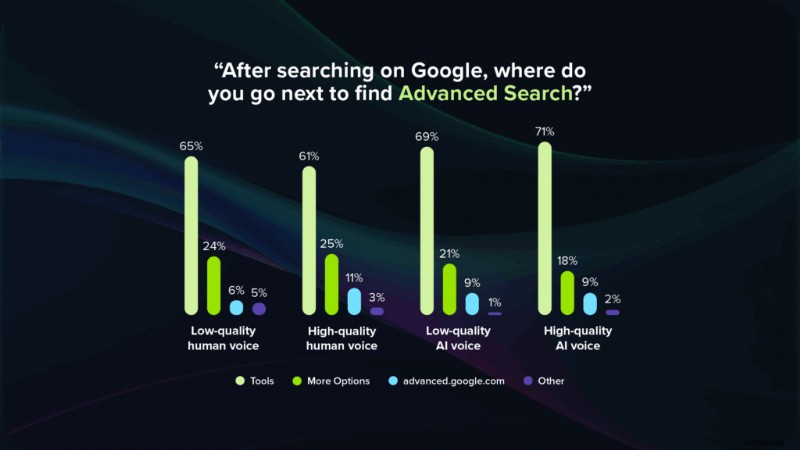
Why does this happen? We believe that poor audio introduces friction. When narration sounds uneven, artificial, or difficult to hear, learners have to work harder just to understand what’s being said, adding cognitive load. Clear, smooth audio lets viewers focus on the steps and concepts rather than the delivery. A high-quality AI voice can support learning just as well — if not better than — a mediocre human recording.
But are AI voices distracting overall? It depends. Low-quality, synthetic voices are unmistakable and draw attention away from the content. When the AI voice sounds natural, many viewers can’t distinguish it from a human voice. The difference is less jarring, and information retention holds steady or even improves.
A practical next step is to pilot test. Compare quiz performance and learner feedback across AI and human voice versions before rolling out full programs. This helps confirm whether an AI voice supports learning without adding unnecessary effort.
Learner comfort, disclosure expectations, and regional differences
In our study, many learners couldn’t tell whether a high-quality AI voice was AI or human, which makes transparency an important consideration. That level of naturalness is impressive, but it also introduces important questions about disclosure.
Viewers in English-speaking countries tended to prefer disclosure that an AI voice was used, while participants in Germany were less concerned. The U.K. stood out in particular: learners there were especially open to AI-narrated videos. These differences matter when designing training for global audiences.
For L&D teams, disclosure works best as a trust-building choice rather than a legal formality. A brief note like “Narrated with an AI voice” in the video description or at the start of a module can reassure learners without distracting from the content.
Considering cultural expectations upfront makes it easier to scale AI narration across a broader training catalog. When learners know what to expect and feel informed, they engage more and adapt more quickly to AI-supported formats.
This also ties to cost and efficiency. Once learners are comfortable with AI voice narration, teams can expand its use across more training programs without sacrificing trust or retention. Thoughtful disclosure, paired with high-quality audio, keeps attention on the instruction itself.
Where AI voice saves time (and how to reinvest it)
Note: The studies referenced earlier did not measure production efficiency. The following reflects common practices and workflows observed across training teams rather than research findings.
AI voices can save a meaningful amount of time in training production. There’s no need to schedule presenters or book recording time, and scripts can be updated and regenerated instantly. Localization into multiple languages also becomes far easier without re-recording every version.
The time saved can go directly into improving the learning experience. Teams can enhance visuals in Camtasia with clearer captions, cursor emphasis, and smoother pacing. They can add more scenario-based examples, build quizzes and checkpoints, or update content more often to keep training aligned with product and process changes.
AI voice doesn’t remove work; it shifts effort toward better instruction and visuals rather than repeated voice-over sessions.
Keep training videos accurate. Avoid “AI slop.”
Build training content faster without sacrificing quality. The HUMAN Framework is a 5-step strategy for integrating AI effectively.
Get the Guide
What our AI Avatar study tells us about visual AI in training
Our AI Avatar study followed a similar structure to the voice research, with viewers watching the same core instructional topic presented in five formats: human picture-in-picture (PiP), human fullscreen, AI avatar PiP, AI avatar fullscreen, and a version with an audio visualizer.
This study used full-time workers from several English-speaking countries who had recently watched an instructional video. It measured reactions to production quality, rewatch intent, confidence, and learning retention.
Across all formats, more than 92% of viewers rated the videos as professional and said they would watch another video from the same creator. They also felt confident that they could complete the steps without extra help.
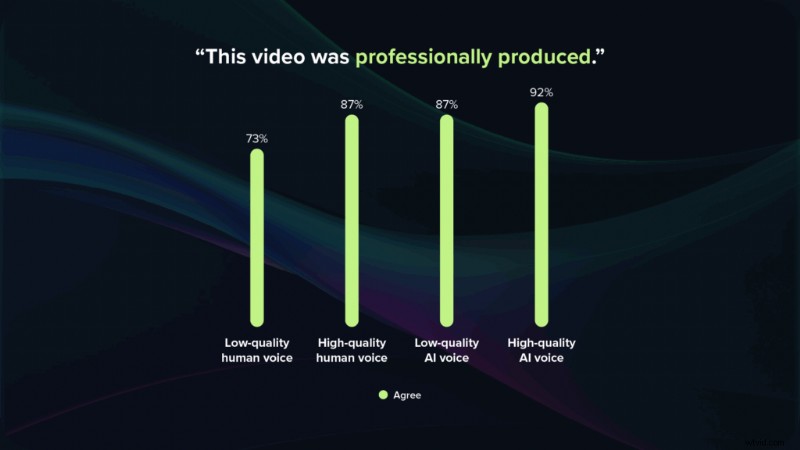
This sets an important baseline: using an AI avatar doesn’t automatically make a video feel cheap or untrustworthy. When production quality is solid, learners engage with and trust the content just as much as they do a human-led video.
When AI avatars strengthen learning (and why picture-in-picture leads)
Less can be more when it comes to AI avatars. In our study, the avatar PiP format delivered the strongest learning retention, with about 76% of viewers answering the quiz questions correctly — roughly 10 points higher than other formats. And they did so even after watching a 43-second video several minutes earlier with no ability to rewind.
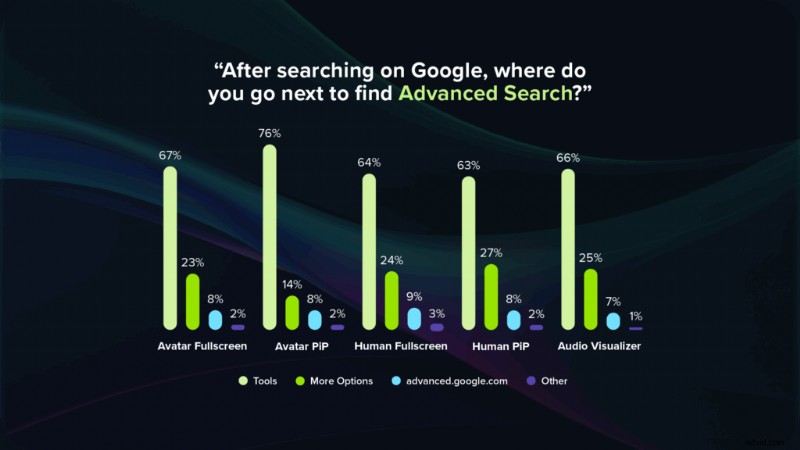
PiP keeps the screen content front and center while still providing a small on-screen guide. The avatar is visible without being overwhelming, which helps learners stay focused on the steps and feel guided through the process.
For step-by-step, screen-heavy training, avatar PiP is a strong default choice. Tools like Camtasia make this layout easy to build, letting the avatar sit in a small frame while the main screen stays clear and readable.
When AI avatars become distracting (and why size matters)
AI avatars aren’t distracting by default, but size matters. When an avatar fills the screen, viewers are more likely to notice robotic traits like lip sync issues, eye contact, limited facial movement, awkward blinking, or unnatural breathing.
In these full-screen formats, more participants correctly identified the avatar as AI. That extra scrutiny shifts attention away from the task or concept and toward the avatar itself. For serious topics, this can make the experience feel uncanny or off-putting.
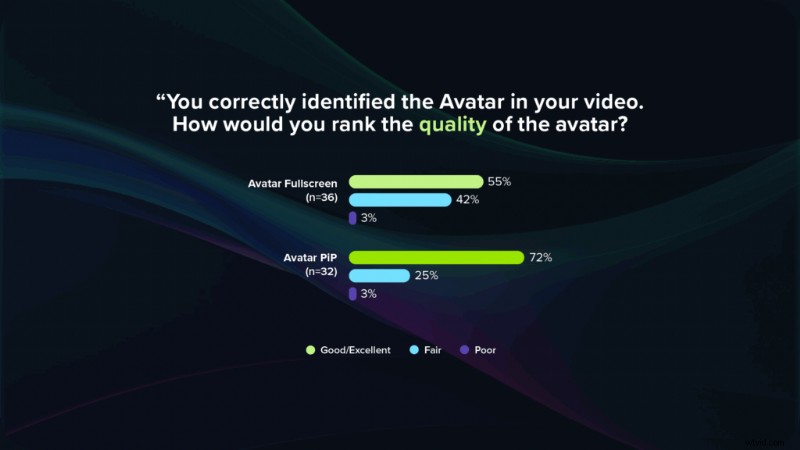
Keeping AI avatars small and secondary is the better fit for most instructional videos. Picture-in-picture layouts or small frames allow the avatar to provide guidance and a sense of presence without dominating the screen.
The right use cases for AI avatars in training content
Not every video format benefits equally from an AI avatar. In our study, viewers were most comfortable with AI avatars in instructional, screen-based content. They were least comfortable when a personal presence was expected, such as a CEO Welcome Video or team update video. For best results, be intentional about aligning your avatar use with your specific use cases.
Use AI avatars for:
- Software tutorials and walkthroughs
- Process training tied closely to on-screen steps
- Scaled updates where consistency matters more than personal presence
Use human presenters for:
- Leadership messages and change communications
- Sensitive topics that require emotional nuance and trust
- Team updates where seeing the actual manager or leader matters
With tools like Camtasia Audiate, teams can mix AI avatars with screen recordings to create efficient, engaging training content, while still capturing human-led videos where authenticity is essential.
How to measure engagement with AI-powered training videos
If AI is changing how your training videos are created, it should also influence how you evaluate learner engagement. The core metrics stay the same for AI and non-AI formats:
- Completion rates and drop-off points
- Rewatch behavior for key sections
- Quiz performance and question-level analytics
- Feedback surveys or quick polls
What changes is the comparison. Instead of reviewing a single version in isolation, you can evaluate AI and human-led formats side by side to see how they differ in retention and learner sentiment. You can also track whether AI-enabled workflows help teams publish more frequent, relevant updates.
Start with a small experiment. Select one or two high-value modules, create both a human-voice and AI-voice version — or a human presenter vs. AI avatar PiP version — and measure completion and quiz results over a few weeks.
Build your next training video with Camtasia
Record your screen or camera. Then, use the video editor to add polish and clarity.
Learn More
How AI reduces training costs and scales content updates
Using AI voices and avatars delivers direct savings and greater operational flexibility.
Direct savings include:
- Eliminate (studio) time doing voice over recordings
- No need to re-record entire videos after small script changes
- Lower marginal cost to create localized versions
Indirect gains include:
- Faster response to product or policy updates
- The ability to keep a larger training catalog current
Rather than cutting corners, AI removes production bottlenecks. Teams can reinvest that time and budget into better visual design, stronger scenarios, clearer feedback loops, and more frequent updates.
Practical guidelines for choosing human, AI voice, and AI avatars
The right format depends on your video’s purpose. Use this quick decision guide:
- Screen-heavy, procedural, and frequently updated content: High-quality AI voice with screen recording, plus an optional AI avatar in PiP.
- Emotionally sensitive, culture-setting, or leadership-driven content: Human presenter with a human voice.
- Long-form, concept-heavy learning: A mix — human-led modules for core ideas, supported by AI-voiced micro-lessons and refreshers.
No matter the format, a few principles always apply. Set high quality standards for every voice, whether AI or human. Use AI where speed, scale, and consistency matter most. Pilot new formats regularly and gather learner feedback.
Within the Camtasia ecosystem, teams can adjust layouts and pacing, use AI voice or avatar tools for voice overs or narration.
Our studies show that when quality is high and the format fits the task, learners are comfortable with AI voices and avatars.
A practical way forward is to start small and stay data-driven. Pair one or two high-impact tutorials with a high-quality AI voice or an avatar PiP, backed by strong scene-based instruction, and see how learners respond. Track completion, retention, and sentiment along the way, then adjust where AI or human presence makes the most sense.
When you’re ready to experiment, Camtasia offers the tools to build, refine, and scale training content — faster and with more consistency.
Ready to get started? Build your next training video with Camtasia.
FAQs
Do AI voices perform as well as human narration in training videos?
In our AI Voices study, voice quality mattered more than whether the voice was AI or human. Quiz scores were slightly better for viewers who watched videos with AI Voices. The high-quality AI voice produced the strongest retention results, while low-quality, clearly synthetic voices were more distracting and easier for learners to identify as AI.
Are AI avatars too distracting for serious or complex topics?
Not by default. All avatar formats scored very high on professionalism, rewatchability, and learner confidence. Distraction only became an issue when the avatar filled the screen and viewers could easily see robotic facial traits. For serious or complex training, the data supports keeping avatars small in picture-in-picture layouts and reserving full-screen formats for human presenters.
Should we disclose when we use an AI voice or avatar in training content?
Respondents in English-speaking countries generally preferred disclosure when an AI voice or avatar was used. A simple note, such as “Narrated with an AI voice,” is usually enough to maintain trust. Disclosure is primarily a transparency choice, especially when rolling out AI narration at scale.
How should we measure the impact of AI voices and avatars on learning?
Use the same engagement and retention metrics you already rely on: completion rate, drop-off points, rewatch behavior, quiz performance, and quick feedback surveys. AI formats simply make it easier to run A/B tests — such as comparing human-voiced and AI-voiced versions — to see which performs better.
Where do AI voices and avatars make the most sense in a training catalog?
The strongest fit is screen-heavy, procedural content where clarity and consistency are important. High-quality AI voice paired with screen recordings, and optional avatar picture-in-picture, works well for walkthroughs, process training, and frequent updates. Human presenters remain the better choice for leadership messages, culture content, and topics requiring emotional nuance.
Will using AI formats make our training feel less personal or trustworthy?
It depends on how they’re used. When audio and visuals are high quality, and the format fits the use case, learners rated AI videos as professional and said they would watch more from the same creator. Trust tends to drop only when AI is used in places where people expect a real human presence or when the avatar or voice looks and sounds clearly artificial.