When doing subtitles, there are 3 tasks to consider : transcribing, translating and synchronizing. The last task is certainly one of the most difficult, since it involves precise audio analysis.

Fortunately, automatic solutions have emerged for some time now, helping you to sync text with speech within milliseconds.
But the result is not yet perfect, and requires manual correction. As subtitling experts, we show you how to do it (without trying to hard).
Why are in sync subtitles so important ?
As you know, subtitles are essential to ensure that your video content is accessible to people with hearing loss. They also increase visual impact and viewer engagement, and expand your audience to languages and nationalities around the world.
So, if you don’t sync them correctly, your audience will feel uncomfortable and have problems reading your content. Actually, the human ear and eye can detect audio/video delay as early as 22 milliseconds (the exact interval is +45/-125 milliseconds). This is even more serious for a hearing impaired audience who are lips-reader, since they will feel the delay more strongly.
Conversely, perfectly synchronized subtitles give you the best benefits :
- Your audience can rely on subtitles to retain and memorize your message.
- You create an impression of fluidity in your audience and engage them better.
Convinced of the importance of the job? We show you how to proceed.
How to synchronize manually: the best practices
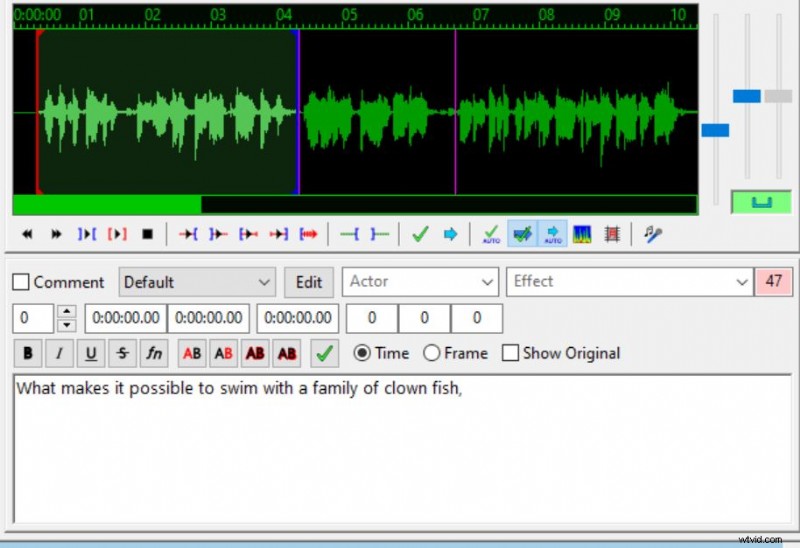
Before automatic synchronization solutions have emerged, transcribers and subtitlers relied on more traditional methods. Since subtitles consisted of files such as SRT or VTT, supported by many video players, they typed the time codes by themselves. And apparently with a bit of practice it works quite well.
Software like Aegisub or VLC for example provide you with a simple interface to match the time codes with the voice.
As for Aegisub, you can read our guide on the subject. Otherwise, here are some good practices to consider when synchronizing.
- Keep the number of characters per sequence (CPS) below 70; it is best to split subtitles into two relatively equivalent lines. This improves readability.
- Try to start the sequence exactly when the speaker is speaking. This means a positive or negative delay of no more than 22 ms. However, you can let the subtitle display for another 2-3 seconds when there is a pause in the speech. This allows some viewers to catch up on their reading.
- Use the sound spectrum to set the beginning of a subtitle to the start of a new sound frequency peak.
Automatic subtitle synchronization : which solutions to use ?
With the improvement of speech recognition technologies, many automatic subtitle solutions have appeared on the market. Some of these tools have also included an algorithm for automatically synchronizing text with voice, based on sound spectrum analysis.
Thus, this task has become much more effective thanks to these solutions, and you shouldn’t deprive yourself of it to save time on your transcription work.
There are sites such as Subshifter or Subsync that allow you to automatically synchronize your SRT files for free.
However, be warned, the result is not always perfect, and requires further correction. Moreover, if you have a large volume of video or more complex content to analyze in terms of sound, these are not the most adequate solutions. This is why we present you here with a solution that includes the best features to synchronize professionally and in a short time.
Checksub: SRT and VTT file professional sync
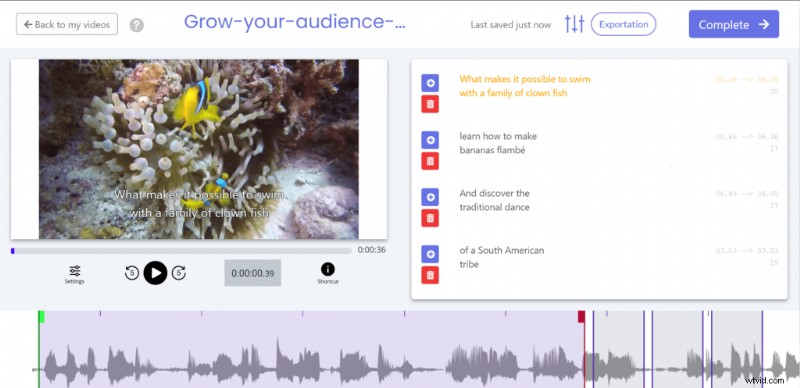
Frustrated by the time spent transcribing videos by hand, we at Checksub created a complete subtitle tool. Our technology is able to synchronize them perfectly, based on machine learning and optimized text cutting.
In addition to that, this automatic subtitle generator includes specific features such as :
- An advanced speech recognition API
- A collaborative interface with subtitlers and translators to manage your video project
- An automatic translation engine to translate your video, with 128 different languages available.
- A powerful and easy-to-use online subtitle editor
But that’s not all. If you don’t want to edit the result yourself, you can request the services of subtitle experts directly from the platform. This way, you are sure to get a reliable and quality service!
We let you try and consider this. Otherwise, we hope we’ve helped you stay in perfect sync with your audience!