
With the upcoming release of “Off the Tracks,” a documentary that chronicles the seismic shift that Final Cut Pro X introduced to the video industry in 2011, there been some chatter, even here on Fstoppers, about the video editing software’s place in history. I don’t have any qualms about its place in history: Simply put, it deserved better than what it got, which was heaps of shame, blame, and ultimately denial.
Part of the response was Apple’s fault. In its initial version the software was somewhat incomplete (no multicam editing off the bat was a big one, but came in an update six months later), and there was no way users could migrate their existing projects over to the new version.
This shift in software and the different paths that Adobe and Apple took with Premiere Pro and Final Cut Pro X essentially mirrors what the big two camera companies did in the 1980s, although with very different results.
Consider Adobe’s Premiere Pro the software equivalent of the Nikon F-mount – it has changed, for sure, but fundamentally the guts of the software and the way it works haven’t. This is great for backwards compatibility and keeps in place a familiar interface that people know and love, but it doesn’t push the envelope for fear of alienating core users.
When Apple introduced Final Cut Pro X, it was like the same shift Canon users had going from the FD mount to the electronic EF mount in 1987. It was a bitter pill to swallow, that all of your lenses suddenly wouldn’t work with the new generation of cameras, but it was ultimately the right decision.
What Made It Better
There were a lot of new features that made FCPX a better editor than the competition at the time. For instance, the Magnetic Timeline all but eliminated the flash frame/black frame problem that was so easy to miss in earlier non-linear editors. Clips just automatically flowed together and you didn’t have to rely on inserting slugs and arranging clips in odd ways.
Speaking of arranging clips in odd ways, without the track-based system, J-cuts and L-cuts became much simpler, with just a double click of a clip and a drag to where you wanted audio or video to come in or out.
Syncing audio became easier with automated syncing tools – the closest equivalent at the time was using a plugin called PluralEyes for Adobe Premiere Pro.
There was also speed improvements that background rendering brought to the party, and I’ve never had to worry about setting my capture scratch ever again.
A lot of the editing paradigms that were present in Final Cut Pro 7 (and are still around to an extent in Premiere Pro) existed because they were rooted in tape-based workflows of old. What Apple did with Final Cut Pro X was finally acknowledge that these conventions were no longer necessary in the digital age, where people were using phones and file-based video cameras.
Finally, one major factor is price: I paid $299 in September 2012 for Final Cut Pro X, and I haven’t had to pay a cent since. If I had paid the monthly fee, even at the educator rate that I get as a professor, I’d be out $1140.
While We're Talking About Education…
I used to be big on Premiere Pro (and it’s still a great piece of software). I’ve trained other educators on it at workshops, and I used it to edit my videos when I was PC-only. I’ve been shooting video since 2006 learned to edit on Avid Xpress Pro while working for Gannett. I advocated for Premiere Pro when the school I worked at wanted to switch systems after Final Cut Pro 7 was retired. But they switched to Final Cut Pro X, and I was forced to learn an entirely new platform. I tried to wing it the first time, and my sequence looked like this:

It wasn’t pretty or efficient. But that was because I was thinking about the old-school way of editing, trying to use Final Cut Pro X as if it were Final Cut Pro 7 and there was the fatal error. Once I took a proper workshop from someone who knew what they were doing (Curt Chandler, of Penn State, by the way), things got much better, and my timelines started looking like the featured image above. The value of proper training can’t be understated, and that goes for any software. I felt better about it, but it wasn't until I was teaching students the new software that it dawned on me: this wasn't just a different way of doing things, it was better.
For my students entering the video editing world for the first time as young journalists, this made much more sense to them. Projects came out better and faster. I realized that this was because they didn't have the baggage that seasoned editors had when it came to non-linear editing software. They had less to unlearn than I did.
Looking to the Future
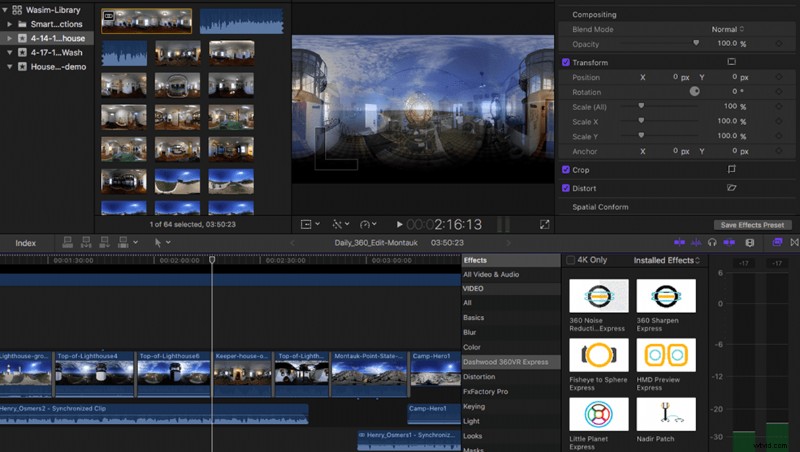
There are some signs that Apple is doubling down on Final Cut Pro X. The next frontier is 360 video, and while Adobe has rudimentary support for this new medium with a VR viewer built in, Final Cut Pro X seemingly has none. But Apple quietly hired the maker of an excellent 360 plugin for Final Cut Pro X (and Premiere Pro), and then made his tools, the Dashwood 360VR Toolbox, free. While that likely signals the end for those tools (witness Google and Nik software), hiring Tim Dashwood can only mean that 360 tools will make their way into FCPX natively. One can hope, anyway.
Pros who are just entering the industry should give Final Cut Pro X a fair shake. While you’ll hear a lot of people who felt burned by the switch complain loudly about the software (for quite valid reasons), if you have no history and no projects under your belt, it only makes sense to approach software with an open mind. Perhaps if you’re a hardcore Hollywood movie editor, it won’t work for you, but I can attest from experience that if you’re a student, an independent filmmaker, or a journalist, there’s no reason not to give it a try if you’re starting from scratch. It’s not the same software it was when it launched after all of these years of updates.
What's your video editor of choice? What do you think of Final Cut Pro X? Sound off in the comments below.