
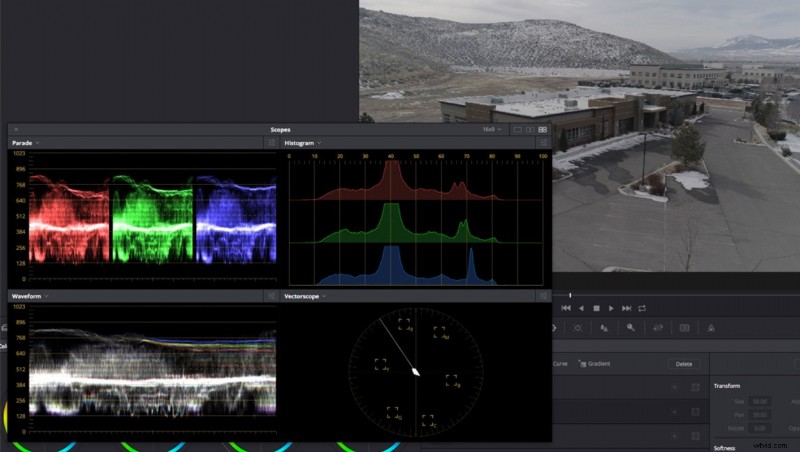
When I first started out, I always used to see color that I wanted to replicate. It seemed there was some magic preset or tool that helped. There isn’t and really what it boils down to, is first really “seeing” the color. What is it about a certain look you like? To help with this I have always been a fan of side-by-side comparisons, both for photo and video.
This article Ron Dawson has written in regard to emulating certain film looks can transform your work in more ways than just the obvious.
As pointed out in his article, scopes (histogram, vectorscope, waveform, etc.) are great to use for this, especially when you may not “see” what specifically you are trying to emulate. Think of it as a “by the numbers” grading. It's almost as if you are not even looking at the clip or photo while you are doing it, but rather to match a similar grade by the scopes. Watch in action below.
I always recommend taking screenshots or sources and matching different ones just as Ron does here, and just play around with clips that don’t matter to you. The exercise will help you being able to “see” it better, and you’ll learn how to identify what you like with ease.
I feel it’s worth mentioning that this practice isn't limited to video. Checking values of an image you like and grading another image to match is also good practice.
Color grading in general is really like of the “finishing” touch that makes up a huge portion of the feel and look of your work. And with anything there’s always a balance of too much versus not noticeable. When first starting out with color grading, much like when retouchers first learn how to fix skin blemishes, it’s easy to overdo it. Looking at it by the numbers really helps you from going too far. Often taking it too far is much worse looking than not doing anything, but then when it’s done just right, it can really take you to whole new levels.
This is why it’s excellent practice to match grades from professional sources who spent many hours and time to get it perfect, it will help you to see what’s too far.
Regardless of your skill level, I find it useful to always find sources and work from folks who are better than you are and literally analyze side by side with your work both visually and via the scopes and ask yourself what’s different, make note and work on it in the future. It will make you better.
Constantly Comparing
I feel that comparing your work against those are better than you constantly is a very under-used and underrated way to get better. I have done this since the beginning of my career, people always tend to say "it's my art, and 'better' is subjective." However, I still believe that no matter how good you are you can always get better, there's always something to improve.
I also believe in the "everything's been done" theory... (within reason) - There's very few things out there that truly haven't been done in some way before... and what I mean by that, is you'll be able to find SOMETHING that's close to the style you are going for and done really well, that you can bounce your quality off of. Even if it's not of the same kind of subject. Say you see a feature film and you like the color grading, and you wish to have a photo done in that style... you can still frame the movie, open the screencap in PS, and have your image up right next to it and you can adjust accordingly to get the style the way you wish. So you have effectively copied a style, but applied it in your own art medium.
Do you compare and analyze?
[via frame.io]