
Want to learn how to trim a video online for free? Whether you’re trimming awkward silences, mistakes, or lengthy content, easily trim videos in a few clicks with Clipchamp’s online video editor.
What is the trim video feature?
Clipchamp’s trim video feature lets you effortlessly cut unwanted video and audio content. If you want to delete unwanted footage from a video clip or improve the quality of your video content, using the trim tool is the fastest way to do it. You can also use the trimming tool to get to the action quicker and ensure videos are timed perfectly with the audio. Cut YouTube videos like gaming, tutorials and vlogs, iPhone videos, and any video clips without leaving your web browser.
How to trim video online
Step 1. Upload your video
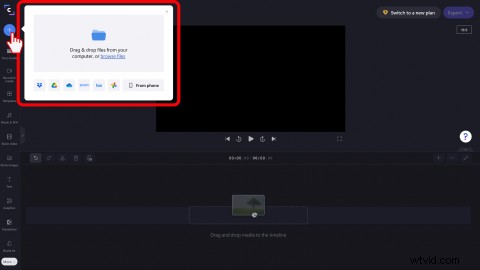
Click on the + button on the left sidebar. Drag and drop files from your computer, or click browse files. You can also upload videos directly from our integrations, your smartphone, or select stock footage.
Step 2. Add your video to the timeline
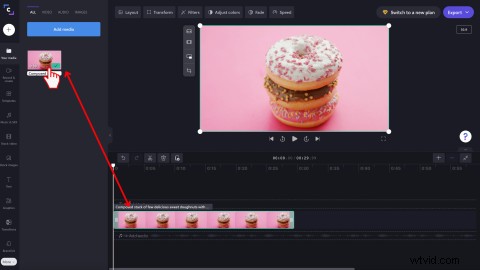
Drag and drop your video onto the timeline.
Step 3. Trim your video
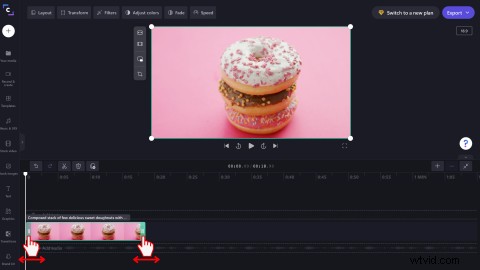
Select the video clip on the timeline you want to cut, and it will highlight green. Move the green sidebars of the clip left and right to trim the video. Background audio will be trimmed as well.
If you’re looking for more help on trimming a video, audio, or image clip, check out our help article.
Frequently asked questions
How do I trim part of a video?
Trim sections of a video that isn’t the beginning or the end by splitting the clip. Use the Split button to separate a clip, then cut it by dragging the green handles left and right. You can also use Clipchamp’s keyboard shortcuts for quicker splitting.
Can trimming change the meaning of a video clip?
Yes. When you trim a video, you can cut any sections of a clip that doesn’t suit the video style or genre you’re creating. Editing the length of a video clip can communicate different meanings to the viewer than the original lengthy clip.
How do I trim a video on Windows 11?
To cut a video on Windows 11, head over to Clipchamp’s Windows PC app. Simply go to the Microsoft Store, install the web app, then use the video cutter in the editor.
Trim video online in no time
No matter what video you’re creating, the trimming feature is an essential part of your editing toolkit. Now you know how to cut videos, try adding transitions between your trimmed clips. In three simple steps, trim a video today with Clipchamp’s free online video editor.