
Transcribing video to text by hand is a painful thing that not only occupies an amount of time but also is easy to make mistakes, which can be aided by video to text converters. Top 3 video to text converters are recommended below. Does the video to text converter have the video length limit? Try MiniTool MovieMaker to trim it.
Video transcription is to transcribe video to text. When you want to add subtitles to movies or get a text script, a video to text converter is essential for you to automatically help you transcribe video to text. And you can also transcribe YouTube video to text with the help of video to text converters.
Top 3 Video to Text Converters
Since online video to text converters are more convenient without downloading other third-party software. Below are the 3 web-based tools to help you transcribe video to text easily.
360Converter
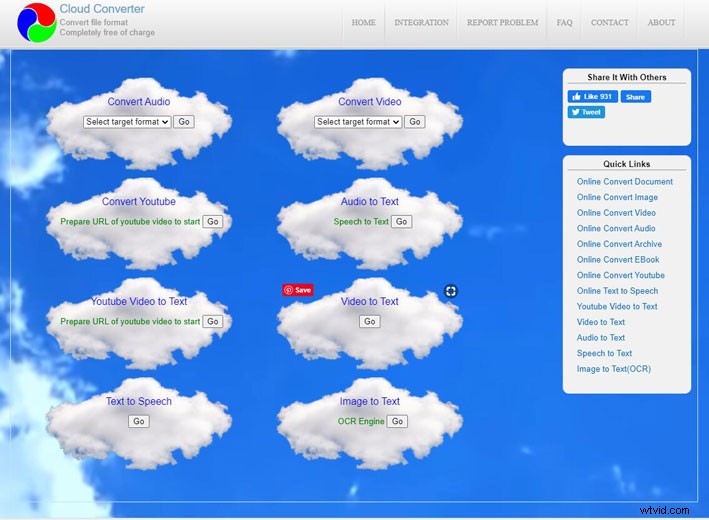
360Converter is a free video to text converter that supports transcribing in different ways, such as YouTube video to text, audio to text, image to text, etc. Furthermore, it’s completely free to use. And it supports transcribing your videos into text in different languages, including English, Chinese, Hindi and French.
Besides, it allows you to upload the video from the cloud Drive like Google Drive, One Drive, and so on. When it comes to its user interface, though it doesn’t have an elaborate design, its interface is clear and intuitive that enables you to quickly navigate to the right place.
Sonic
If you are eager to get the transcript from the video, Sonic is an ideal choice as it works very quickly to convert video to text in minutes. Apart from the video transcription, it also supports converting speech to text. Powered by cutting-edged AI, Sonic enables you to transcribe over 35 languages.
By the way, it is paid in 10$ hourly, but according to its users’ reviews, it is remarkably affordable. So you can take advantage of it 30-minute free trial to decide on. Besides, it has many excellent features that allow you to match with your video and audio editing software.
Temi
Temi is a web-based service that provides professional video or audio transcription for those who need advanced speech recognition software. And it supports many video formats MP4, WMA, MOV, and AVI included, and many different languages. What’s more, you should be noted that the accuracy of video transcription depends on the audio quality.
How to Transcribe Videos
Using any of the above video to text converters can help you transcribe video to text efficiently. Let’s take 360Converter as an example to expound on how to transcribe video since 360Converter contains many free and useful features for your options.
Step 1. Launch the website of 360Converter.
Step 2. In its Cloud homepage, choose one converter you need. There are YouTube video to text converter, video to text converter, etc.
- If you choose the YouTube video to text converter, click Go, and then paste the YouTube video URL.
- If you choose the video to text converter, firstly choose the source, local disk file, file from URL or cloud drive.
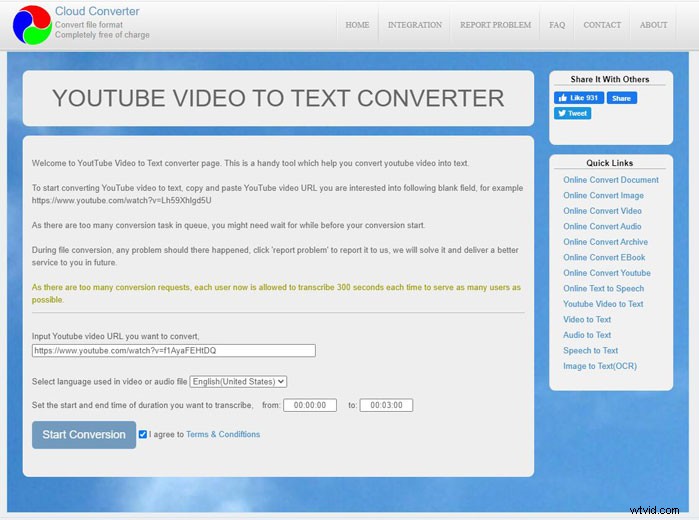
Step 3. Then select the language of your transcript, and set the duration. At last, click Start Conversion to wait for your video transcription finished.
Related article: How to Convert MP3 to Text/Speech to Text in 2020
Bottom Line
Have you gotten the above video to text converters? They work well 100% and all can help you transcribe video to text easily. And the difference lies in the speed of conversion. Undoubtedly, the paid video to text converter is faster than free software. Hope you can choose the most suitable one.
If you have any questions or suggestions when you read the above content, please feel free to contact us via admin@wtvid.com or leave your comments in the below section.