
In 2026, video editing has become one of the fastest‑growing freelance fields, offering unparalleled creative freedom and income potential. Whether you’re a content creator needing a YouTube editor or a business seeking polished training videos, understanding how to become a top‑tier editor or how to hire one is essential.
Becoming a Freelance Video Editor
Freelancing lets you set your own schedule, choose projects that excite you, and build a brand around your editing style. Success, however, demands disciplined skill growth, a compelling portfolio, and strategic self‑promotion.
What Clients Pay for Video Editing

Rates vary by experience and project complexity:
- Beginner editors: $20–$50 per hour
- Mid‑level professionals: $70–$120 per hour
- Senior specialists: $120–$150+ per hour
- Per‑project fees typically start at $100 and rise with added services such as color grading, motion graphics, or multi‑camera editing.
Sharpen Your Editing Skills

Begin with core techniques—cutting, transitions, and audio sync—then progress to advanced workflows like color grading, motion graphics, and multi‑track editing. Continuous practice and following industry tutorials will keep your skill set sharp and marketable.
Select the Right Editing Software
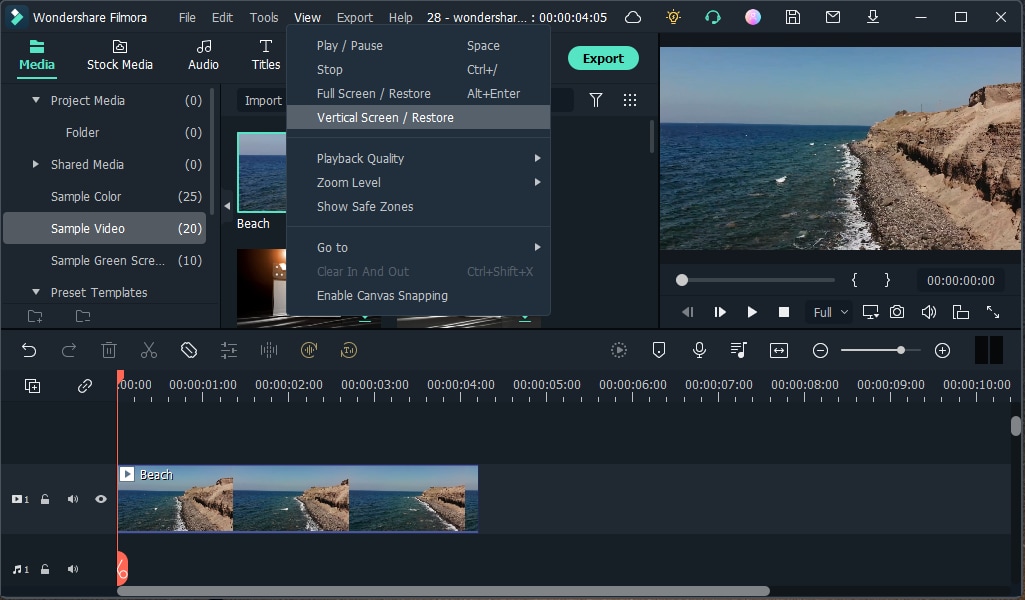
Filmora stands out for its intuitive interface and powerful AI features, making it ideal for both novices and professionals. Its text‑based editing, thumbnail generator, AI video translation, and music library streamline production and boost creative output.
Master the Full Production Workflow

A master editor understands the entire pipeline—from pre‑production planning and shooting to post‑production refinement. Filmora’s Master Class modules cover audio effects, stabilization, masking, and more, allowing you to offer end‑to‑end solutions.
Showcase Your Work in a Professional Portfolio

Publish your projects on YouTube, Vimeo, or a personal website. Highlight diverse styles, technical proficiency, and client results to demonstrate your versatility and reliability.
Market Yourself and Secure Projects

Engage in online communities, participate in editing contests, and network with creators. Consistent self‑promotion builds visibility and attracts repeat clients.
Leverage Freelance Platforms

Join platforms like Upwork, Fiverr, Freelancer, PeoplePerHour, ProductionHUB, Viedit, Video Husky, Behance, Videopixie, and Mandy. The more sites you’re active on, the broader your reach to potential clients.
Hiring a Freelance Video Editor
Clients benefit from flexible budgets, specialized talent, and efficient turnaround times. Here’s how to secure the right editor for your project.
Define Your Project Scope

Draft a detailed brief that includes objectives, timeline, deliverables, and preferred style. A clear outline attracts qualified editors and reduces revisions.
Top Platforms to Find Video Editors

- Upwork – Extensive pool, project‑by‑project or hourly hiring.
- Fiverr – Affordable gigs, ideal for short tasks.
- Freelancer – Broad categories, useful for larger campaigns.
- PeoplePerHour – Quick turnaround for social media clips.
- ProductionHUB – Industry‑focused, high‑quality talent.
- Viedit – Dedicated video‑editing marketplace.
- Video Husky – Subscription model, continuous editing support.
- Behance – Portfolio‑centric, vetted professionals.
- Videopixie – Diverse skill levels, customizable pricing.
- Mandy – Film‑and‑TV talent database, premium expertise.
Evaluate Portfolios, Testimonials, and Reviews

Inspect each editor’s past work, client feedback, and ratings. Look for consistency, creativity, and technical quality that align with your project needs.
Draft a Clear Contract

A written agreement should detail scope, milestones, payment terms, ownership rights, and confidentiality clauses. It protects both parties and ensures smooth collaboration.
Conclusion
Freelance video editing offers creative autonomy and flexible income. Whether you’re stepping into the field or sourcing talent, mastering industry tools, honing your craft, and maintaining a professional presence are keys to long‑term success.
FAQ
How much do freelance video editors charge?
Rates depend on experience: $20–$50/hr for beginners, $70–$120/hr for mid‑level, and $120–$150+/hr for seasoned pros. Project fees start at $100 and scale with complexity.
Can I freelance as a video editor?
Absolutely. With a strong portfolio and presence on freelance sites, anyone can secure projects—formal education isn’t mandatory.
Which video editing software is best for freelancers?
Filmora balances ease of use with powerful features, making it ideal for beginners and professionals alike.
How much does a 3‑minute video cost?
Simple edits: $15–$60; advanced work (color grading, motion graphics): $80–$200, depending on scope.
Can a self‑taught editor make money?
Yes. Many successful freelancers teach themselves through tutorials, practice, and building a compelling portfolio.
Is video editing a good side hustle?
With high demand for online content, editing is a profitable side gig that can grow into a full‑time career.
Are video editors still in demand?
Demand continues to rise as digital media expands across platforms; the field offers abundant opportunities.
Is video editing a tough job?
Complex projects require focus and technical skill, but regular practice and user‑friendly tools like Filmora make the process manageable.
Will AI take over video editors?
AI assists with repetitive tasks, but creative storytelling and nuanced editing remain human strengths.