
Looking to boost sales and attract more customers? A software product demo video or a compelling animated product demo is a powerful way to highlight your product's features and show how it works in real life.
Wondering how to make a product demo video without complex tools? With Wondershare Filmora, you can create demo videos easily—no pro editing skills required. This guide includes product demo video examples and tips tailored for small businesses and startups looking to stand out.
In this article
- Why Product Demo Videos Matter for Your Business
- Step-by-Step: How to Make a Product Demo Video with Filmora
- Inspiring Product Demo Video Examples You Can Learn From
Part 1. Why Product Demo Videos Matter for Your Business
Creating a demo video for your product is a great way to show people how it works and why they should buy it. Instead of just telling them about it, you can visually explain its features and benefits. This approach makes it easier for customers to understand and trust your product.
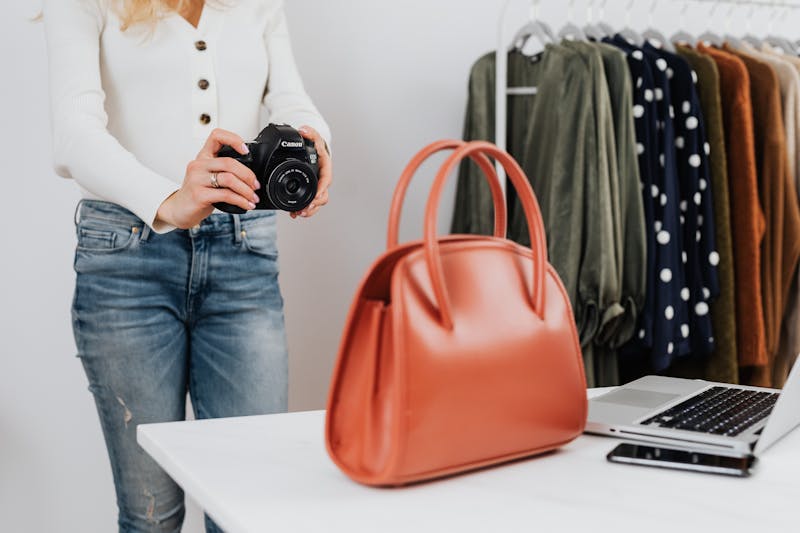
Here's how demo videos can help your business grow:
- Boost Engagement & Sales: People prefer watching over reading. A demo video shows your product in action, making it easier to understand and more appealing, leading to more purchases.
- Build Trust with Customers: A clear, honest demo builds credibility and shows that you believe in your product. It's especially valuable for startups that want to earn trust.
- Make Buying Decisions Easier: When customers see how your product solves their problem, they feel more confident and buy faster.
- Make Your Brand Stand Out: A well-made demo sticks in people's minds. If it's helpful and engaging, they'll remember your brand when it's time to buy.
With these benefits in mind, let's see how to make a product demo video using Wondershare Filmora!
Part 2. Step-by-Step: How to Make a Product Demo Video with Filmora
Creating product demo videos for startups or small businesses is easier. You don't need expensive equipment or advanced video editing skills to create one. With Wondershare Filmora, you can you can create demo videos that showcase your products in the best way.
Follow these simple steps on how to make a product demo video with Filmora:
01of 07Record Your Demo Video
You can use a smartphone or camera with good lighting and a clean background to keep the focus on your product. Here are a few things that you need to capture:
- Close-up shots of the product's details.
- A real-life demonstration of how it works.
- Record from different angles to make the video more dynamic.
- Before and after comparisons (if applicable).

02of 07Open Filmora and Start Editing Your Demo Video in Filmora
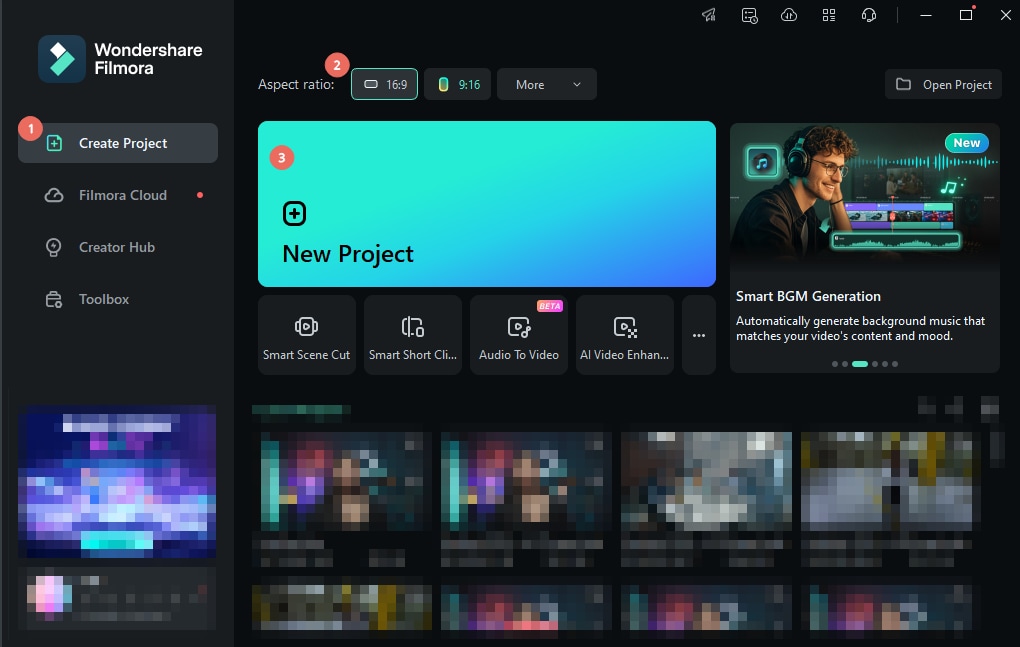
Once you've recorded your footage, open Filmora to edit the video. First, go to the Create Project tab and select the Aspect Ratio for the demo video. Choose 16:9 for widescreen videos or 9:16 for vertical content. Then, click New Project to begin editing!
03of 07Import Your Product Demo Footage
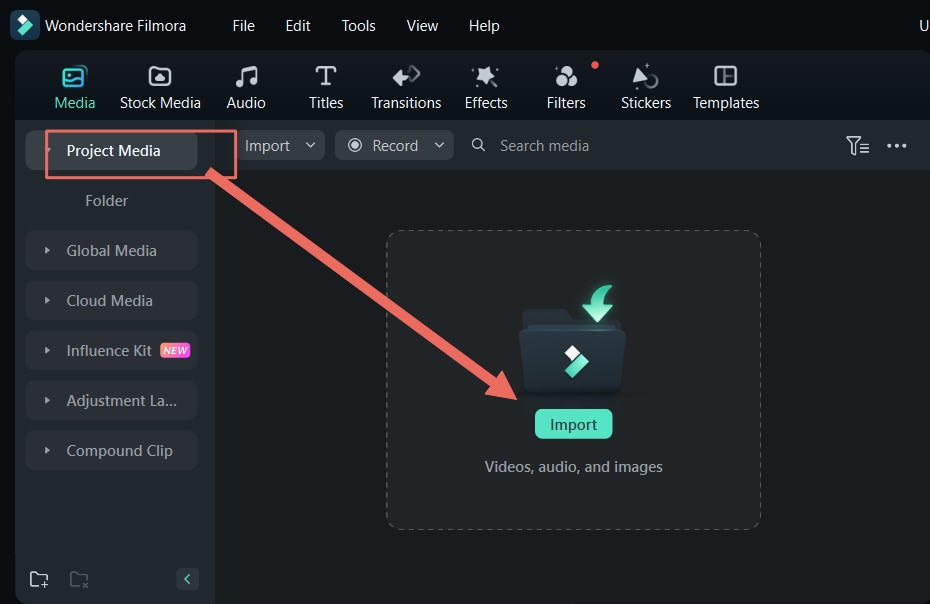
Go to Media > Project Media > Import to upload your recorded clips, product images, or any other elements you want to include. Once imported, simply drag and drop your files onto the timeline. Then, arrange them in the right order.
04of 07Add Voiceover with AI Text-to-Speech feature
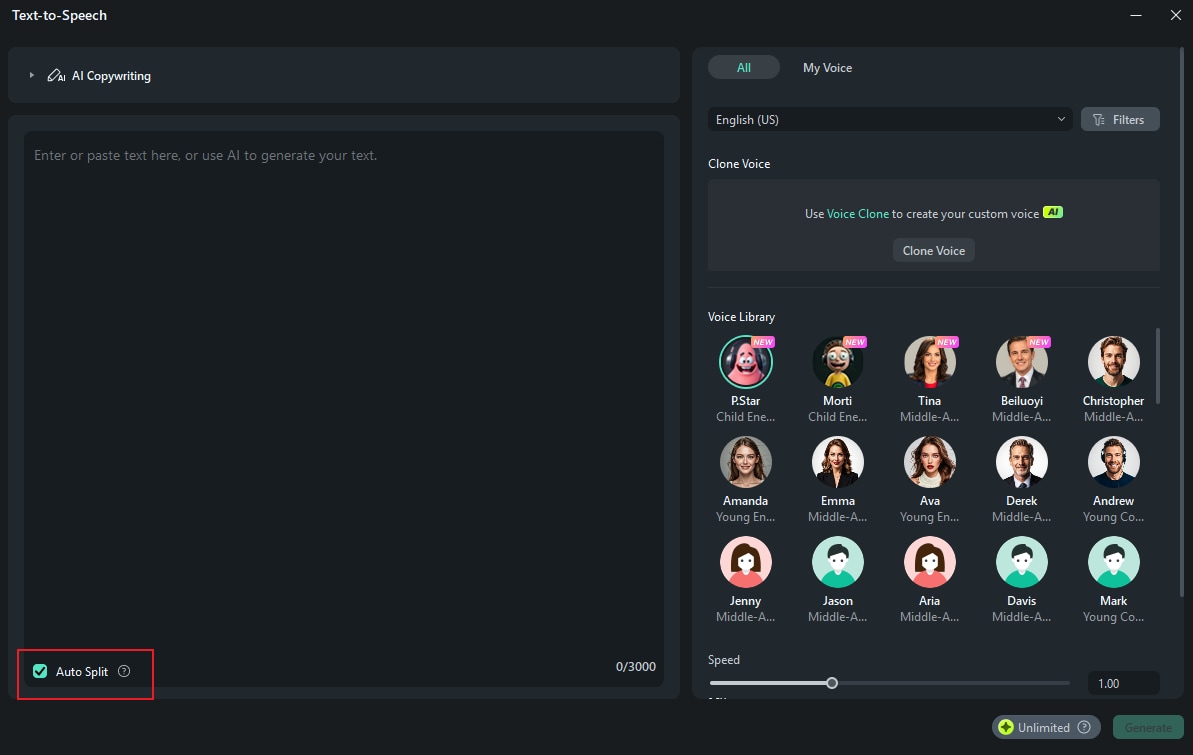
Want to add a voiceover without recording your own? Filmora's AI Text-to-Speech tool can generate natural-sounding narration. Go to Audio > Text to Speech > Start to use this feature.
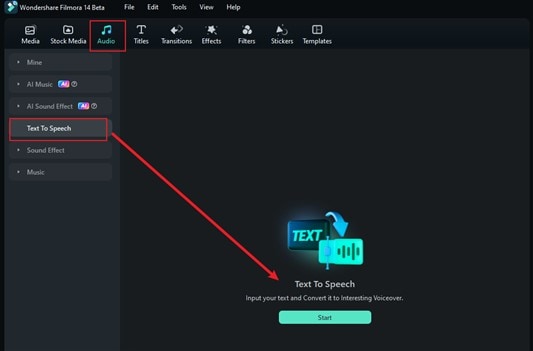
Enter your script and choose a voice from the Voice Library. Use the Auto Split tool to break the text into smaller segments if your text is too long. Click Generate, and Filmora will create the voiceover for you.

05of 07Add an Animated Logo for Branding
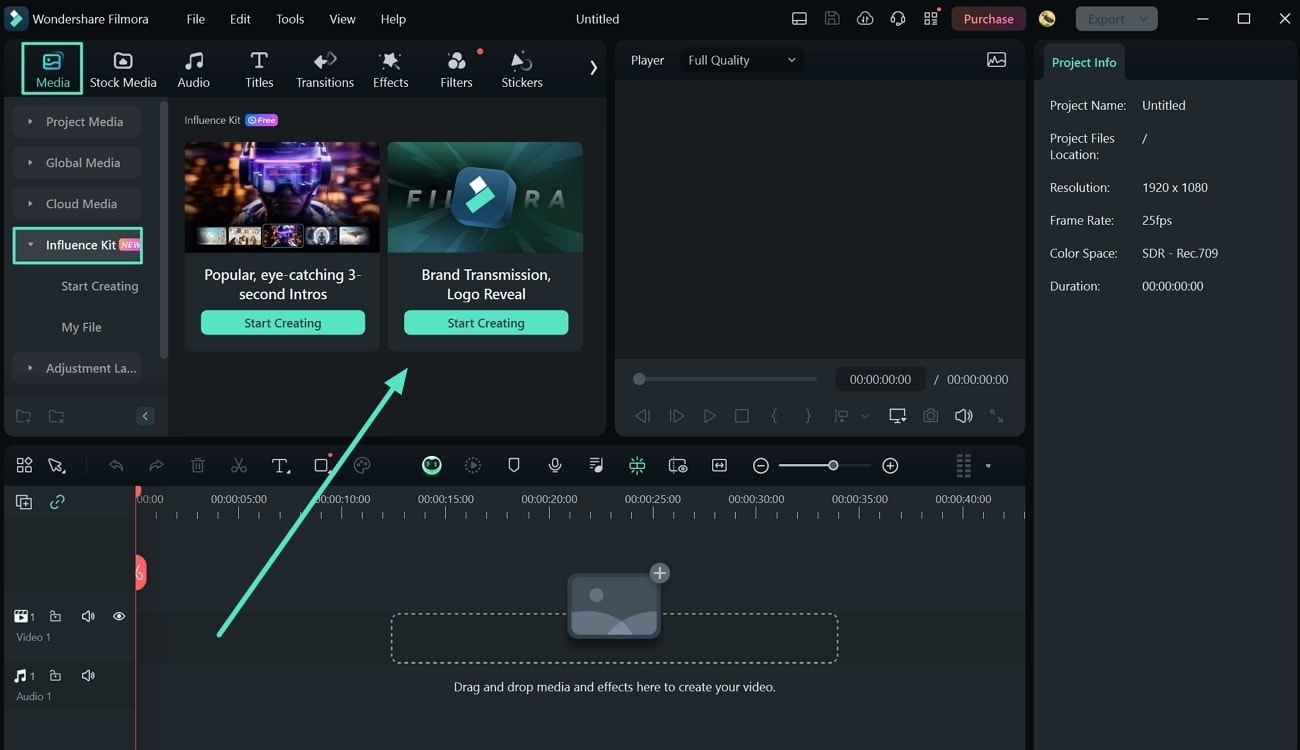
Add an animated logo to reinforce your brand identity and make your product demo video look more professional. Go to Media > Influence Kit > Brand Transmission, Logo Reveal > Start Creating to add an animated logo.
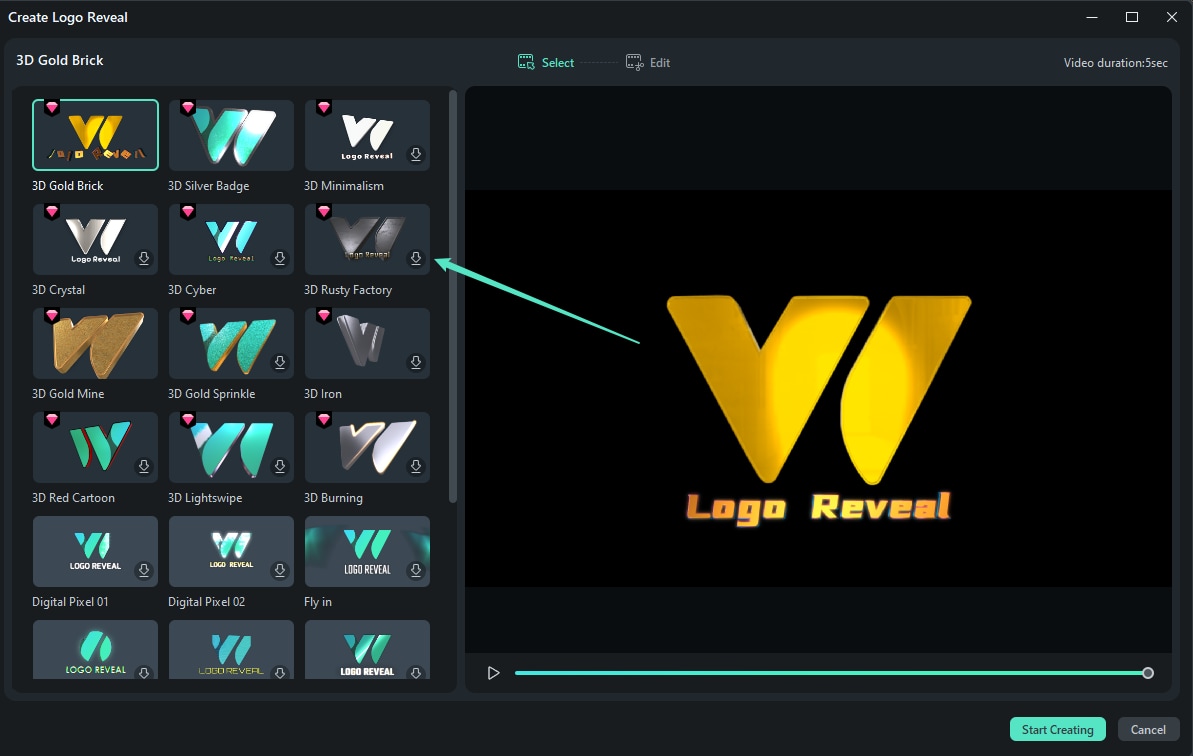
A window with several animation presets will open. Choose a style that fits your brand and click Start Creating to begin customizing.
Next, upload your logo and modify the text. Then, click Finish, and your animated logo will be added to the timeline.
06of 07Add Background Music to Your Video
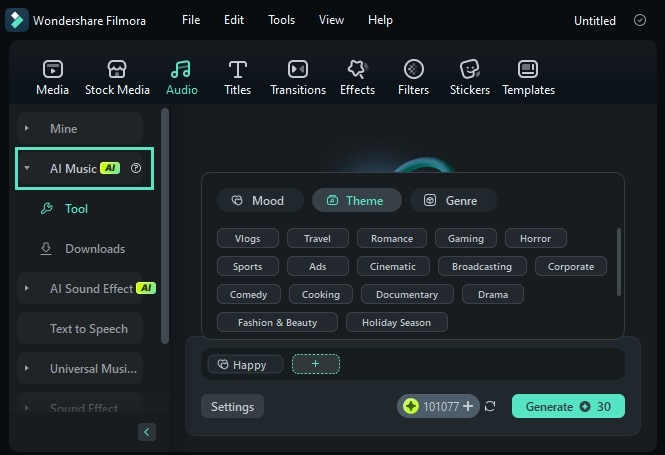
If you need unique background music, try the AI Music Generator feature. Navigate to Audio > AI Music, click the Plus icon, and select your preferred mood, genre, and theme. Adjust the tempo and duration under Settings, then click Generate to create a custom track. Once your music is ready, download it and drag it onto the timeline.
07of 07Review and Export Your Video
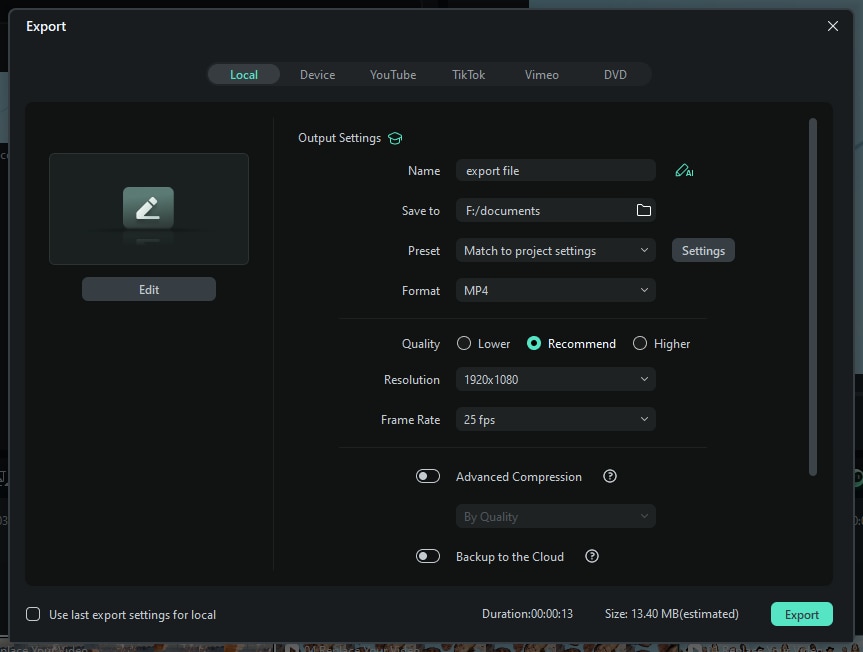
Before sharing your product demo video, take a final look to ensure everything is smooth and professional. Once you're happy with your final cut, click Export and select the Local option to save the video to your computer. Then, adjust the resolution and format settings as needed. Finally, hit Export, and your product demo video is ready to share!
Part 3. Inspiring Product Demo Video Examples You Can Learn From
Looking for ideas to make your demo videos stand out? The best way to learn is by studying great product demo video examples from other brands. These examples use storytelling and clear demonstrations to showcase products effectively.
1. [AIRROBO] T10+ Robot Vacuum Cleaner
Why It Works:
- The video shows a step-by-step demonstration that clearly explains how to switch the vacuum cleaner from sweeping to mopping.
- It displays close-up shots, allowing viewers to see the product in action and making it easier to understand how to use it.
- It also shows the cleaning performance by inserting before-and-after comparison clips.
Takeaway: If your product has multiple functions, break them down into easy-to-follow steps with clear visuals. Use before-and-after shots to demonstrate results and boost credibility.
2. Yaheetech 54.5 Inches H Cat Tree Tower Installation Guide
Why It Works:
- It has precise and straightforward assembly instructions. The video guides viewers through the setup process step by step.
- It also has on-screen text & labels to help viewers follow along easily without needing to rewind.
- It speeds up repetitive parts while keeping everything easy to understand.
Takeaway: If your product requires assembly, simplify the process by using step-by-step visuals and on-screen text. Speed up less important steps while keeping the key details easy to follow.
3. Insta360 X4 - How a 360 Camera Works (ft. Brandon Li)
Why It Works:
- Instead of just listing features, the video uses storytelling to take viewers on a journey. It shows the real-world examples of the camera in action.
- It shows 3D graphics and overlays highlighting how the camera captures 360-degree footage.
- Viewers can see the real-life applications for different ways to use the camera, making it more appealing.
Takeaway: If your product has unique features, use storytelling and real-life examples to showcase its potential. Adding motion graphics or overlays can help thoroughly explain complex technology.
Conclusion
A product demo video is one of the best ways to showcase your product, highlight its features, and convince potential customers to buy. A well-made demo video can boost sales and enhance brand awareness, making it a valuable marketing tool.
This guide has walked you through how to make a product demo video using Wondershare Filmora. Now, it's your turn! Follow the steps, create stand-out demo videos, and let your product shine!

Filmora
⭐⭐⭐⭐⭐
The Best AI-powered Video Editing Software and App