
One the features that separate smartphones from interchangeable lens cameras such as mirrorless and DSLRs is the ability to adjust the depth of field utilising aperture.
This is due to smartphone cameras featuring fixed aperture lenses and small sensors. With no aperture control, there is no ability to adjust the depth of field through traditional techniques of bending light to adjust focus.
At least that was until recently. Now the AI, an integral part of the latest smartphones such as the Huawei P30 Pro enables you as the photographer to adjust the point of focus.
It may not use blades within its cameras lenses to open and close the aperture, but instead, uses clever technology that enables you to adjust the point of focus after the image has been taken.
Why would you want to adjust the point of focus? The main point of adjusting focus is to draw attention to the subject. For example, when shooting portraits you want the subject to be sharp and the background to be blurred.
The most sort after soft focus effect is Bokeh, which creates a soft and elegant background blur effect. Lens manufacturers go to great lengths to create the effect and the look has been harnessed by the like of Huawei in the P30 Pro.
Using an interchangeable lens camera you’d achieve this effect by using an 85mm lens with the aperture wide open to f/2.8, other focal lengths and apertures can be used this is just an example. The combination of focal length and the aperture gives you the ideal combination to capture the perfect portrait.
Knowing what settings to use to capture a portrait with the right balance of focus takes skill, and once you’ve taken the shot that’s it, no way to adjust it again.
That was until now, with the Huawei P30 Pro you’re able to take the shot using the ‘Aperture’ photo mode. Once you’ve taken the shot you can then reopen the image later and adjust the focus as you see fit.
What makes this really clever is that you adjust where in the image the point of focus is. Just tap on the screen to select where in the image you want to focus, then move the slider to increase or decrease the depth of field.
The process is quick and easy giving you a way to gain complete creative control over the depth of field of your images after you’ve taken the shot.
- Read our Huawei P30 Pro review
- Read our Huawei Nova 5T review
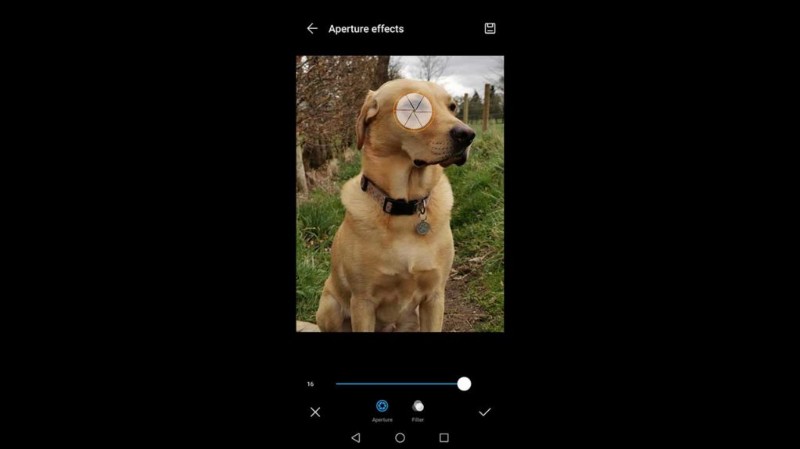
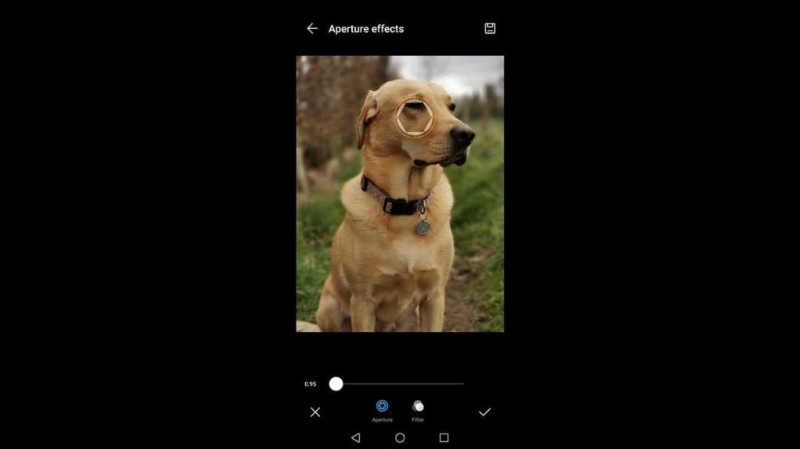
How to control the Bokeh effect with the Huawei P30 Pro
- Open the camera app
- Swipe right to the first option ‘Aperture’
- Take your photo as normal
- Open the picture taken and tap the Iris Icon in the top right of the screen
- Tap into the image where you’d like to focus
- Use the slider at the bottom of the image to adjust the depth of field
- Click the tick to save the image
- At any point you can reopen the image and tap the iris to readjust


- Huawei P30 Pro vs P20 Pro Camera: What are the key differences?
- Huawei P30 Pro Camera vs Mate 20 Pro Camera: what are the key differences?