
One of the handy features introduced in the Nikon D850 is a Silent Live View Photography mode, commonly called the quiet mode or quiet shutter, that employs the camera’s electronic shutter to eliminate shutter sounds.
Thanks to this electronic shutter, if you switch to Live View with the Nikon D850 and enable the Silent Live View mode you can shoot full-frame (FX) 45-megapixel raw images at 6fps or APS-C (DX) format 8.6-megapixel JPEGs at 30fps completely silently.
It’s worth noting that the Nikon D850 will shoot 7fps at full resolution in its regular continuous shooting mode.
How Silent Live View Photography works
Nikon’s Silent Live View mode uses the Electronic Front-Curtain Shutter mode – which was also found in the D810 – and locks up the mirror during the exposure to reduce noise.
Why should you use the D850’s Silent Live View?
So who might make best use of the Nikon D850 quiet shutter mode? In theory it should be useful for wedding, wildlife and sports photographers who need to avoid mirror and shutter movement sounds.
But because the Nikon D850 quiet mode option is only available in live view, it will probably mostly be of benefit to landscape photographers or those shooting time-lapses or static subjects.
Nevertheless, it’s a very handy feature and quite easy to set up.
- Nikon D850 review
How to set the quiet shutter on the Nikon D850
Setting up the quiet mode, or Silent Live View Photography mode, on the D850 is a very simple process. The video below shows you how it’s done. Or you can follow the step-by-step instructions below.
- Press the Live View button on the back of your D850 (making sure the little dial is set to stills).
- On the back of the D850, like all Nikon DSLRs, you’ll see an i, or Info button. Press this and the
- Silent Live View Photography menu appears down the right side of your LCD screen.
- You’ll see a few tiled icons for focus peaking and other associated features. Tap the Silent Live View icon.
- From the next menu you can then either choose SL1, which lets you shoot 6fps at full resolution (45.7 megapixels), or SL2, which switches the camera to its APS-C, or DX, crop mode and shoots 30fps at 8.8 megapixels.
- Once you select your mode, press the Info button to return to live view.
- Frame your shot, touch the subject you want to focus on and press the shutter button.
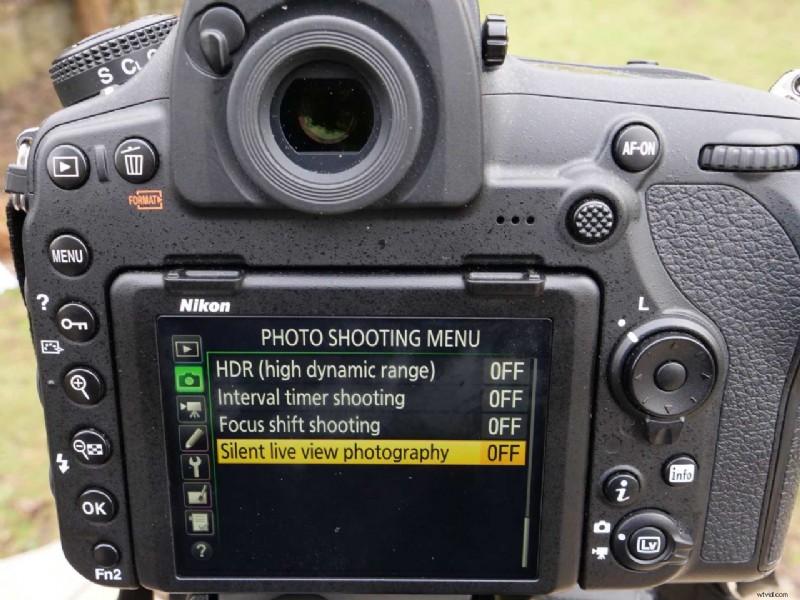
Another way to set it up
You can also enable the Silent Live View Photography mode in the camera’s Shooting Menu (see pic above).
Navigate to the last page of your Shooting Menu in the D850 and you’ll find the Slent Live View Photography mode.
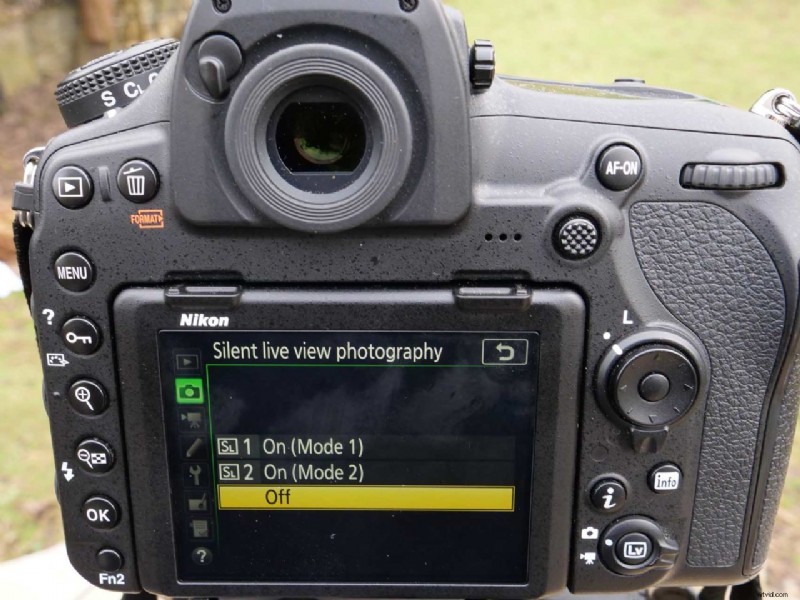
Click the OK button or right arrow on the four way controller to access the settings, and then you can select SL1 or SL2 as we did above, or you can disable it.
It works just the same as using the Info button but requires a few more clicks. For speed and ease of use, I tend to use the Info button.
- iPhone X vs Nikon D850
- Google Pixel 2 vs Nikon D850