

Apple has rolled out iOS 26.5.2 for iPhone and iPadOS 26.5.2 for iPad. The updates focus exclusively on security fixes—no new features are included—so installing them is essential to keep your device protected.
Apple also released corresponding security updates for other platforms: macOS Tahoe 26.5.2, and Safari 26.5.2 for macOS Sequoia and Sonoma.
Below you’ll find the official release notes and IPSW firmware download links for iOS 26.5.2.
How to Download & Install iOS 26.5.2 and iPadOS 26.5.2
Before beginning, back up your iPhone or iPad to iCloud to safeguard your data.
- Open the Settings app on your device.
- Navigate to General > Software Update.
- Tap Update Now to download and install the latest iOS 26.5.2 / iPadOS 26.5.2 update.
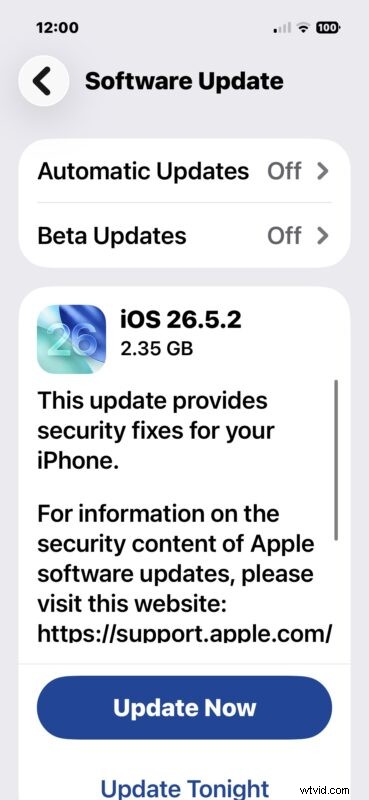
The update file is several gigabytes in size and will trigger a device restart to complete installation.
Alternatively, you can update via a computer or by downloading IPSW firmware files directly from Apple’s CDN servers.
iOS 26.5.2 Release Notes
Apple’s official release notes are concise:
- iOS 26.5.2 – Provides critical security fixes for your iPhone.
For a detailed breakdown of the security content, visit Apple’s Security Updates Page.
iOS 26.5.2 IPSW Firmware Download Links
Users who prefer a manual update can download IPSW files from the links below, which point to Apple’s official CDN servers:
- iPhone 17 Pro
- iPhone 17 Pro Max
- iPhone 17
- iPhone 17e
- iPhone Air
- iPhone 16 Pro
- iPhone 16 Pro Max
- iPhone 16
- iPhone 16 Plus
- iPhone 16e
- iPhone 15 Pro Max
- iPhone 15 Pro
- iPhone 15 Plus
- iPhone 15
- iPhone 14 Pro Max
- iPhone 14 Pro
- iPhone 14
- iPhone 14 Plus
- iPhone 13 Pro Max
- iPhone 13 Pro
- iPhone 13 mini
- iPhone 13
- iPhone 12
- iPhone 12 Pro
- iPhone 12 mini
- iPhone 12 Pro Max
- iPhone 11 Pro Max
- iPhone 11 Pro
- iPhone 11
- iPhone SE 2nd Generation
- iPhone SE 3rd Generation
iPadOS 26.5.2 IPSW Firmware File Download Links
- Updating…
Don’t forget to update your Mac as well: macOS Tahoe 26.5.2, macOS Sequoia, and macOS Sonoma are all available.