
The best apps for black and white photos can completely transform your photography! Black and white is a classic look in photography, but it also helps you develop your camera skills. That’s why everyone should try their hand at black and white photography.
In this article, we went looking for the best black and white app for photography. Some apps turn your phone into a black and white camera. Others let you convert color images to monochrome. Let's start with the apps that let you see the world in black and white.
Expert Recommendations
Looking for solutions beyond apps for black and white photos? Capture It All is the first online video course to cover everything your iPhone camera can do, with step-by-step lessons and lifetime access.
Shooting Black and White with a Smartphone
Before we look at the best apps for black and white photos, we need to tell you how you can shoot in black and white using your smartphone’s native camera.
The native cameras on both IOS and Android phones allow you to make black and white photos without much difficulty.
Click the filter icon. It looks like three connected circles. Depending on your phone, you will have one or more monochrome filters.
The iPhone has three filters—Mono, Silvertone, and Noir. The newer iPhones have two more black and white options in the Portrait mode—Stage Light Mono and High-Key Light Mono. These options work best when taking portraits.
The native camera on your phone may not be the best black and white app, but it is available without a download.
But if you do want a better camera app for black and white photography, we’ve got all the best options in the list below. Keep reading to find the best smartphone app for incredible black and white photos.
Best Apps for Black and White Photos
First, we look at some apps that create black and white photos. Each of these apps creates a black and white aesthetic in camera.
1. Lightroom Mobile

| Brand |
Brand Adobe |
| Operating System |
Operating System iOS and Android |
| Free? |
Free? Free with in-app purchases |
| Key Features |
Key Features Easy black and white transformations, sophisticated editing tools, AI enhancements, quick-apply presets |
Whether you like color or black and white photography, Lightroom Mobile is one of the best smartphone apps there is. It has a wide-ranging and sophisticated tool set, including excellent features for black and white photos.
Lightroom Mobile is an editing app rather than a camera app. But you can take black and white photos with your native camera and edit them in Lightroom. Or, you can upload color photos and transform them into black and white images in the app.
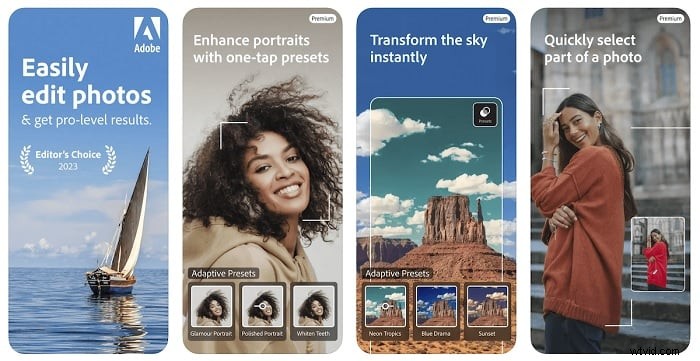
Converting a color photo to black and white is a simple procedure that only takes a second. Then you can use the editing tools to achieve the black and white aesthetic you’re looking for.
The app also has AI-powered enhancement tools, helping you take your black and white photography to the next level. You can quickly add a bokeh effect to black and white portraits or change the sky to add more texture to a landscape.
As with the full Lightroom software, you also get brush tools for more localized image editing. You can heal and retouch specific areas, giving you incredible creative control.
Download: iOS | Android
2. Camera1
| Brand |
Brand Sebastien Ardon |
| Operating System |
Operating System iOS |
| Free? |
Free? No |
| Key Features |
Key Features Black and white photos only, Zen mode, manual camera controls,  |
Camera1 is the best dedicated black and white photography app. With this app, your phone becomes a manual black and white camera.
You have full control over your exposure settings as well as manual focus adjustments.
Whenever you change exposure settings, a histogram pops up to guide your choice. Red zebra stripes appear if you are overexposing. A magnifying glass helps you focus.
You can lock in the settings to take a series of black and white images.
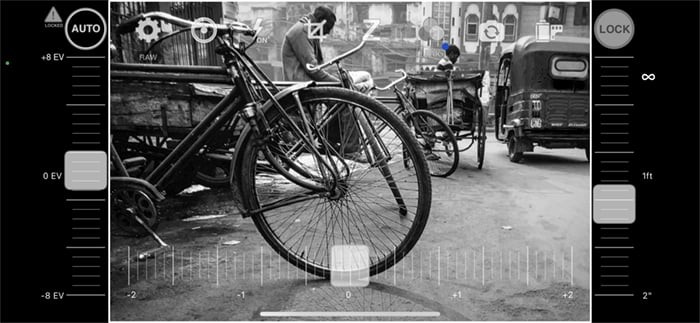
The Camera1 sliders let you manually control exposure and focus
You can shoot in various RAW formats. These keep color information as well as monochrome JPEG.
When you apply color filters to your photos, you can see the effect in real time. This shows you exactly how each filter affects the colors.
The Zen mode (Z) hides all the controls to let you focus on composition without distractions. It also has grid for composition, like the rule of thirds or golden triangles.
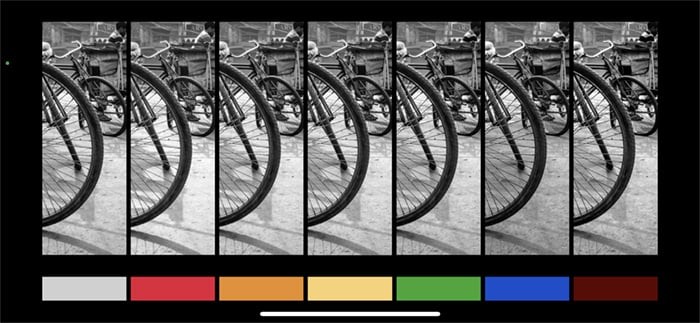
Camera1 app interface shows you live color filters simultaneously
The apps works with a range of image file types, including JPEG, TIFF, and RAW. This means you have maximum editing potential if you transfer your images to editing software like Adobe Lightroom.
You have to pay to download the app, which will put some people off. But it is the best dedicated app for black and white photography. It won’t be for everyone, but black and white photography enthusiasts will love it.
Download: iOS
3. Snapseed

| Brand |
Brand |
| Operating System |
Operating System iOS and Android |
| Free? |
Free? Yes |
| Key Features |
Key Features JPEG and RAW processing, black and white editing, brush tools, bokeh tools, double exposure features |
Snapseed is a popular photo editing app. It is one of the best choices when converting color images to black and white. The app walks you through the process of editing your photo, starting with a filter and then a look.
The number of editing tools is impressive, allowing you to change nearly any aspect of your image.
Tools like Vintage, Retrolux, Noir, and Grainy Film will give your image an old-fashioned look. You can add text, frames, and even a second image as a double exposure.
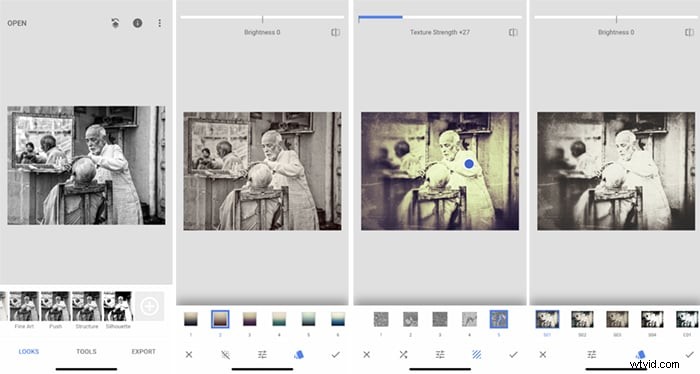
Snapseed app interface showing filters under four of the tools: Looks, Vintage, Grunge, and Noir
As well as standard black and white images, you can give your images a Noir feel with black and white film filters. Adding grain and texture gives your shots a classic aesthetic, as if you’re shooting with an analog camera and a roll of B&W film.
Snapseed is a great app if you like black and white portraiture. The lens blur tools give you a gorgeous bokeh effect, making your smartphone portraits look professional.
There is a lot of editing power in Snapseed, and the app is completely free.
Download: iOS | Android
4. Hypocam
| Brand |
Brand Pierre Gougelet |
| Operating System |
Operating System iOS and Android |
| Free? |
Free? Free with in-app purchaes |
| Key Features |
Key Features Dedicated black and white camera app, social media integration,manual camera controls |
Hypocam is a free black and white app that comes with five black and white filters and textures. You can also buy more in the app.
On top of the basic filters, you can add a color filter to emphasize or minimize certain colors in the scene. Once you have taken the photos, you can apply texture, grain, vignette, and fade to get the look you want.
The app also gives you custom camera settings, giving you more creative control when taking pictures.
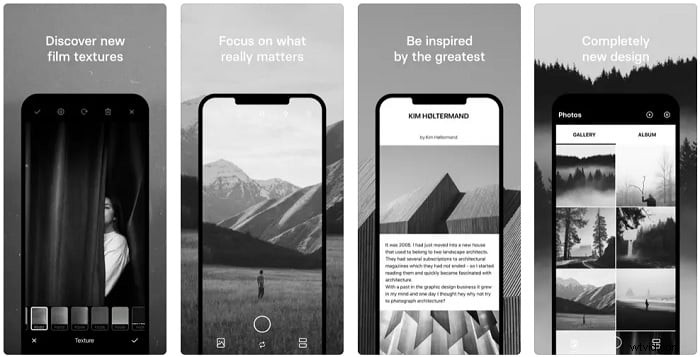
Hypocam also works as a black and white filter app. You can apply the filters to color photos in your camera roll and edit the effect in the app.
This app is an easy and flexible tool. You can expand your filter collection, and the editing functions are simple yet powerful.
It also has social media integration, making it easy to share your best black and white photos on Instagram or Facebook.
5. Black and White Camera
| Brand |
Brand Peaksel Photo Apps |
| Operating System |
Operating System iOS and Android |
| Free? |
Free? Free with in-app purchases |
| Key Features |
Key Features Live camera filters, social media integration, +40 effects |
The Black and White Camera app is the best option if you want to post images on social media. The social media integration makes it easy to share your favorite B&W images on Instagram, Facebook, Twitter, and more.
Black and White Camera lets you take photos with black and white film effects. Some filters simulate the look of damaged film with flares, discolorations, and scratches on negatives. If you are going for an old film vintage look, this is your app.
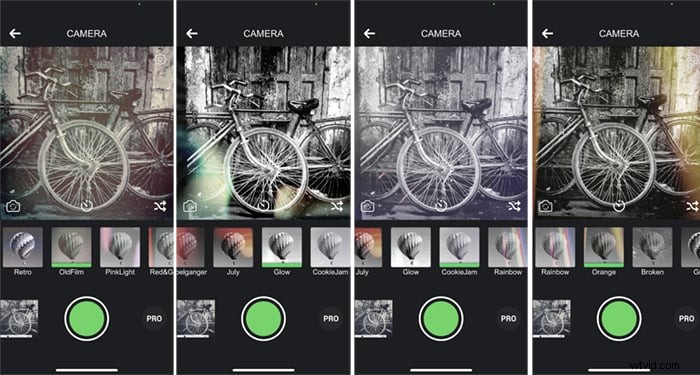
There are many filters included, and you can buy more in-app. The app works with your phone's camera. But you can also apply the filters to images on your camera roll.
The free version of this app watermarks your images and popup ads can distract from your image-making. If you like this app, you will want to upgrade to the paid version.
Download: IOS | Android
6. Carbon B&W Filters and Effects
| Brand |
Brand Livintis W.L.L. |
| Operating System |
Operating System iOS |
| Free? |
Free? Free with in-app purchases |
| Key Features |
Key Features 50+ black and white filters, texture effects, creative borders |
Carbon by Livintis W.L.L. is an elegant black and white photographyapp. You can edit your own photos or demo portraits. The app focuses on portraits, but you can use editing tools on any style of photograph.
Start with the included monochromatic filters. You can adjust how much of the filter shows through.
The app has a full editing suite. You can adjust exposure, sharpness, vignettes and many other settings. You can even add a tilt-shift effect to your image.
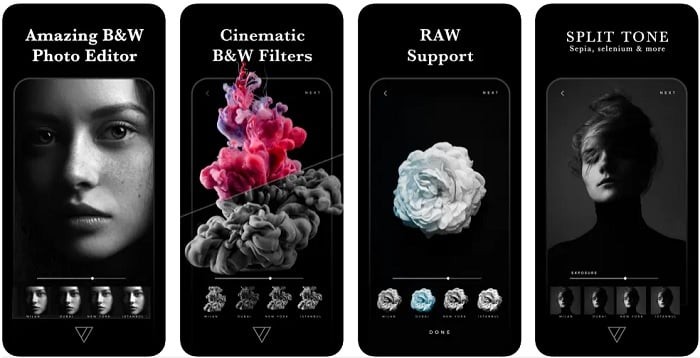
You can also add grain, dust, light leak, and lens flare textures and a border.
Some of the effects are free. Others are available to buy through the app. The filter packs can be pricy. But this is one of the best apps for black and white photos.
You can only export your own images, but the demo portraits will help you edit like a pro.
Download: iOS
7. Classic Camera
| Brand |
Brand Hipstamatic |
| Operating System |
Operating System iOS |
| Free? |
Free? No |
| Key Features |
Key Features Analog camera effects, signature presets, advanced editing tools, custom presets |
The entire Classic Camera app experience is retro. The graphics look come straight out of the ’60s. It isn’t an exclusively black and white app, but the app does have excellent B&W effects.
You can select a look or choose an analog camera simulation. You can also build your own vintage camera simulation with different lenses and film options.
After you take a photo, you can apply various filters or presets. There are only a few free options in the app. Most options are only available to club members who pay a subscription.
You can also save custom presets if you like the results of your manual adjustments.
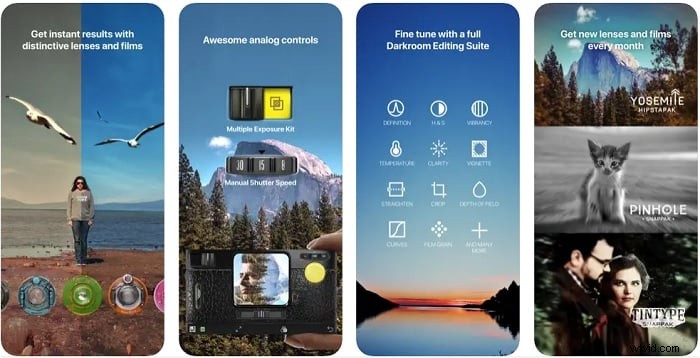
A wide tool set gives you options to adjust clarity, definition, exposure, grain, texture, and more. You can also crop and rotate, as well as add a fade or vignette.
You can also make more minor tweaks using the RGB curve tool.
Hipstamatic is not only a black and white app. But if you like a vintage look to your images, Hipstamatic will help you get it.
Download: iOS
8. Dramatic Black and White
| Brand |
Brand JixiPix Software |
| Operating System |
Operating System iOS and Android |
| Free? |
Free? No |
| Key Features |
Key Features High-definition black and white, ellipse spotlight tool, live filters |
Dramatic Black & White is a powerful photo editing app by JixPix Software. Select an image from your phone to start applying filters.
The purchased app comes with dozens of black and white filters, including many infrared filters. It also has the special Dramatic Black and White filter that has ultra-high definition. The results are really impressive for a smartphone camera.
A randomize button lets you try out different ones to see what works best. You can also customize the filters. You can change color tone, softness, brightness, and contrast.
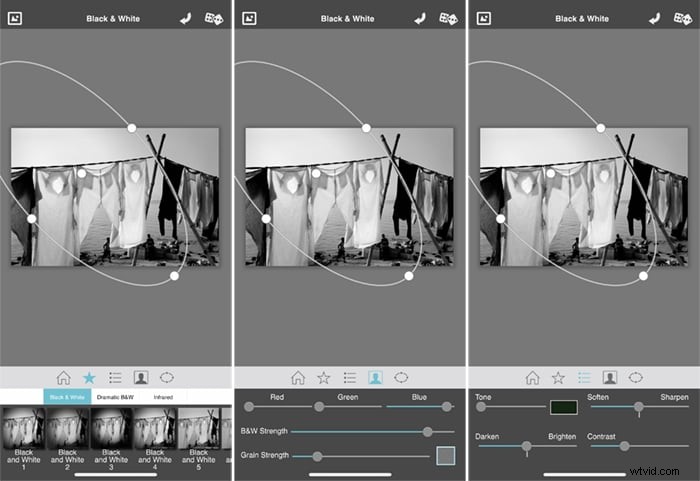
You can also add color filters and grain. What makes this app unique is the ability to add spotlights.
These are extra areas of light and shadow that you can resize, tilt, and strengthen as you like. You can layer several spotlights for a more complex effect.
It’s a simple app that doesn’t have some of the more advanced editing tools of the other apps. But the finished black and white images are excellent. The app really understands B&W editing and the types of things photographers are looking for.
Download: iOS | Android
9. BlackCam Pro
| Brand |
Brand XnView |
| Operating System |
Operating System iOS and Android |
| Free? |
Free? No |
| Key Features |
Key Features Colored lens filters, film photo effects, social media integration |
BlackCam by developer Pierre Gougelet and XnView lets you make a black and white photo by using adjustable filters.
The filters simulate classic black and white looks, including color lens filter effects. You also have film photography filters that give your images a grainy retro look.
There are a few pro filters you can add as purchasable upgrades, but most come free in the app.
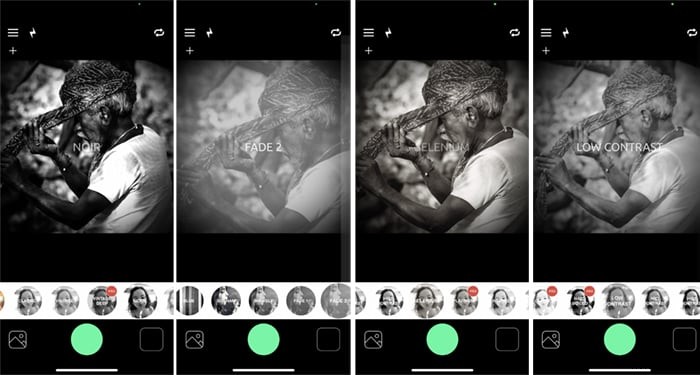
BlackCam app interface showing four of the filters: Noir, Fade 2, Selenium, and Low Contrast
Click the plus button, and you have even more control over your photos. Use sliders to change exposure, vignette, fade, and the amount of desaturation.
You can easily pass your finished images from BlackCam Pro to your social media profiles thanks to the social media integration tools. Uploads images only takes a second.
It doesn’t have the most complete tool set, but the transformations are fantastic when. The app makes it quick and easy to create stunning black and white artworks.
Download: iOS | Android
10. Argentum Camera
| Brand |
Brand 55th Street Ventures |
| Operating System |
Operating System iOS |
| Free? |
Free? Free with in-app purchases |
| Key Features |
Key Features Specialist shooting modes, Live B& |
Argentum Camera simulates the look of famous black and white photographers. These include Ansel Adams and Henri Cartier-Bresson.
The app is free to download and comes with the Ansel Adams filter. You can buy other filters in the app if you want more options.
Read the introductions for each of the filters. There is a lot of information about the photographer and how they achieved their specific black and white aesthetic.
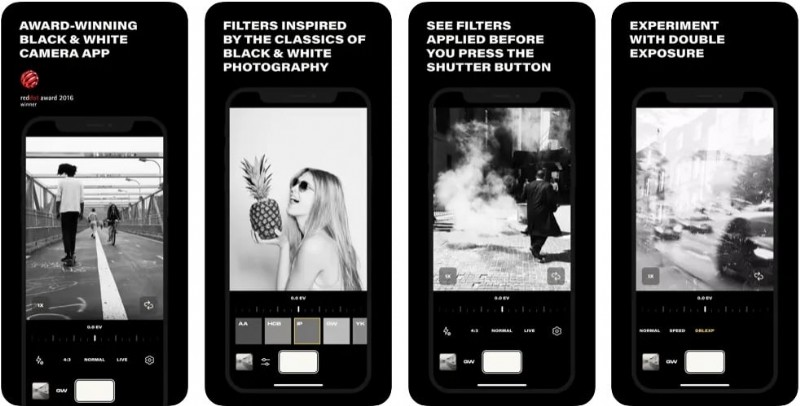
There are many adjustments hidden within the app. You can adjust the exposure, shoot in Live mode, use a flash or constant light, change orientation and aspect ratio, and choose to shoot in JPEG or RAW.
In a nice twist, the DBLEXP setting captures allows you to layer photos in a double exposure.
Download: iOS
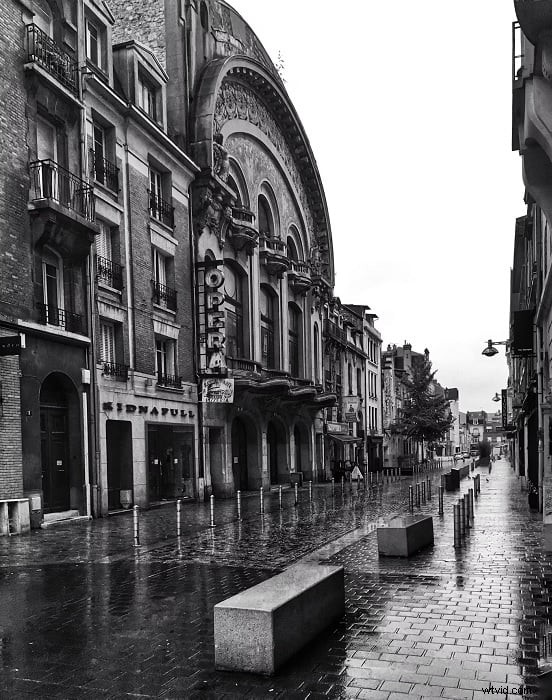
Taken on iPhone by Adlan
Conclusion
We went in search of the best black and white camera app and the best black and white photo editor. The best included many presets and let you explore your own black and white aesthetic.
Our favourite black and white app was Adobe Lightroom Mobile because of its functionality and incredible tool set.
If you want a simpler filter app, then Hypocam is your best bet. Snapseed is another fantastic editing app. But Dramatic Black and White is not as overwhelming and is highly flexible.
Any of the apps featured on this list will help you explore the magical world of black and white photography.