

Siri now has a non-binary gender neutral voice option available to users who prefer to not have a stereotypically male or female Siri voice.
While Apple somewhat recently removed all gender identifying information from Siri voices, simply referring to them as ‘Voice 1’ and so on, the introduction of the gender neutral non-binary Siri voice is freshly available on the latest iOS, iPadOS, and MacOS releases. Apple calls the gender neutral voice, “Voice 5”, and you can set it on any Mac, iPhone, or iPad.
How to Use the Non-binary Gender Neutral Siri Voice on iPhone & iPad
- Open the “Settings” app on the iPhone or iPad
- Go to “Siri & Search”
- Choose “Siri Voice”
- Select “Voice 5” to use the non-binary gender neutral Siri voice
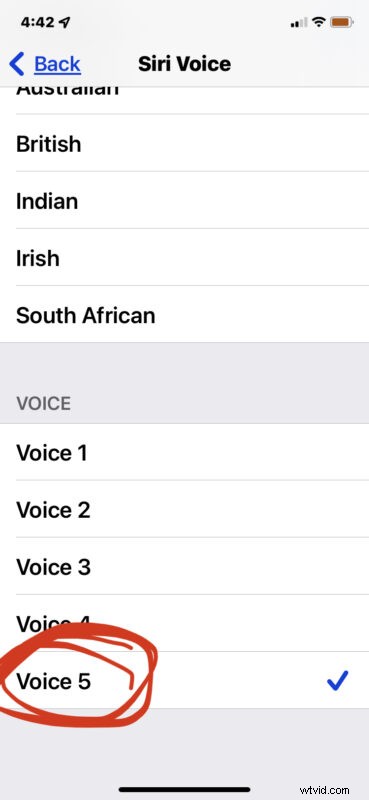
When you select ‘Voice 5’ you will hear the non-binary gender-neutral Siri voice right away.
This voice may be in the ear of the beholder. For some users, Voice 5 may sound feminine still. For other users, it may sound a little masculine still. For others, it will sound gender neutral, and be just right, like a goldilocks voice.
How to Use the Non-Binary Siri Voice on Mac
- From the Apple menu choose “System Preferences”
- Go to “Siri”
- Choose “Voice 5”
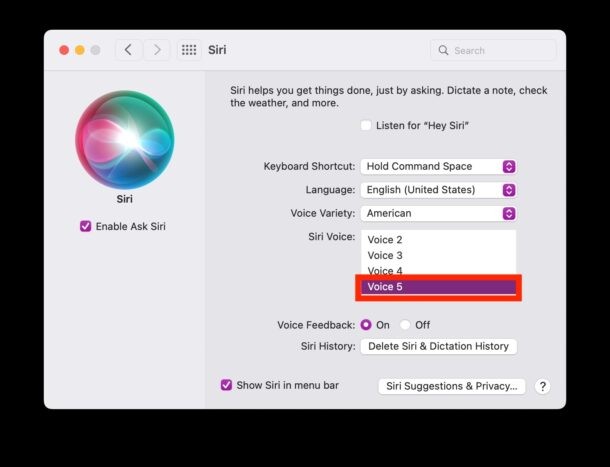
You will hear the Siri Voice 5 right away when you select it, so you can determine if it is the right voice for your Siri use on the Mac too.
If you’re already familiar with changing Siri voice on the Mac or iPhone, then this should not be a foreign process to you, except choosing the new voice option is different.
This is only available in modern versions of iOS and MacOS, from iOS 15.4 and later, and MacOS 12.3 or later.
🤰🫄🫃