
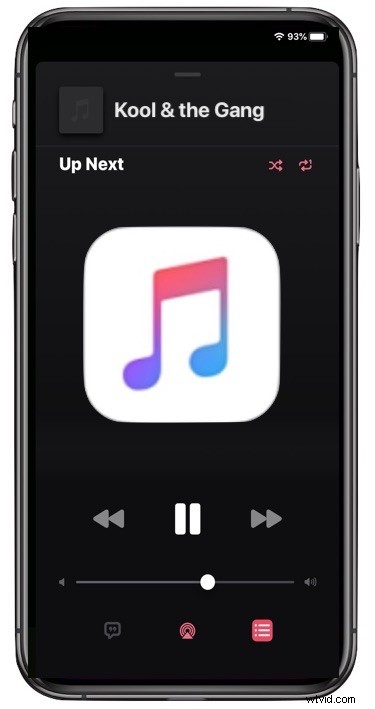
Wondering how to Shuffle music in the iOS 13 Music app on iPhone, iPod touch, or iPad? You might not be alone, because the Shuffle function has been relocated in the new Music app.
Let’s review where to find the Shuffle button and how to use the Shuffle feature in Music app for iOS 13 and iPadOS 13.
How to Shuffle in Music App in iOS 13 & iPadOS 13
- Open the Music app on iPhone or iPad and either play a song, album, or go to a playlist
- Tap the “Now Playing” section at the bottom of Music app screen
- Tap on the button that looks like three lines
- Tap on the “Shuffle” button near the “Up Next” label, it looks like two arrows that are intersecting one another

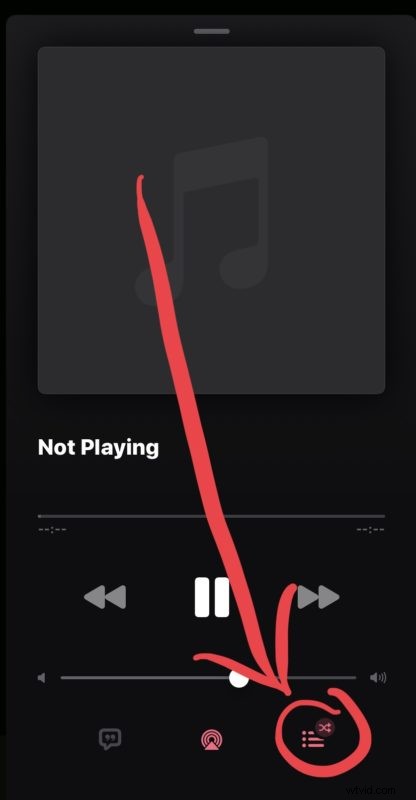
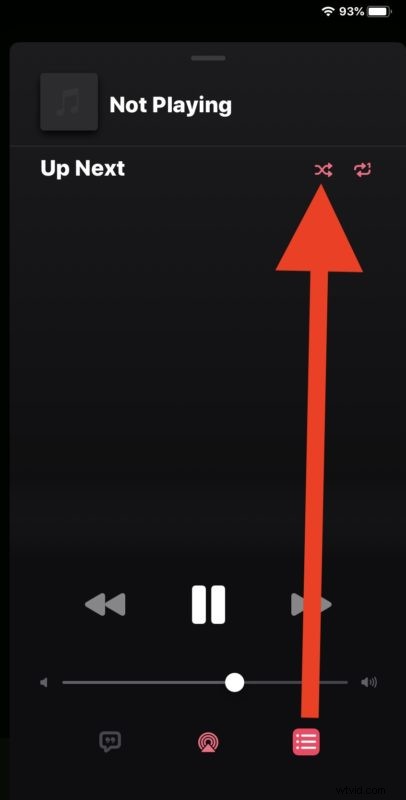
You can access the Shuffle button from anywhere that’s playing music, whether it’s an individual song, an album, or a playlist.
While you’re discovering where the new Shuffle feature is, you may have also noticed that the Repeat songs button in iOS 13 Music app is in the same location because it too was moved, so keep that in mind if you want to repeat a song or repeat an album.
This obviously applies to iOS 13 and later, but you may recall that prior versions of Music app have also relocated the Shuffle and Repeat buttons before too so the move is not unprecedented. It’s also possible that a future version of iOS and iPadOS will change the Music shuffle and repeat locations yet again, so don’t be too surprised if you look in a future version and discover that to be the case.
So if you thought the Shuffle button was removed in Music app of iOS 13 and iPadOS 13, think again, it has simply moved to a new location! And once you learn how to access it, it’s easy as ever.