
Your wedding day is a once‑in‑a‑lifetime celebration. Capturing those moments in a polished slideshow lets you relive the joy and share it with friends and family. Choosing the right tool can make the process effortless, even for beginners.
Why a Dedicated Slideshow Maker Matters
While any video editor can stitch photos together, a wedding‑focused application offers themed templates, intuitive drag‑and‑drop workflows, and smart AI features that save time and elevate the final product.
Top Three Creators for 2026
After extensive research and hands‑on testing, we’ve narrowed the field to three standout options, each catering to a different skill level and platform preference.
- Wondershare Filmora – Beginner‑friendly, cross‑platform, AI‑enhanced.
- Adobe Premiere Pro – Industry standard for seasoned editors.
- Final Cut Pro – Premium performance for macOS users.
Feature Comparison
| Feature | Filmora | Premiere Pro | Final Cut Pro |
|---|---|---|---|
| Platform | Windows & macOS | Windows & macOS | macOS only |
| Templates | Wide wedding library | Manual or 3rd‑party | Limited built‑in |
| Transitions & Effects | Pre‑built themed set | Customizable | Cinematic presets |
| Audio Tools | Built‑in music & editing | Advanced mixing | Logic integration |
| Speed for Quick Projects | Fast, lightweight | Heavier workflow | Efficient timeline |
| Rendering Performance | Good on modern PCs | GPU accelerated | Optimized for macOS |
| Customizability | Moderate | Extensive plugins | High with Motion |
| Ideal For | Beginners & semi‑pros | Professional editors | Mac pros & enthusiasts |
Wondershare Filmora – The Beginner’s Champion
Filmora combines a clean, drag‑and‑drop interface with powerful AI tools: background music generation, subtitle creation, and Image‑to‑Video transformation. Its 4K export and direct social‑media scheduling let you share your memories instantly.
- AI features: music, subtitles, voiceovers, text‑to‑video.
- Rich library of wedding templates and transitions.
- Smart masking, motion tracking, and keyframing.
- 4K export, social media scheduling, and a universal music library.
- Cross‑platform: Windows, macOS, Android, iOS.
Pros
- Fast rendering and an intuitive workflow.
- Competitive pricing with flexible plans.
- AI enhancements reduce editing time.
Cons
- Many premium assets require a subscription.
- Complex projects may trigger minor stability issues.
Pricing
See the official pricing page for subscription details.
Adobe Premiere Pro – The Professional Powerhouse
Premiere Pro is the industry standard for video editors. Its vast array of tools—unlimited tracks, advanced transitions, color grading, and integration with After Effects, Photoshop, and Audition—enables cinematic wedding slideshows.
- Unlimited audio/video tracks and multi‑cam editing.
- Native 4K/8K support with multiple codecs.
- Comprehensive color grading and scopes.
- Seamless Adobe ecosystem integration.
Pros
- Extremely powerful and flexible.
- Excellent color control and cinematic output.
- Seamless integration across Adobe apps.
Cons
- High learning curve for novices.
- Subscription‑only model (~$20.99/month per app).
- Heavier system requirements may slow simple edits.
Pricing
Subscription via Adobe Creative Cloud; trial available.
Final Cut Pro – The Apple‑Exclusive Performer
Final Cut Pro delivers lightning‑fast performance on macOS with a magnetic timeline and background rendering. Its extensive support for high‑resolution formats, 360° video, and professional color correction makes it ideal for wedding slideshows that demand cinematic quality.
- Magnetic timeline and background rendering.
- Support for 8K, 360° video, and multi‑cam.
- Professional color correction and video scopes.
- Extensible via Motion, Compressor, and third‑party plugins.
Pros
- Fast, efficient editing on Mac hardware.
- One‑time purchase ($299.99) with free updates.
- High‑resolution, cinematic output.
Cons
- macOS only.
- Steeper learning curve than entry‑level tools.
- Limited cross‑platform integration.
Pricing
Available on the Mac App Store for $299.99.
What to Look for in a Wedding Slideshow Maker
- Intuitive interface that feels natural right away.
- Pre‑made wedding templates to accelerate creation.
- Extensive transition and video effect libraries.
- AI tools that streamline music, subtitles, and photo‑to‑video conversion.
Based on these criteria, Filmora stands out as the most balanced choice for couples who want ease, creativity, and AI support.
Bonus: AI‑Powered Photo‑to‑Video Magic
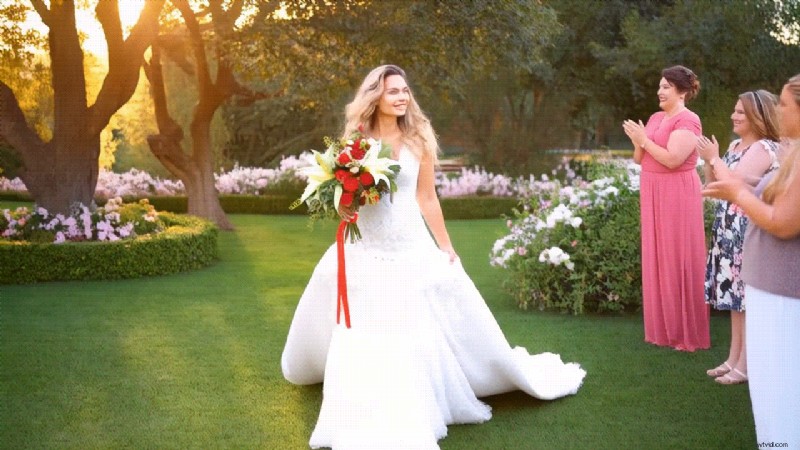
Filmora’s Image‑to‑Video feature transforms a single photo into a dynamic clip. Pick a template—such as “Dream Bride,” “Wedding Bride,” or “Wedding Groom”—and watch the AI animate your image in moments.


Conclusion
Whether you’re a seasoned editor or a first‑time bride and groom, the right slideshow tool can transform your wedding photos into a lasting keepsake. For most couples, Filmora offers the perfect blend of ease, creativity, and AI features. Professionals may prefer Premiere Pro’s depth, while Apple users will appreciate Final Cut Pro’s speed and ecosystem integration.
Start creating your wedding slideshow today and let technology help you celebrate the story of your love.