
To change the speed of your audio in Adobe Audition, you’ll have to use the Stretch and Pitch (process) effect.
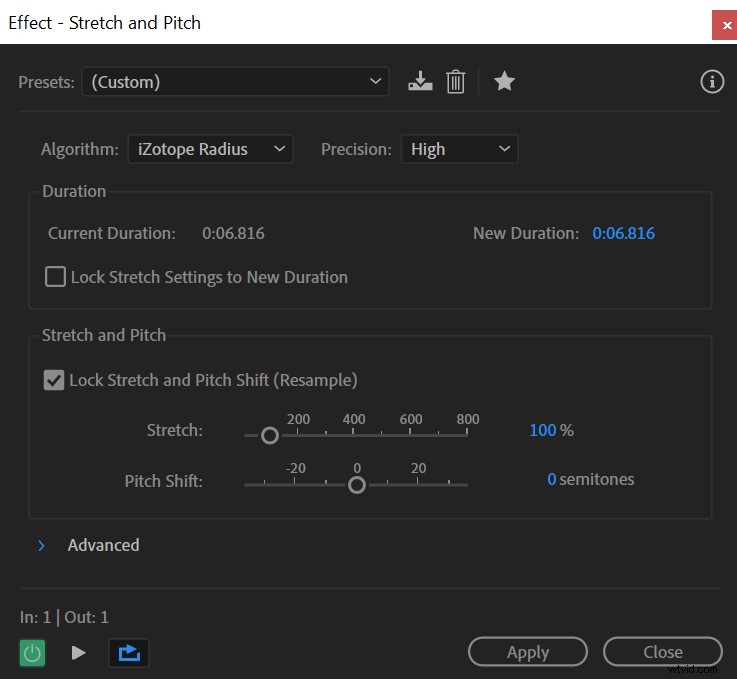 Stretch and Pitch effect in Adobe Audition.
Follow these steps to apply the Stretch and Pitch (process) effect:
- Select audio track
- Go to Effects->Time and Pitch->Stretch and Pitch (process)
- Adjust the Stretch parameter to control the speed of your audio
- Check the Lock Stretch and Pitch Shift (Resample) box to adjust the pitch of your audio simultaneously (Optional)
Using the Stretch and Pitch effect you have control over the speed of your audio and the pitch. By adjusting the Stretch below 100% you’ll speed up and shorten your audio; by going above 100%, your audio will stretch out and slow down.
Also, if you check the Lock Stretch and Pitch Shift (Resample) box the Stretch and Pitch Shift parameters will be locked and change simultaneously relevant to each other. Increasing the Stretch will lower the Pitch Shift and vice versa.
If you want a fading effect when using Stretch and Pitch, you can check presets at the top of the effect box, among which you’ll find a preset named Cutting Power. This preset will create a fade in effect.
Normal audio:
Slowed down audio after applying Cutting Power preset: