
REC

Recommended: Video Production, Editing & Gear Maintenance Guide

 WTVID >> WTVID >  >> Video Editing >> Adobe Audition

Customize Premiere Pro Transitions: A Quick Guide

Premiere Pro has a bunch of built-in transitions for both video and audio. All of these are available to be set as your default transition.

By default, your transitions are probably set to Cross Dissolve for video and Constant Power for audio. You can find your current default transitions by checking which transition effects have a blue highlight on them.

To change your default transitions in Premiere Pro, follow these steps:

  • Go to the Effects menu
  • Type in ‘transitions’
  • Click the right mouse button on the transition you wish to be set as your default
  • Choose Set Selected as Default Transition.
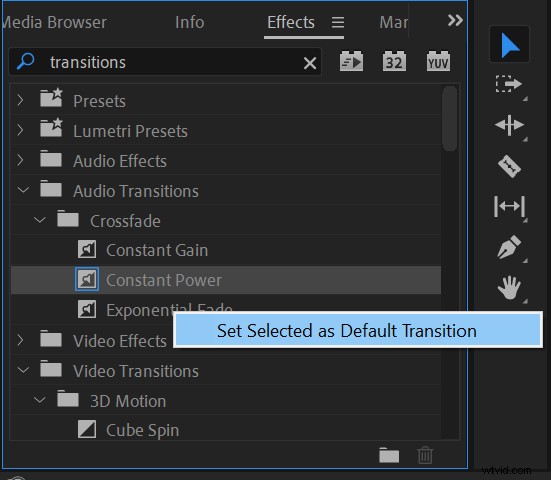
Customize Premiere Pro Transitions: A Quick GuideChanging default transition in Premiere Pro.

Also, you can change the length of your default transition by going to Edit->Preferences->Timeline and adjusting the time on Video Transition Default Duration and Audio Transition Default Duration.
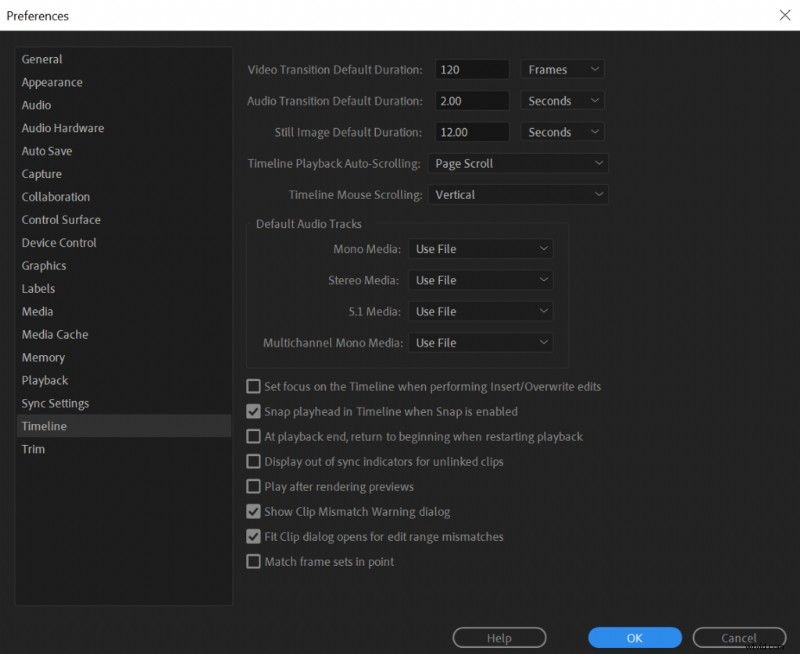
Customize Premiere Pro Transitions: A Quick GuideAdjusting default duration for video and audio transitions in Premiere Pro.
  1. How to Eliminate Noise in Audio Recordings: Expert Tips for Crystal-Clear Sound

  2. Audacity Safety & Security: A Comprehensive Review for Voice Over Artists

  3. How to Eliminate Background Noise in Audacity: Step-by-Step Guide

  4. Unlocking Exceptional Actor Performances: A Director's Essential Guide

  5. WAV: The Highest Quality Audio Format for Unmatched Clarity

Adobe Audition
  1. Craft Stunning Custom Lightroom Presets for Portraits: Step-by-Step Guide

  2. How to Restore Old Photos: Expert Step-by-Step DIY Guide

  3. How to Create a Stunning Grunge Effect on Portraits in Lightroom: Step-by-Step Guide

  4. Expert Tips: Capturing Stunning Winter Snowdrop Photos (and Other Flowers)

  5. Instantly Merge Multiple Images in Photoshop: Quick Pro Tutorial

  6. 5 Expert Tips to Set Up a Home Studio for Stunning Dramatic Portraits

  7. Create Stunning 'Soft Portrait' Presets in Lightroom 4: Step-by-Step Guide

  8. Photoshop Tutorial: Create Realistic Glass Window Reflection Effects