
Everyone has one, but does everyone know how to take photos with their point and shoot or Iphone that will truly amaze and wow people?
These days they are literally everywhere – cameras that is. We got big ones, small ones, expensive ones, cheap ones, and even some pretty darn good ones in our phones! This is an exciting time, where technology has advanced to a point that we can have devices small enough to fit in our pocket that can take a magnificent photo. Do you take many photos with your point and shoot or iPhone that make you go “WOW”? Well you certainly can, and that’s what we are going to talk about today. There are many ways we can all learn to take a better photos but I don’t want to overwhelm anyone with techie details or things that give you a headache from data overload – so let’s keep it simple. Here are some quick tips on how you can still just “point and shoot” but take far better images.
1. Composition is everything – What is composition? Quite simply, how did you “compose” the photo, where did you place your subject in the overall frame of the photo? How interesting is the picture? These all relate to composition. There are two distinct ways everyone can improve on their composition, they are:
Use angles – To make a photo more interesting use some different angles, get high and look down, get down low and look up, sometimes a slight tilt to the camera can give an interesting effect. Remember we all see life straight ahead so viewing life in a photo from a different angle creates interest.
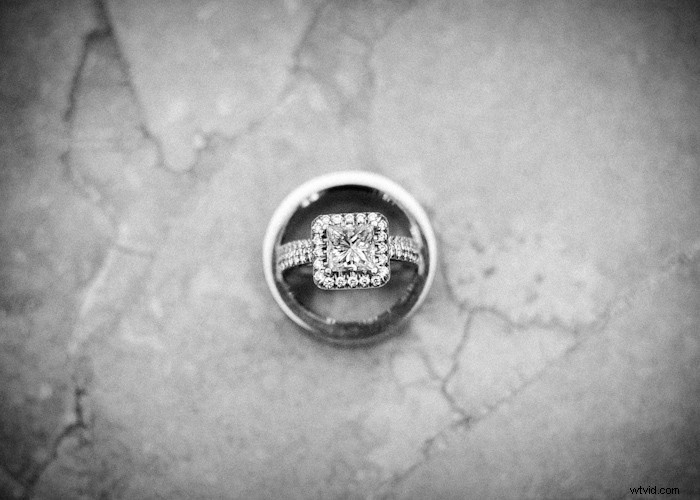
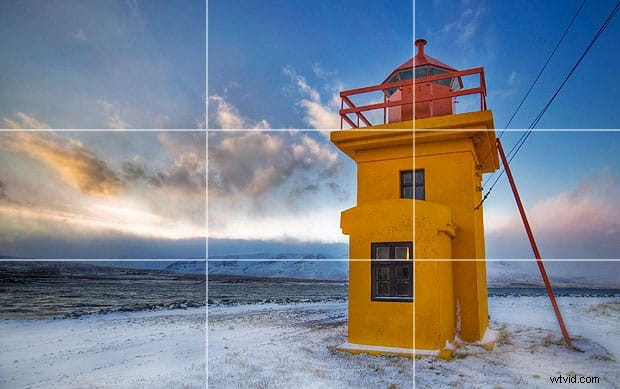
Framing the shot – Having your subject dead center in the frame gets boring. It makes what could be a great photo very simple, traditional and snapshot like. Using the rule of thirds can drastically add some creative and artistic value to your image and even make an otherwise average photo suddenly become a very cool shot! The rule of thirds divides the viewfinder into a 3×3 grid and recommends composing your photo with your subject at any intersection of any two lines in the grid as shown in the photo below. If you haven’t ever thought of this, give it a try – I think you’ll be impressed!

2. Flash – Lighting is everything in photography. Do your photos ever seem “dull” outside and not as vibrant? When inside do your photos seem to “flashy”? On small compact cameras and also smartphones – the flash is a terrible one, even more so with smartphones where it’s an LED light. Without getting too technical, the flash on these cameras is too close to the lens and as a result it’s very harsh, unflattering lighting. But when you are outdoors that flash does more help than harm and quite often is underutilized. By using flash outside in the daylight you are filling in the shadows on your subjects but not overpowering the overall scene – thus keeping the rich colors in the sky or landscape. This is called “fill-flash”. When indoors however, try to use the flash less often. If its daylight still, having your subject stand near a window may provide nice natural light and you can retain that nice soft light be turning your flash off on your camera. The more you can use your camera without flash when indoors, the better.

3. Use Preset Camera Modes– Preset camera modes make it easy for anyone to take better photos with the twist of a dial, these modes below would be the most useful in everyday usage.
Macro – Use this mode when wanting to take a photo really up close, it will enable the camera to still focus.
Landscape – Use this mode when you want a lot of the photo to be sharp and in focus, it changes the aperture of the lens to have a greater depth of field (more in focus)
Portrait – Use this mode when taking people photos and you want more of the background behind your subject out of focus. This lets the subject stand out from the background more.
4. Edit your Photos – In optimal lighting conditions most photos won’t require any editing or color correcting, but more times than not, we don’t have optimal lighting. Doing some basic photo editing, especially on your favorite images can really enhance the photo and make your good photo an excellent one. Some common and quick edits that anyone can do would be, adjusting the contrast, exposure or brightness, cropping & converting to black and white, sepia or any other “effect”. For smartphone users, the Instagram app is an easy way to make the most “normal” shots with a phone look like works of art!


5. Shoot more – The greatest benefit of having a camera that can fit in your pocket or already be included in your phone is accessibility. Take advantage and always keep your eyes open for an interesting photo. Even when amongst family or friends, be ready to take some candid photos and not only the posed “say cheese” type of photos.
Here are just a few of some of my favorite quick snaps I have taken with my trusty Iphone.



With these 5 quick tips I am confident that you can start taking photos that are more interesting, exposed better and overall have more “Wow factor” to them. Also if you want to see more of my daily adventures taken with only my Iphone you can go here and if on Instagram you can follow me at: colejosephphoto
Also if you want to read more about Instagram and what photographers think about this trendy new app check out our blog post here.
I really hope you enjoyed this tutorial, if so, please support the site and make sure to sign-up to our mailing list right here to receive more exclusive FREE tutorials, tips and giveaways!
Thanks,
Cole