
Reading Time: 8 minutes
Published: December 19, 2025

What Is Bit Depth?
Bit depth represents the number of discrete brightness and color values that a video or image file can store per channel. The higher the bit depth, the smoother the gradients, the more color grading headroom, and the lower the risk of banding, posterization, or abrupt transitions.
Bit depth is often mistaken for other technical terms. Here’s the clear distinction:
- Resolution – the total number of pixels (megapixels, pixel dimensions).
- Bitrate – the amount of data per second that a codec writes; it governs compression.
- Bit depth – the number of tonal steps each channel can represent.
Bit Depth in Numbers
In practice, video bit depth is usually expressed as 8‑bit, 10‑bit, or 12‑bit. These figures refer to bits per channel, not the combined pixel value.
- 8‑bit – 256 steps per channel (2⁸).
- 10‑bit – 1,024 steps per channel (2¹⁰).
- 12‑bit – 4,096 steps per channel (2¹²).
For an RGB image, each channel’s steps multiply, so 8‑bit RGB can display 256 × 256 × 256 ≈ 16.7 million colors.

Bit Depth and Colors demonstrates how additional bits expand tone steps per channel, resulting in smoother gradients. Image credit: FilmDaft.com
Most consumer and professional footage is encoded in Y’CbCr (luma + chroma) with chroma subsampling (e.g., 4:2:0, 4:2:2) and often uses a legal or limited range. For a refresher on these terms, consult the FilmDaft cinematography glossary.
Ultimately, higher bits per channel mean finer tonal resolution and smoother gradients, especially when you perform color grading or work in wide‑gamut or HDR workflows.
Where Bit Depth Appears in the Pipeline
Bit depth can be defined at several stages, but the most critical point is the recorded file.
- Sensor & ADC – the camera’s conversion of light into digital numbers.
- Internal processing – precision maintained during demosaicing, color transforms, sharpening, and noise reduction.
- Recorded bit depth – the depth preserved in the codec or RAW file.
- Output/display bit depth – the precision your monitors and playback devices can show.
Consequently, a camera can internally operate at 12‑bit yet still write an 8‑bit file in certain modes.
Seeing Bit Depth on Screen
The most obvious way to spot bit‑depth limits is a smooth gradient, such as a sky fading from bright white to deep blue. With insufficient steps, you’ll notice visible stripes or rings—banding.
Banding becomes more pronounced after aggressive color grading:
- Boosted contrast
- Increased saturation
- Shadow lifts
- White‑balance shifts or tint adjustments
Starting with 8‑bit often leads to banding sooner, while 10‑bit or 12‑bit files usually hold up better under the same adjustments.
Why More Steps Provide Greater Grading Headroom
Color correction reshapes value ranges—stretching some areas while compressing others. If a region has few stored steps, stretching it will expose gaps as banding or posterization. Higher bit depth offers more available steps, keeping gradients smooth even after significant adjustments.
This principle underpins the reliance on dedicated colorists and tools like vectorscopes in professional pipelines.
Quick Reference Table
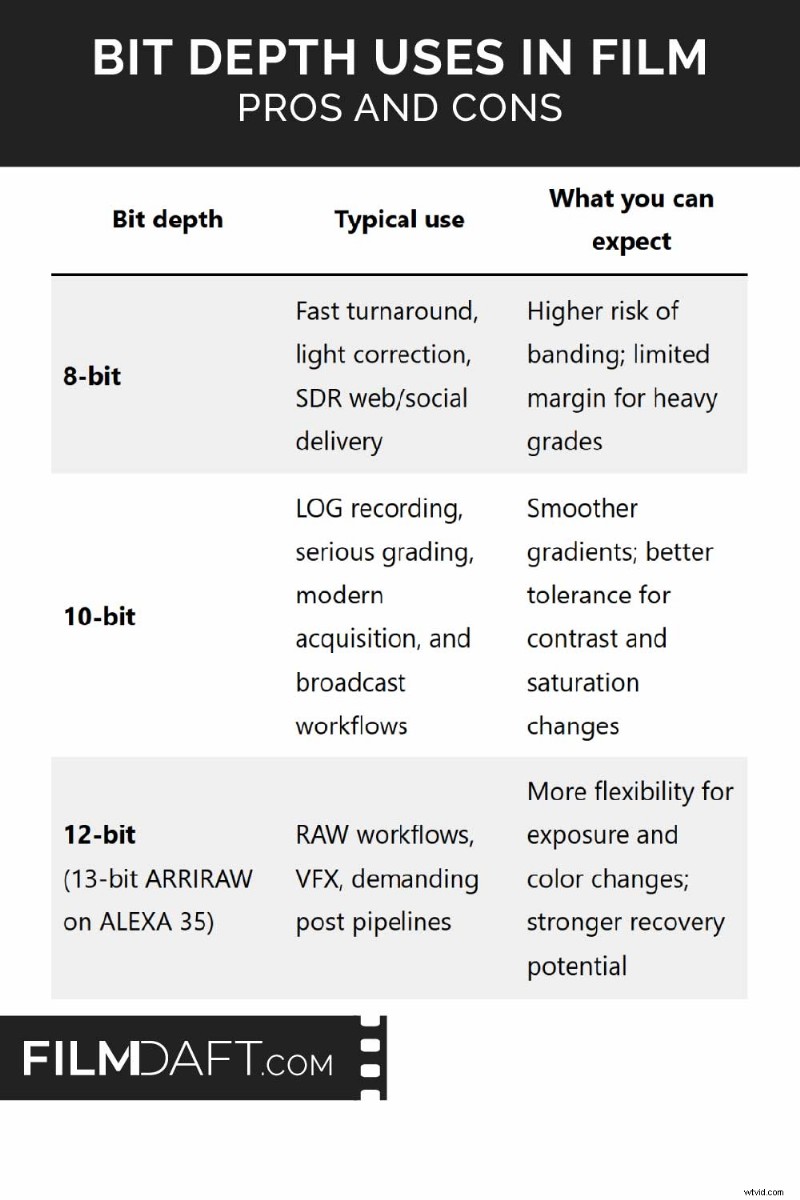
Bit Depth Uses in Film compares 8‑bit, 10‑bit, and 12‑bit recording (with a note on 13‑bit ARRIRAW on ALEXA 35), illustrating typical use‑cases and grading impacts. Image credit: FilmDaft.com
Which Bit Depth Should You Shoot?
Choose a recording mode that aligns with your post‑production needs:
- Minimal grade, SDR delivery, fast turnaround: 8‑bit can suffice if exposure and white balance are nailed.
- LOG recording with significant grading: 10‑bit (often 4:2:2) protects against banding and preserves skin tones.
- Heavy exposure recovery, VFX, green‑screen: prioritize 12‑bit or RAW for maximum flexibility.
- HDR mastering: 10‑bit is a practical minimum; 12‑bit/RAW aids complex highlight roll‑offs and intricate gradients. Refer to Rec.709 vs DCI‑P3 vs Rec.2020 for cross‑standard work.
Why 10‑bit Is the Industry Baseline for Grading
While 10‑bit doesn’t eliminate banding, it dramatically reduces its likelihood during heavy contrast or saturation adjustments. It’s the sweet spot for LOG workflows and most post‑production scenarios.
- Solid exposure: 8‑bit may suffice.
- Strong contrast moves or careful skin‑tone work: 10‑bit is safer.
- Extensive exposure recovery or RAW: 12‑bit and above become valuable.
For example, a night exterior with neon highlights and deep shadows demonstrates how 12‑bit preserves gradient fidelity when lifting shadows.
Banding Can Still Appear at Higher Bit Depth
Bit depth is a key factor, but other elements can introduce artifacts:
- Heavy compression can create banding and blocking—bitrate choices matter.
- Aggressive in‑camera noise reduction can flatten gradients.
- Extremely clean gradients (skies, painted walls) make steps more visible.
- Display or monitoring limits can exaggerate banding.
- Adding fine noise or dither can mask banding by breaking up smooth steps.
Practical Fixes to Reduce Banding
- Record with a higher bitrate, intraframe codec, or a better codec family.
- Avoid excessive in‑camera smoothing (noise reduction, sharpening).
- Expose cleanly—avoid underexposing LOG and then aggressively lifting shadows.
- Add a subtle amount of grain or dither before heavy gradients in post.
If banding appears mainly after export, review your encoding settings. A checklist for high‑quality export with small file sizes can help you choose the right codec and bitrate.
Bit Depth in LOG, RAW, and HDR Workflows
LOG Video
LOG formats flatten tones to preserve highlight detail, with contrast restored in post. Low bit depth can cause banding during this reconstruction, which is why LOG is commonly paired with 10‑bit recording.
RAW Video
RAW preserves high precision and allows large exposure and white‑balance adjustments. Higher bit depth is especially beneficial when making significant corrections, particularly in shadows and saturated areas.
HDR Delivery
HDR magnifies subtle gradient changes. Higher bit depth helps maintain smooth skies, practical lights, and fade‑through highlights in HDR masters. Understanding the underlying color space (Rec.709 vs Rec.2020) is essential.
Interpreting Camera Spec Lines
A spec like “10‑bit 4:2:2, 400 Mbps” describes:
- 10‑bit – tonal precision per channel.
- 4:2:2 – chroma subsampling ratio.
- 400 Mbps – bitrate, indicating compression level.
All three components should align with your project needs.
Bit Depth vs. Dynamic Range
- Dynamic range – the sensor’s capture span from shadows to highlights.
- Bit depth – the resolution of tones within that span.
A camera may capture a wide dynamic range, but recording it in low bit depth compresses that range into coarse steps, making banding more likely when contrast is applied.
Bit Depth vs. Chroma Subsampling
- Chroma subsampling controls color detail relative to brightness (e.g., 4:2:0, 4:2:2, 4:4:4).
- Bit depth controls the precision of each stored value.
For green‑screen keying, 10‑bit 4:2:2 provides cleaner color separation than 8‑bit 4:2:0, aiding keying quality.
Bit Depth vs. Bitrate
- 10‑bit at a very low bitrate can still look blocky due to compression.
- 8‑bit at a high bitrate can look sharp but still show banding.
When comparing recording modes, evaluate bit depth and codec settings together. For online delivery (YouTube, social media), start with bitrate fundamentals and then verify export settings.
When Bit Depth Matters Most
Bit depth is crucial when color fidelity and smooth gradients are paramount. Typical scenarios include:
- Skies and soft walls with gentle gradients.
- Heavy color grading that reshapes contrast.
- Mixed lighting with complex skin tones.
- Green‑screen and VFX work.
- HDR masters with visible highlight transitions.
References and Standards
- ITU‑R BT.709 – HD color system.
- ITU‑R BT.2020 – UHD wide‑gamut color system.
- ITU‑R BT.2100 – HDR reference.
- SMPTE ST 2084 – PQ transfer function for HDR.
- Your camera and codec documentation (bit depth, chroma subsampling, bitrate, HDR/LOG specifics).
Key Takeaways
- Bit depth = steps per channel (8‑bit = 256, 10‑bit = 1,024, 12‑bit = 4,096).
- Banding is most visible in smooth gradients after heavy grading.
- For LOG and serious color work, 10‑bit is the safer baseline.
- Bit depth complements bitrate—compression can still degrade gradients.
Read Next: Master the fundamentals of camera work—from lenses and lighting to exposure and movement.