
Did you know that studies have shown that 80% of videos on social media are watched while on mute? That’s why it’s no longer just an option to add subtitles to your videos — it’s a necessity. But the truth is many people skip the step of adding subtitles because it’s too labor-intensive… or they’re just not sure how to do it.
If you want to save yourself the hassle of transcribing your videos (or the money you’d spend hiring a virtual assistant to do it for you), then it’s time to learn how to auto-subtitle your videos. We’re here to show you how it’s done in 3 easy steps!
How to Auto-Subtitle Your Videos (in 3 Simple Steps)
Zubtitle’s simple online video editor makes it easy to auto-subtitle your videos. Just follow these 3 easy steps:
1. Upload Your Video
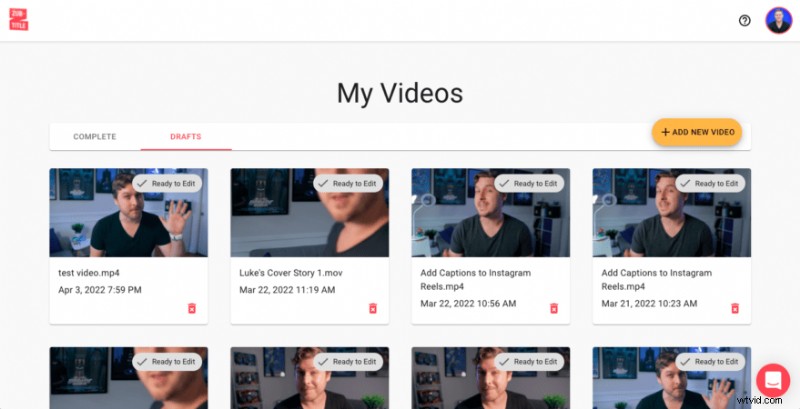
Once you’ve logged into your Zubtitle account (or created a new one), you can upload your video by clicking the yellow “Add New Video” button on the right-hand side of the screen.
2. Edit Your Subtitles
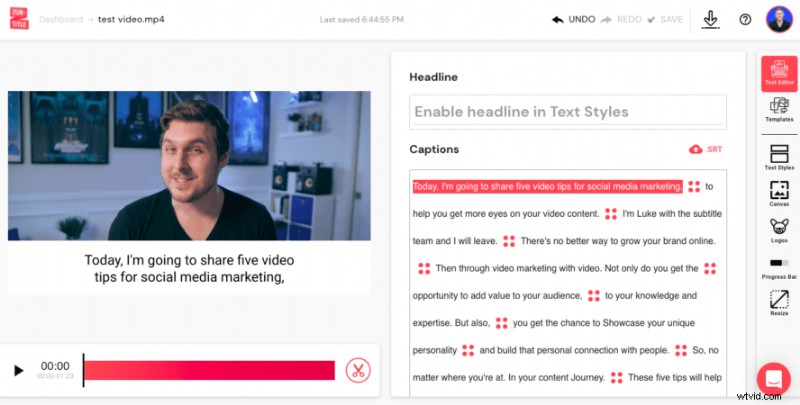
Once you’ve uploaded your video, Zubtitle will automatically transcribe all of the audio from your file and generate timed subtitles. Even though our state-of-the-art software might seem like magic, it’s not infallible. So make sure you review your subtitles to make sure everything is correct.
3. Style Your Subtitles
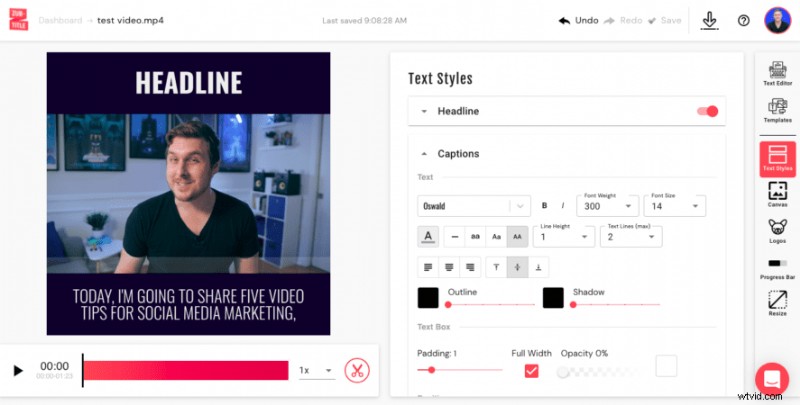
You’re almost done! All that’s left is for you to decide how you want your subtitles to look. When you select the Text Styles menu, you'll be able to choose a font (or upload a custom font), change the font size/color, adjust the text box, and more. You can also fine-tune the positioning of your subtitles. Then you’re all set to render your new auto-subtitled video!
Do you want to auto-subtitle your videos?
Sign up for a free Zubtitle account and start creating today!