
It could take a long time to share a song in WAV format with your friends. So how to make WAV file smaller? Here suggest using a WAV compressor to reduce WAV file size. This post will show you how to compress WAV file with WAV compressors.
A WAV file is raw and uncompressed audio which is very easy to process and edit. However, the drawback is it takes much storage space on mobile devices. Thus, you may need to reduce WAV file size by compressing it. Here are 3 ways to help you compress WAV files.
Top 3 WAV Compressors to Compress WAV Files
- ClipCompress
- Compress.com
- Aconvert
If you want to convert WAV to MP3, MiniTool MovieMaker might be a good option.
1. ClipCompress
As its name suggests, ClipCompress is an online file compressor that can compress WAV, MP3, image, video, PDF, Word, PowerPoint, Excel and APK for free. This tool can work in any modern web browser including Google Chrome and Mozilla Firefox. By using this service, you can compress WAV files as many as you can.
Remember, the maximum size of the uploaded WAV file is 50 MB.
Here’s how to compress a WAV file.
Step 1. Open the web browser and enter the ClipCompress website.
Step 2. Upload the WAV file by clicking on Select File to Compress.
Step 3. It will take a few seconds to compress the WAV file.
Step 4. After that, you can download the compressed WAV file from the website.
2. Compress.com
This WAV compressor can be used to compress WAV, M4A, AAC, OGG, AMR, WMA, AU, AIFF and many more. In addition to reducing audio file size, you can also use it to shrink the size of videos, audio files, images and documents. What’s more, this tool comes with 11 languages.
Follow the steps below to learn how to compress WAV file online.
Step 1. Head to Compress.com and choose the Audio option in the left panel.
Step 2. On this page, you are allowed to change the overall audio quality and set the audio bitrate and sample rate.
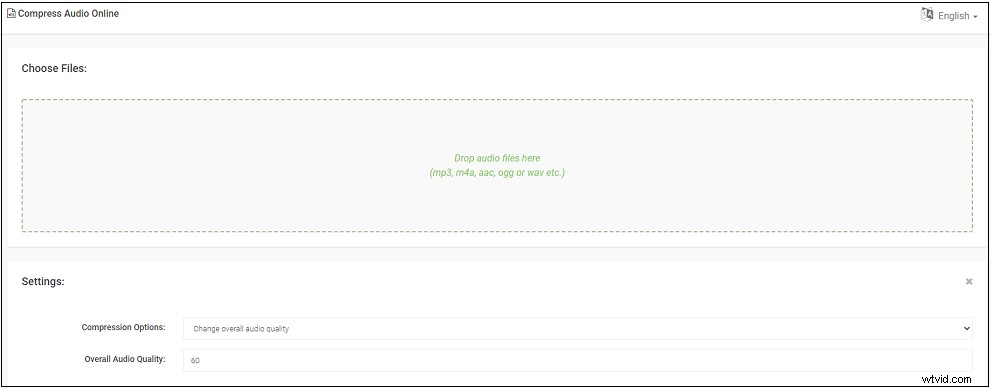
Step 3. Afterward, choose the WAV file you want to compress from local. Then it will automatically compress the WAV file.
Step 4. When the audio compression is done, click on the File information icon to download it or save this file to Google Drive or Dropbox.

Related article: The Top 4 Ways to Compress MP3 Online.
3. Aconvert
Aconvert is a powerful online file converter that supports converting videos, audios, images, eBooks and so on. Also, it can be used to reduce audio file size by changing the audio bitrate and sample rate. The imported audio format can be WAV, MP3, WMA, AU, AIFF, M4A, MKA, RA, etc.
Here’s how to compress a WAV file with Aconvert.
Step 1. Open the Aconvert website and tap on Audio.
Step 2. Upload the target WAV file from the computer.
Step 3. Choose the WAV format as the target format.
Step 4. Change the audio bitrate and sample rate. Then click on Convert Now.
Step 5. When the conversion is over, click the download button to save the converted WAV file.
Conclusion
All of these WAV compressors are free to use and has no limitations. With them, you can compress WAV file effortlessly!