
It’s worthwhile to collect idol’s valuable videos, while Vlive can’t support download and only paid V+ are downloadable. Below are 3 free online Vlive downloaders for you, without installation, and support any platform to use. If you want to edit the downloaded video, try MiniTool MovieMaker.
What Is Vlive
Vlive, a famous Korean live video streaming site, which invites many K-Pop stars to establish their channel in Vlive, frequently provides chances with fans to make live chat with their band idol. It’s really a great platform for idolaters and serves as a symbol of Korean popular culture.
It has been available for many countries and offers different language subtitles. However, you can’t download Vlive interesting videos that just can be watched online. So how to download Vlive video? How to download video in Vlive with subtitle? The following online Vlive downloaders may help you.
Top 3 Vlive Downloaders
These recommended 3 Vlive Downloaders are all web-based and easy-to-use, which can be easily available for both PC and mobile phone.
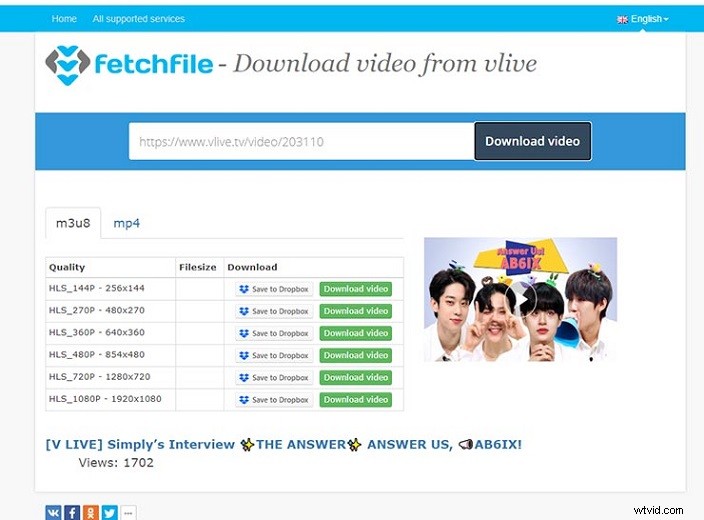
FetchFile
FetchFile is a free website that allows downloading video from Vlive with ease. As an online Vlive download, it offers quick download speed and easy-to-use interface. You just need to paste the video link to the pasted frame, and it can help you quickly extract video. Furthermore, it supports downloading in different quality (480p, HD, FullHD, UltraHD) and formats (MP4, WebM, X-FLV, MP3, WAV).
Otherwise, it can apply to most video streaming websites to download their videos, such as YouTube, Facebook, FOX, etc. which is a cross-platform video downloader that also supports diverse languages.
9xbuddy
9xbuddy is an easy and quick way to download videos from Vlive, which can quickly extract the video according to your pasted link. Similar to FetchFile, you can choose the video quality from 270P to 1080P HD, while it can’t support various formats and only has the MP4 format.
After looking through its home page, you can also find it virtually can be used to download other sites’ videos, such as YouTube. Besides, it provides a shortcut to quickly download video from Vlive. The simple method is to add an affix 9xbud.com/ to the link (in front of the http), and you can directly jump to the 9xbuddy’s download page.
Savieo
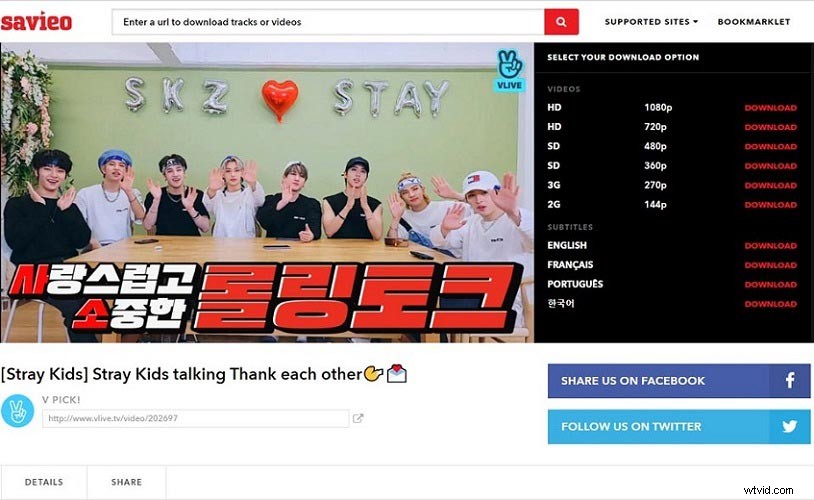
Different from the previously recommended Vlive video downloaders, Savieo supports downloading subtitles as long as subtitles are available in the original Vlive video, which makes Savieo have an edge over other Vlive downloaders. Savieo also offers different quality options for download.
How to Download Vlive Videos
With the help of the above Vlive downloaders, it so easy to download video in Vlive with subtitles. Let’s take Savieo as an example to make a simple guide about how to download Vlive videos.
Step 1. Find the Vlive video you want to download, and copy the video URL from the address bar. Then paste the link to the search frame on the top of Savideo’s home page. Then click the Search icon.
Step 2. When entering into the download page, different quality and attached subtitles would be arranged on the right side. Choose one quality and click the DOWNLOAD button to open the new tab in your browser.
Step 3. In the right bottom of the new tab, left-click the third icon and tap on the pop-up Download button to save the Vlive video.
Related article: 3 Online Tools Help You Download Bilibili Video Easily
Bottom Line
Have you mastered these three Vlive downloaders? They are very useful online tools and you can make good use of them to easily extract video from many video streaming sites, not just Vlive. If you have any questions or suggestions about it, please let us know via admin@wtvid.com or share them in the comments section below.