
Nicovideo, also known as Niconico, is one of the most anime websites in Japan. Want to download your favorite anime video from Nicovideo? Fortunately, this post will detail 3 practical and free Nicovideo downloaders to help you do that. Besides, you may need MiniTool MovieMaker to edit the downloaded videos.
Nicovideo, also known as Niconico or Nikoniko, is a popular Japanese online video-sharing platform. It’s one of the most visited sites in Japan and you can find tons of Japanese videos from anime to TV shows there. In this post, we’ll delve into the details on how to download Niconico videos.
Top 3 Best Nicovideo Downloader
- VideoSolo Online Video Downloader
- Video DownloadHelper
- WonderFox Free HD Video Converter Factory
VideoSolo Online Video Downloader
For the best NicoVideo Downloader, we’d like to recommend VideoSolo Online Video Downloader. This online tool supports free downloading videos from more than 1,000 websites. It is a perfect NicoVideo downloader that allows you to easily download videos from NicoNico in your preferred video format and quality, including Niconico to MP3.
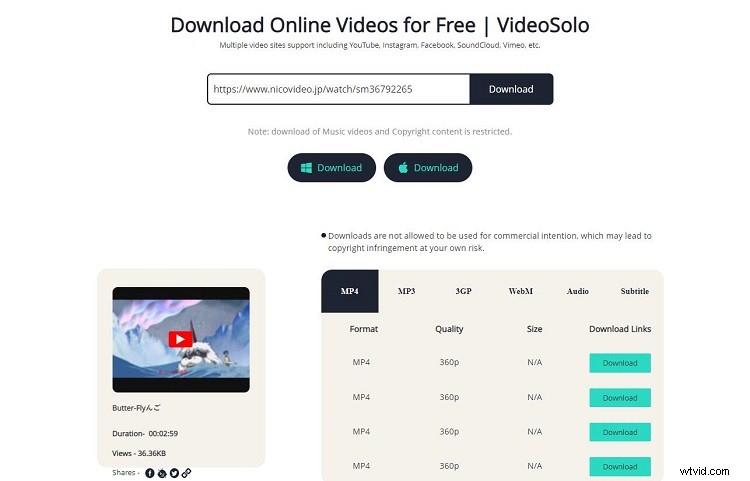
- Go to the Nicovideo site on your browser, open the video that you’d like to download, and copy its URL.
- Open a new tab and visit VideoSolo Online Video Downloader.
- Then paste the URL into the download box and click the Download button.
- The program will analyze the link and fetch the video at once.
- After analyzing, you can choose which type and format you want to save the video in and click the Download button.
- Then it will start downloading your video.
Note: Downloading music videos and copyrighted content is restricted.
Video DownloadHelper
For those who prefer to download Niconico videos without third-party software, using Video DownloadHelper is also a good choice. This extension can help you free download any video from Nicovideo on Chrome or Firefox.
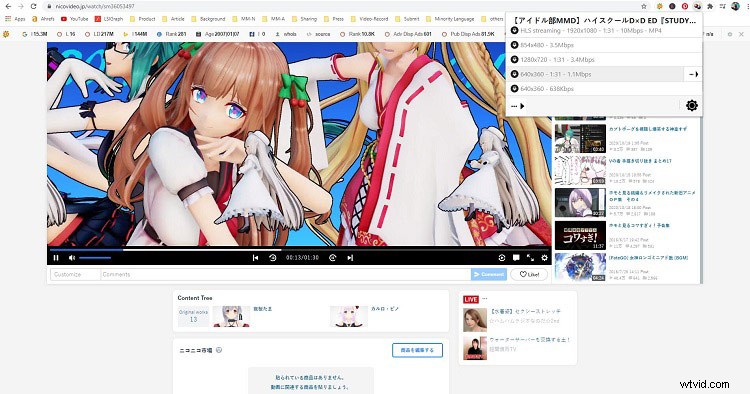
- Find out Video DownloadHelper on the chrome web store and then click Add to Chrome > Add extension.
- Once Video DownloadHelper is installed, you will see a new icon in your browser’s toolbar.
- Open the Nicovideo site and search for the video that you want to download.
- Click the target video and play it, and then you will find the Video DownloadHelper icon turns colorful.
- Simply hit the icon and the video will be displayed in the pop-up window.
- Choose your preferred video quality and click the Quick Download button.
Related article: How to Download Wistia Videos – 3 Practical Tools
WonderFox Free HD Video Converter Factory
The last Nicovideo Downloader on the list is WonderFox Free HD Video Converter Factory. It is a powerful desktop software that provides outstanding video downloading as well as converting services for people to grasp videos from online platforms easily.
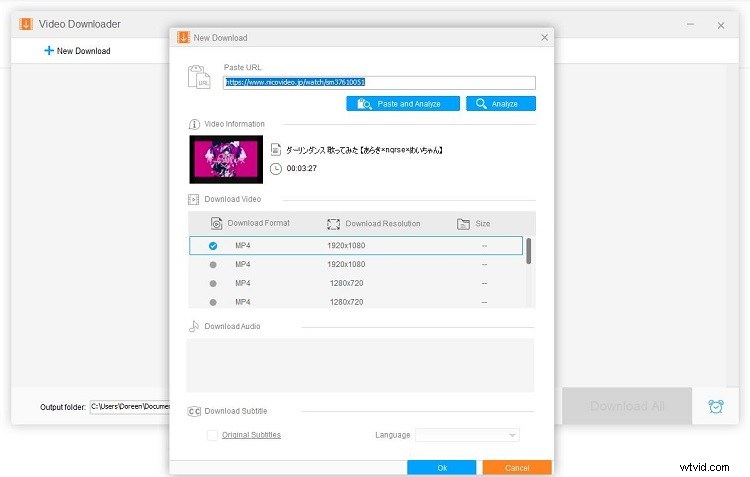
- Go to Nicovideo.jp on your browser and copy the URL of your desired video.
- Free download, install and launch VideoHunter on your PC.
- Click the Downloader section and click the New Download option on the top of the software.
- Paste the URL that you copied and click the Paste and Analyze option.
- Choose your desired video resolution and click OK.
- Browse the output folder to specify the output path for the downloaded Niconico video.
- Finally, click the Download All button.
Bottom Line
The above have present 3 available and workable methods for you to download Niconico videos to your device for offline watching and enjoyment. Which one do you prefer?
If you have any questions or suggestions about it, please let us know via admin@wtvid.com or share them in the comments section below.