
It’s hard to download JW player videos from website. You tried lots of video downloaders, but none of them works. Do not stress out, this post offers serval effective methods to help you download JW player videos painlessly. Need to convert video to MP3, try MiniTool MovieMaker released by MiniTool.
JW player is designed for embedding videos into webpages, which is used by many video hosting platforms. When you find a video and want to save it, right-click on this video and receive the message “About JW Player…”.
So how to solve this problem? How to download video from webpage? Continue to read this post and find the answer.
Note: Downloading copyrighted videos could put you at risk.Solution 1. How to Download JW Player Videos on Chrome
For Chrome users, here give you two methods.
Inspect Element
The easiest way to download JW player videos is using Inspect Element. Below are the detailed steps on how to download JW player videos.
Step 1. Open the website where the JW player video is located.
Step 2. Right-click on this webpage and choose the Inspect Element (or Inspect) option.
Step 3. Then go to Network> Media.
Step 4. Press the F5 key to refresh the webpage and play the video.
Step 5. Later, you will see an MP4 file shows in the box. Right-click on it and open it in a new tab. After that, this JW player video will be downloaded automatically.
Video DownloadHelper
Want to download JW player videos quickly? Try the best JW player video downloader - Video DownloadHelper. It works with both Chrome and Firefox browsers.
Here’s how to download JW player videos.
Step 1. Install Video DownloadHelper from Chrome Web Store.
Step 2. Play the JW player video that you want to download.
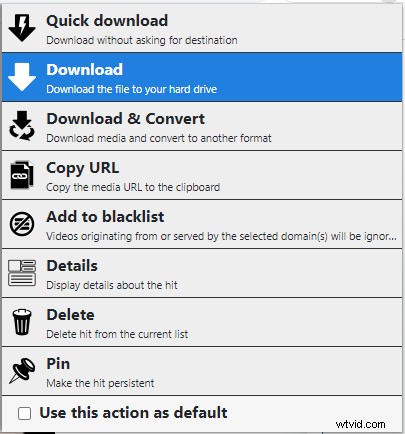
Step 3. Click on the extension icon and click the three dots to choose the Quick download or Download option.
See also: The Top 4 Ways to Download Embedded Videos.
Solution 2. How to Download JW Player Videos on Firefox
For Firefox users, here offer you two ways.
Page info
Take the steps below to download JW player videos.
Step 1. Open the video in the browser and right-click its webpage.
Step 2. Choose the View Page Info option and go to Media.
Step 3. Then select the video file and right click it to save it by choosing Save As….
IDM
Internet Download Manager (IDM) also can help you download JW player videos.
Here’s how:
Step 1. Download and install IDM.
Step 2. Open the webpage where the video is located.
Step 3. Then choose the Download This Video button to download the video from webpage.
How to Download HLS Streams from JW Player
If the above methods still can’t download the JW player video, then this video may use HTTP Live Streaming. Therefore, there is no direct way to download it.
At this time, using a screen recorder is simpler. Here recommend Screencastify. By using it, you can record any video on the web and edit it online. Also, it can save the video to Google Drive automatically.
Conclusion
That’s all about how to download JW player videos on Chrome and Firefox browsers. After reading this post, you must know how to download video from webpage. Now, it’s your turn!