
When it comes to making high-quality vlogs, there are two things you need: An HD video camera and a professional vlog video editor. Here, we will detail the 5 best vlog editing software, including MiniTool MovieMaker. Whether you’re a novice or a professional, you can easily produce captivating vlogs.
If you’re curious about how to edit a vlog, what video editing software do vloggers use, or what is the best vlog editing software, continue to read. Here are the 5 best vlog editors. Both free and paid programs are covered.
MiniTool MovieMaker
Price: Free
Compatibility: Windows
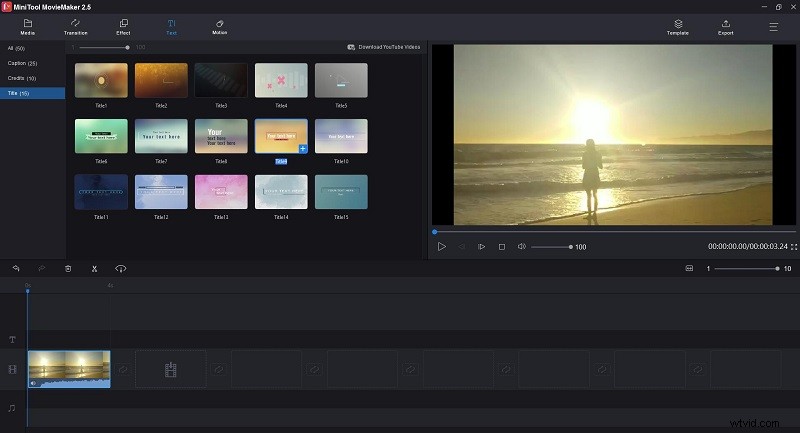
Are you looking for easy-to-use vlog editing software? MiniTool MovieMaker has all the powerful features you need. It features a simple and intuitive interface that offers easy access to the main features, and it supports a wide range of image, audio, and video file formats.
You can trim video, split video, rotate video, flip video, reverse video, change video speed, and add transitions, effects, motions, text as well as music. All in all, it's pretty easy to create an attractive vlog. If you want to know more about MiniTool MovieMaker, just download it.
VSDC Free Video Editor
Price: Free & Paid
Compatibility: Windows
VSDC Free Video Editor is another best vlog editing software that supports all popular video and audio formats. As a non-linear program, VSDC allows you to blend multiple layers of footage into a single composition to achieve a picture-in-picture effect and a split-screen effect.
This video editor offers all the essential features for editing vlogs. And you can use the multi-color Chroma Key to give your video a professional look. If you need more advanced tools, just upgrade to the Pro version, which comes with a video stabilization tool and audio waveform.
Corel VideoStudio
Price: Paid with a Free 30-Day Trial
Compatibility: Windows
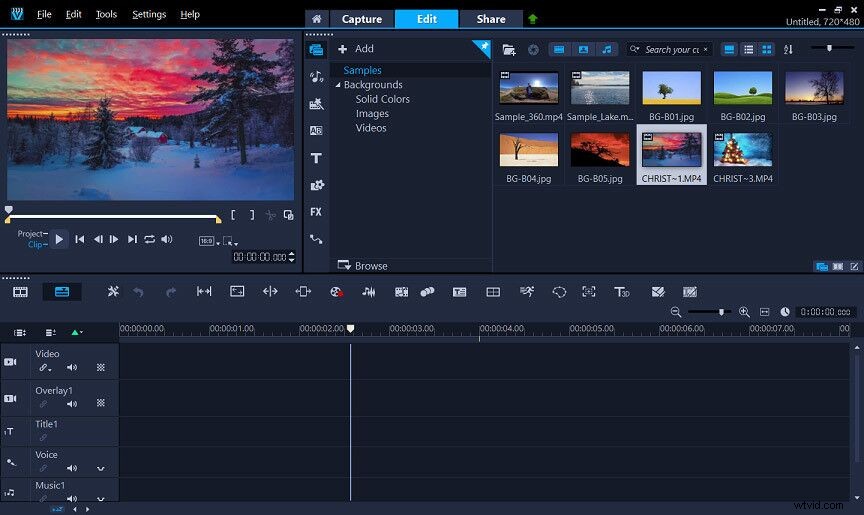
The next excellent vlog editing software is Corel VideoStudio, which targets middle-level and advanced professionals. You can access a wide selection of basic tools and explore powerful features, such as motion tracking, 4K and 360-degree video support, multi-camera support, etc.
Easily edit vlogs on the timeline by dragging and dropping footage, and adding creative graphics, overlays, animated titles, and transitions, and then export your vlogs to popular formats to share online, download to devices, upload directly on YouTube, or burn to disc.
iMovie
Price: Free
Compatibility: macOS & iOS
iMovie is one of the best free vlog editing software for Mac users. It has a simple drag-and-drop function and supports multiple video formats. You can use it to edit your vlogs in various ways, such as adding texts, animations, voiceovers, and even videos.
The biggest highlight of iMovie is that your project is stored in Apple’s cloud, which means you can interactively edit the vlog on your iPhone, iPad, and Mac. Besides, the freeware also lets you share your vlog on social platforms.
Adobe Premiere Pro
Price: Paid with a Free 7-Day Trial
Compatibility: Windows & macOS
Need a more advanced vlog video editor for Mac? Then Adobe Premiere Pro is the best recommended one. It is a timeline-based video editing program developed by Adobe Systems and published as part of the Adobe Creative Cloud licensing program.
No matter what you want to do with your vlogs, you can get it easily done with Adobe Premiere Pro. Additionally, it can work seamlessly with other apps and services, including Adobe Photoshop, After Effects, Audition, and Adobe Stock.
Bottom Line
That’s all for the best 5 vlog editing software. Choose one and start creating your stunning vlog. If you have any questions or suggestions about MiniTool MovieMaker, please contact us via admin@wtvid.com or share them in the comments section below.